Stay or Switch: A Decision Guide for Teams Frustrated with Jira

Deciding whether to stay with Jira or switch comes down to one question: is your frustration caused by the tool's structure, or by how it's set up and extended? Setup and missing-feature problems are usually cheaper to fix inside Jira. Structural mismatches, such as non-technical teams, on-prem compliance needs, or service-desk-first work, are where switching, or connecting Jira to other tools, pays off.
Some teams are convinced there's nothing better than Jira, while others are not so satisfied with this platform. While Jira remains widely popular, its alternatives also gain traction.
In October 2026, Atlassian was named a Leader in the 2026 Gartner Magic Quadrant for Collaborative Work Management Platforms for the second consecutive year. However, the quadrant also shows that competing solutions are close, as monday.com, Asana, Smartsheet, Wrike, and ClickUp share the Leaders section with Atlassian.
In this article, we'll help you decide whether to stay with Jira, switch, or connect Jira to the tools your other teams prefer. First, we'll look at common Jira limitations. Then, we'll cover when leaving makes sense and which alternatives fit different use cases. We hope this will help you better understand your options and find the right solution for your team.
Jira Limitations and Drawbacks That Push Teams to Switch
Before you weigh your options, it's worth looking at the problems that cause the frustration in the first place:
- Cost at scale. Per-seat pricing climbs quickly as headcount grows, even when many of those seats only need light, occasional access.
- Steep learning curve. The interface, terminology, and configuration options are designed for power users, which means new team members often need formal onboarding before they can work in it confidently.
- Heavy admin overhead. Proper configuration and instance maintenance often require dedicated Jira admins.
- Weak fit for non-technical teams. The interface and structure can feel foreign to marketing, HR, or operations teams.
- Gaps in functionality. Some processes need more than Jira offers natively, such as checklists with statuses, templates, and due dates inside work items.
Not every item on this list is a reason to leave. Some problems can be fixed inside Jira, while others signal that a different tool fits your team better. Let's look at both cases, starting with when staying makes sense.
Staying with Jira: When It Makes Sense
For many organizations, the right move is to invest in adoption and extensions rather than switch. Staying is likely to be the better call in these cases:
- Your engineering teams depend on Jira. Running sprints, tracking bugs, and managing backlogs is the classic Jira use case. Jira offers deep customization, mature agile tooling, and one of the largest integration ecosystems on the market. For example, you can connect GitHub, GitLab, Bitbucket, Jenkins, or Azure DevOps. Depending on the tool, your work items then show linked branches, commits, pull requests, builds, and deployments. And when your dev and business teams live in different tools, such as Jira and Azure DevOps, an integration platform like ZigiOps can keep work items in sync both ways. All this often makes Jira hard to replace once it's embedded in a team's workflow.
- The problem is your setup, not the tool. A bare-bones configuration, unclear ownership, or no onboarding will follow you to any new platform. Fixing the process first is usually cheaper than a migration. For teams that find Jira too heavy, there is a lighter option. In team-managed spaces, a team can manage its own work and processes without asking a Jira admin for help. Their configuration doesn't affect other spaces on your site.
- Switching costs outweigh license savings. Migrating work items, rebuilding workflows and automation rules, reconnecting integrations, and retraining people all take time. Compare that effort with what you would save on seats. If you're on Jira Data Center and Cloud is an option for you, moving to Jira Cloud is a migration too. However, your team stays in Jira, and Atlassian offers the Jira Cloud Migration Assistant for free.
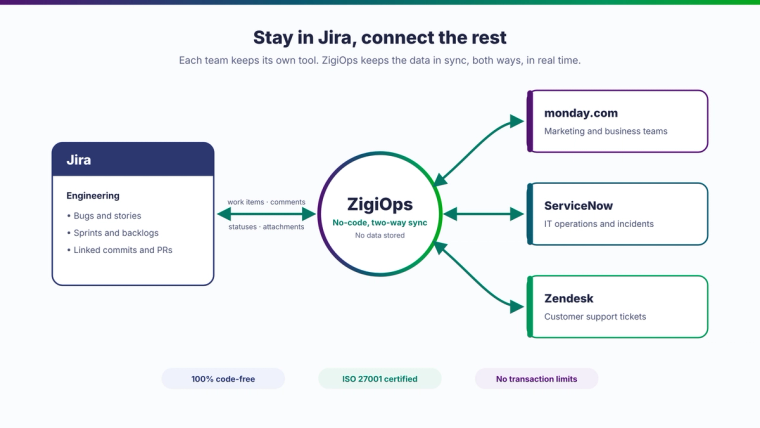
- Only one team is struggling. If engineering is happy and one business team is not, you probably don't need to move the whole company. Jira also offers business spaces with list and calendar views, which may suit that team better than a board built for sprints. Alternatively, you can simplify that team's setup or address their needs separately. A third option is to let that team keep the tool it prefers and connect it to Jira. With a no-code integration platform like ZigiOps, work items, comments, and statuses sync both ways, so engineering stays in Jira while the business team works in monday.com, or support works in Zendesk or ServiceNow.
- Your pain is missing functionality. If you lack checklists inside work items, templates for recurring work, or test management, Atlassian Marketplace apps can add them. Apps work on top of your existing setup, so your workflows, history, and integrations stay where they are.
How Atlassian Marketplace Apps Close the Gaps
Functionality gaps are often the easiest limitation to address. Here are a couple of examples of useful Atlassian Marketplace apps:
- Smart Checklist for Jira is a solution that allows you to add advanced checklists inside Jira work items. Jira's native action items are basic checkboxes without statuses or templates. This tool helps organize multi-step processes and tasks with multiple criteria, such as the Definition of Done. Here is an example of a client onboarding checklist:
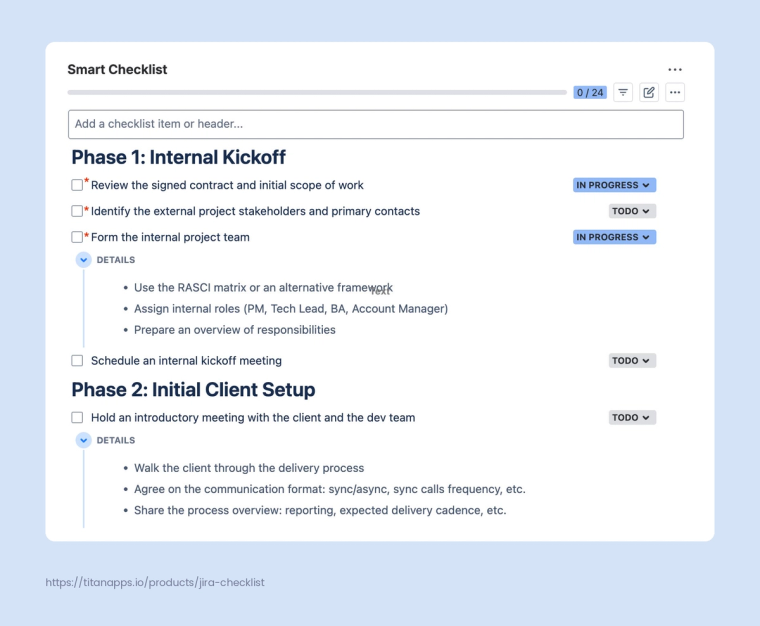
With Smart Checklist, you can save standard checklists as templates and have them added to your work items automatically, based on your custom conditions. You can also use headers, set due dates and priorities, add expandable details, assign items to people, and mark steps as mandatory. Each checklist item has its own status so that you can easily track progress.
- Smart Templates for Jira is a solution that enables you to save Jira work items and sets of work items as reusable templates with pre-filled fields and variables. Then, you can generate the complete set of work items from that template with one push of a button. Alternatively, this can be done automatically on a schedule. As a result, you can save significant time managing recurring tasks and processes because you won't have to create standard tasks manually. Here's an example of a reusable template for recruitment:
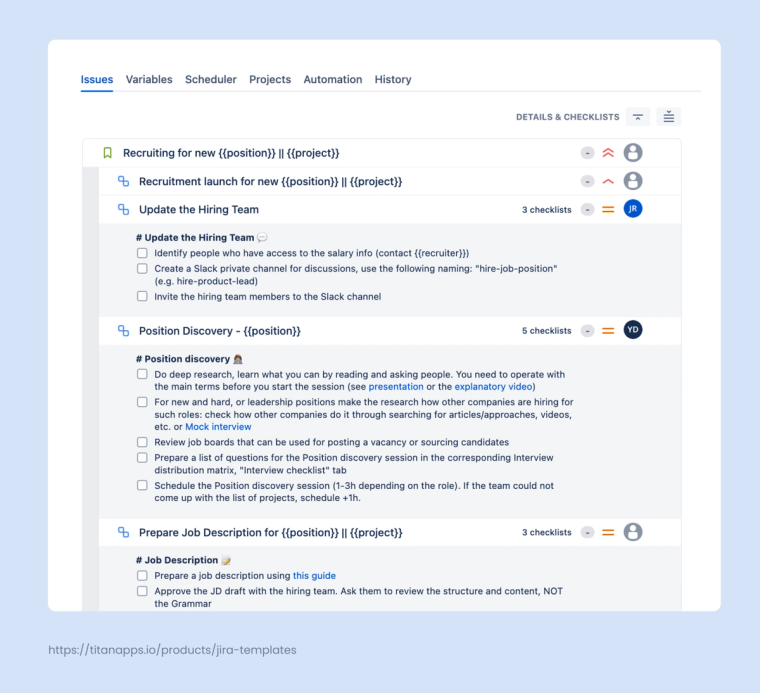
When you use marketplace solutions that fit your team, you can expand Jira's native functionality and tailor the platform to your needs.
If you've weighed all the pros and cons and still lean toward leaving Jira, check whether your situation matches one of the cases below.
When Leaving Jira Makes Sense
Sometimes the limitations are structural, and no app will fix them. The right choice depends entirely on what your team does and how they work. A solo dev team has very different needs from a marketing department, and a regulated enterprise has different needs again. Leaving Jira is worth considering in these cases:
- Your small dev team wants speed over configuration depth. Smaller dev teams often don't need Jira's full configuration depth. They want speed, a clean interface, and minimal time spent on tool admin. For these teams, the right Jira alternative is one that gets out of the way and lets engineers focus on shipping code.
- Cross-team work needs a simpler shared workspace. Many workflows involve more than one team. Marketing coordinates with engineering on launches, HR builds processes that touch IT and finance, and so on. These teams need shared visibility, flexible views, and a UI that non-technical people will actually adopt. Heavy customization can get in the way, since every extra setting is one more thing new users have to learn. Shared workspaces aren't the only way to align teams, though. If marketing plans in monday.com, IT works in ServiceNow, and engineering stays in Jira, syncing the tools often beats moving everyone into one platform.
- Your team is small and needs to start fast. Small teams and early-stage startups often face different problems than larger organizations. They don't need enterprise features. They need something that works on day one and doesn't require anyone to read documentation before they can use it. The right tool for this audience prioritizes simplicity over depth.
- You want docs and tasks in one place. Some teams don't want separate tools for documentation, tasks, and wikis. This is common in younger companies and lean teams that prefer one source of truth over a stack of specialized apps. The trade-off is that many all-in-one workspaces are lighter on dedicated project management features. However, they win on consolidation and ease of use.
- Your work is mostly service management. Some teams use project management software primarily for tickets, incidents, change requests, and internal support. These are typically the people considering Jira Service Management as the platform to replace, rather than Jira. The needs here are different: ITIL processes, asset management, SLAs, and a service portal that employees can actually use. Leaving may make sense when your team wants that coverage with less setup. Many teams keep Jira for engineering and run IT or customer support in Freshservice or Zendesk, with the two connected through an integration platform.
- You need on-prem hosting for compliance. Healthcare, defense, government, and finance teams often need on-prem hosting for compliance reasons. Cloud isn't an option for them, no matter how convenient. This has become more pressing since Atlassian announced it is phasing out its Data Center products, including Jira Data Center, with full end of life on March 28, 2029. Regulated organizations now have to plan their next move. For these teams, self-hosted Jira alternatives are often the most practical path.
The Right Alternative for Your Use Case
If you decide to switch, start with the tools built for your situation:
| If you need | Consider | Why it fits |
|---|---|---|
| Speed over configuration depth | Linear, GitHub Projects | Linear organizes work into Issues, Projects, and sprint-like Cycles. Cycles run on an automated schedule, and open work generally rolls over automatically, so sprints need less manual admin. GitHub Projects suits teams that already work in GitHub, with issues, pull requests, and project boards in one place. |
| A simpler shared workspace | monday.com, Asana | monday.com offers an intuitive UI with customizable boards, automations, and color-coded views. Asana improves visibility for mixed teams by connecting goals with projects and portfolios (Advanced plan and above). |
| A fast start for small teams | Trello, Asana (Starter plan) | Trello's boards, lists, and cards are easy to pick up without instructions. Asana's Starter plan adds timeline and Gantt views plus custom fields for teams that expect to outgrow a basic board quickly. |
| Docs and tasks in one place | Notion, ClickUp | Notion combines notes, databases, and task management for teams where docs come first. ClickUp positions itself as one app that can replace a task manager, document hub, chat platform, and whiteboard tool at once. The trade-off is complexity, since it packs in more features than many teams use. |
| Service management | Freshservice, Zendesk | Freshservice covers incident, problem, change, and asset management in a single product, and Freshworks positions it as quick to deploy and easy to use. Zendesk handles customer-facing and internal support from one platform. |
| On-prem hosting | GitLab (Self-Managed), Plane | GitLab combines planning, source code management, CI/CD, and security on your own infrastructure. Plane is open source and self-hostable, with paid editions for air-gapped deployments. |
Jira Alternatives at a Glance
Here's how the tools above compare on the criteria that matter most when you leave Jira: where they run, what they cost, and whether you can bring your Jira data with you or keep it in sync.
| Tool | Hosting | Free plan | Lowest paid plan* | Native Jira import | Sync with Jira via ZigiOps |
|---|---|---|---|---|---|
| Linear | Cloud | Yes | Basic, $10/user | Yes | Custom connector |
| GitHub Projects | Cloud or self-hosted (Enterprise Server) | Yes | Team, $4/user | No | Yes |
| monday.com | Cloud | Yes (2 seats) | Basic, $9/seat (3-seat min.) | Limited (Jira Server, Enterprise plan) | Yes |
| Asana | Cloud | Yes (2 users) | Starter, $10.99/user | Limited (via Asana for Jira Cloud) | Custom connector |
| Trello | Cloud | Yes (10 collaborators) | Standard, $5/user | No | Custom connector |
| Notion | Cloud | Yes | Plus, $10/seat | No (Jira Sync connector) | Custom connector |
| ClickUp | Cloud | Yes | Unlimited, $7/user | Yes | Custom connector |
| Freshservice | Cloud | No (14-day trial) | Starter, $19/agent | Yes (Project Management) | Yes |
| Zendesk | Cloud | No (14-day trial) | Suite Team, $55/agent | No | Yes |
| GitLab | Cloud or Self-Managed | Yes (5 users) | Premium, $29/user | Yes | Custom connector |
| Plane | Cloud or self-hosted | Yes (12 users) | Pro, $6/seat | Yes | Custom connector |
*Lowest paid plan, per user, seat, or agent per month, billed annually, from each vendor's official pricing page as of October 28, 2026. GitHub and GitLab prices include promotional terms. "Custom connector" means ZigiWave can build a connector for that app on request.
Pricing sources: Linear, GitHub, monday.com, Asana, Trello, Notion, ClickUp, Freshservice, Zendesk, GitLab, Plane.
For a side-by-side look at how Jira and monday.com compare on features, see TitanApps' Jira vs monday.com breakdown. TitanApps also offers Smart Checklist and Smart Templates for monday.com, with the same focus on extending the platform to handle repetitive work.
If you want a deeper analysis of the alternative solutions, including pricing tiers and detailed feature comparisons, take a look at ZigiWave's guide to the top Jira competitors. You may also find additional ideas in this Forbes article about the 10 Best Project Management Software of 2026.
The Third Option Is to Stay and Connect
The stay-or-switch question often hides a third answer. When engineering is happy in Jira and another team is not, you don't have to force one tool on everyone. Each team can work in the tool that fits it, while the data flows between them automatically.
That is where ZigiOps comes in. ZigiOps is a no-code integration platform that connects Jira bi-directionally with work management, ITSM, DevOps, and CRM tools such as monday.com, ServiceNow, Azure DevOps, Zendesk, Freshservice, Freshdesk, GitHub, and Salesforce. For apps that aren't on the list yet, such as Asana or Trello, ZigiWave can build a custom connector. Work items, comments, statuses, and attachments stay in sync in real time, so a support ticket in one tool and the related bug in Jira never drift apart. Here's why IT teams choose it:
- 100% code-free. Integrations are configured in a guided UI with ready-made templates, so no scripting is needed.
- No data storage. ZigiOps transfers data between systems without storing any of it.
- ISO 27001 certified. Enterprise-grade security for regulated and security-conscious teams.
- No transaction limits. Sync as many work items, tickets, and updates as your teams need.
- Standalone application, not a plugin. It runs outside your Jira instance, so it adds no load or admin overhead to Jira.
Integration also helps if you do decide to switch. Running Jira and the new tool side by side, with data synced between them, lets teams move in stages instead of in a single weekend cutover. Our guide to data migration tools for ITSM and DevOps covers that approach in more detail, and you can browse all available Jira integrations.
Want to see how Jira can work alongside the rest of your stack? Book a demo with the ZigiWave team.
Stay or Switch: How to Make the Final Call
If the Jira limitations you face come down to missing features, the right Marketplace apps may solve them faster than a migration. The Jira alternatives market is large, but the choice is narrower than it looks once you're honest about how your team actually works and what your hands-on requirements are. After all, the most important question isn't which tool has the most capability. It's about whether your choice will solve your pain points and be adopted smoothly by your team. If most of your reasons match the stay cases, start by improving your Jira setup. If they match the leave cases, shortlist the tools from the tables above. And if your reasons are split across teams, you may not need to choose at all: keep Jira where it works and connect it to the tools your other teams prefer.
Organizations often invest in new software that employees eventually underuse, and switching tools doesn't fix that pattern. Whichever path you choose, plan for adoption: involve the people who will use the tool in the decision, roll out in stages, and check actual usage a few weeks after launch.
Frequently asked questions
Should my team stay with Jira or switch to an alternative?
Stay if your pain comes from configuration, onboarding, or missing features, because those can usually be fixed inside Jira with a better setup or Atlassian Marketplace apps. Consider switching when the mismatch is structural: a small dev team that wants speed over configuration depth, non-technical teams that won't adopt Jira, service-desk-first work, or a compliance need for on-prem hosting.
Can Atlassian Marketplace apps add checklists and templates to Jira work items?
Yes. Smart Checklist for Jira adds checklists with per-item statuses, due dates, assignees, and mandatory items inside work items. Smart Templates for Jira generates recurring sets of work items from reusable templates, manually or on a schedule. Both run on top of your existing setup, so workflows and history stay in place.
When does Jira Data Center reach end of life?
Atlassian has announced that its Data Center products reach end of life on March 28, 2029, and that includes Jira Data Center. Teams can move to Jira Cloud with the free Jira Cloud Migration Assistant or, if cloud isn't an option, evaluate self-hosted alternatives such as GitLab Self-Managed or Plane.
Can Jira work alongside monday.com, ServiceNow, or Zendesk instead of being replaced?
Yes. A no-code integration platform like ZigiOps syncs Jira bi-directionally with monday.com, ServiceNow, Zendesk, Freshservice, Freshdesk, Azure DevOps, GitHub, Salesforce, and other tools, and ZigiWave can build custom connectors for apps that aren't covered yet. Each team keeps its preferred tool while work items, comments, statuses, and attachments stay in sync. See the full list of Jira integrations.
What is the best Jira alternative for non-technical teams?
Marketing, HR, and operations teams usually adopt monday.com, Asana, or Trello faster than Jira, thanks to simpler boards and views. If those teams still work closely with engineering, keeping engineering in Jira and syncing the two tools avoids a company-wide migration. For a broader comparison with pricing, see our list of the top Jira competitors.
Can you migrate away from Jira without losing work item history?
Mostly, yes, but plan for it. Linear, ClickUp, GitLab, and Plane offer native Jira importers for work items, while workflows, automation rules, and custom fields usually need to be rebuilt. Running both tools in parallel with an integration in between lets teams move in stages and keep history accessible.