Data Migration Tools: How to Choose One Without Losing Ticket History (2026)

A data migration tool for ITSM and DevOps teams moves records such as incidents, requests, changes, issues, work items and configuration items from one platform to another, together with their history, comments, attachments and relationships. The right tool does more than copy rows: it maps fields and statuses between different data models, migrates in verifiable batches, and keeps the source and target consistent until cutover, so nobody loses the context behind a ticket.
Ticket data is not like a customer list. An incident record carries its full story: who touched it, what was tried, which change caused it, which configuration item it hit and which Jira issue the developers opened to fix it. Lose that and your team loses years of operational memory, your auditors lose their trail, and your new platform starts life looking emptier than the old one. This guide compares the main categories of data migration tools, shows what "no history lost" requires in practice and explains how to choose. Last updated: October 12, 2026.
Why ITSM and DevOps migrations are on everyone's roadmap
Three forces are pushing teams to move ticket data in 2026.
Atlassian's Data Center end of life. Atlassian has announced that it stops selling new Data Center subscriptions to new customers on March 30, 2026, and that Data Center reaches end of life on March 28, 2029. Thousands of Jira and Jira Service Management instances will move to cloud, and some organizations will use the moment to consolidate on a different ITSM platform altogether.
Tool consolidation. After a decade of SaaS sprawl, many enterprises are reducing the number of service desks, moving from BMC Remedy or Cherwell to ServiceNow, from several Jira instances to one, or from a legacy tool to Freshservice or Jira Service Management.
Mergers and reorganizations. When two companies or business units merge, two service desks become one, and somebody has to decide what happens to the ticket history.
None of this is low risk. A McKinsey survey of about 450 CIOs and IT leaders found that 75% of cloud migrations ran over budget and 38% ran behind schedule. Data movement is one of the places where those overruns start, which is why the choice of tool matters as much as the choice of target platform.
What has to survive the move
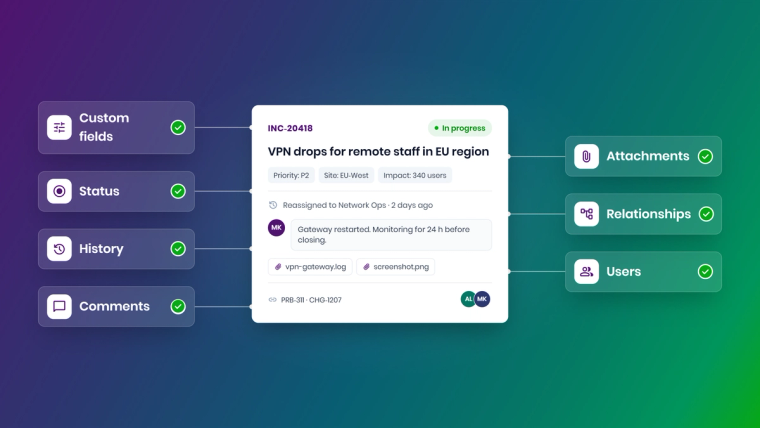
Before comparing tools, agree on what "complete" means. For ITSM and DevOps data, a migration is only complete if the target keeps:
- Records and custom fields. Every incident, request, problem, change, issue or work item, including custom fields mapped explicitly rather than dumped into a catch-all description.
- Status and workflow state. Open tickets must land in the right state in the target workflow, even though states rarely map one to one (ServiceNow uses numeric state values, Jira uses workflow transitions).
- History and audit trail. Timestamps, status changes and who did what, so audits and SLA reporting still make sense.
- Comments and work notes. Public comments and internal notes, with the right author and time, and with internal notes kept internal.
- Attachments. Screenshots, logs and documents, attached to the record they belong to.
- Relationships. Parent and child tickets, linked issues, related changes and configuration item references.
- Users and groups. Assignees, requesters and assignment groups matched to accounts in the target.
If a tool cannot handle one of these, you need a plan for it before you start, not after the first batch lands.
The four main categories of data migration tools
1. Native importers and migration assistants
Most platforms ship their own tools. Atlassian's Jira Cloud Migration Assistant moves projects, users, attachments, boards and Jira Service Management data from Jira Server or Data Center to Jira Cloud, and Atlassian offers programs such as FastShift for larger customers. ServiceNow offers import sets and transform maps for loading external data. These tools are free or included, and they are the best option for same-vendor moves. Their limit is scope: they are designed to move data into their own platform, usually from a specific source, and they do not help much when you move between vendors or need both systems live at once.
2. CSV exports and ETL tools
Export from the source, transform in a spreadsheet or an ETL pipeline, import into the target. This works for flat data and small volumes. It struggles with exactly the things that make ticket data valuable: comment threads, attachments, relationships and history. Exports also tend to hit row limits, and every re-run risks duplicates unless someone writes careful de-duplication logic.
3. Migration services and consultancies
A partner plans and executes the migration, often with their own scripts or toolkits. This brings experience and spare hands, which matters for very large or heavily customized estates. The trade-offs are cost, dependence on the partner's calendar, and the fact that the scripts usually leave with the partner. If you are weighing outsourcing in general, our guide on integration services vs. a no-code platform covers the cost model in detail.
4. Integration platforms used for migration
An integration platform connects to both systems through their APIs, maps entities and fields, and moves records in controlled batches. Because it is built for ongoing sync, it can also keep the two systems aligned during a phased cutover, so teams can keep working while the history moves. This is how ZigiOps enterprise data migration works, and it is especially useful for cross-vendor moves such as BMC Remedy to ServiceNow or ServiceNow to Jira Service Management.
Comparison: which type of tool fits which migration
| Criteria | Native importers and assistants | CSV export and ETL | Migration services | Integration platform (ZigiOps) |
|---|---|---|---|---|
| Best for | Same-vendor moves, e.g. Jira Data Center to Jira Cloud | Small, flat data sets | Very large or highly customized one-off projects | Cross-vendor moves and phased cutovers |
| Cross-vendor support | Limited to the vendor's own target | Any, with manual transformation | Any, depends on the partner's toolkit | 58 documented connectors across ITSM, DevOps, monitoring and CRM |
| Comments, attachments, links | Good within the same platform | Weak, usually manual | Depends on scripts | Comments, attachments and related records moved with their parent |
| Status and field mapping | Fixed by the vendor | Manual in spreadsheets | Scripted | Visual field mapping, conditional mappings and expressions |
| Safe re-runs | Varies | Duplicates unless handled | Depends on scripts | Correlation, Lookup-Create and Last Time prevent duplicates |
| Systems live during migration | Usually a freeze | Freeze | Often a freeze | Delta sync keeps both systems current until cutover |
| Data stored by the tool | Vendor cloud | Files on someone's laptop | Partner environment | No transferred data stored, ISO 27001 certified vendor |
| Skills required | Platform admin | Data or ETL specialist | Partner team | Platform admin using a no-code UI |
The pattern is clear. If you are moving within one vendor's ecosystem, start with the native tool. If you are moving between vendors, need history intact or cannot afford a long freeze, you need something that understands both systems at the API level.
Big bang or phased: pick the cutover model first
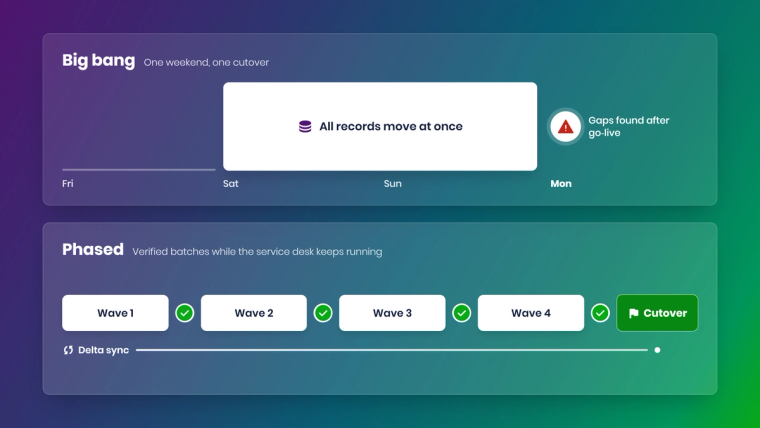
The cutover model drives the tool choice more than any feature list.
A big bang migration freezes the source, moves everything over a weekend and switches users on Monday. It is simple to explain and risky to execute, because any data problem you find on Monday is now a production problem.
A phased (or batch) migration moves data in waves, for example by project, queue, business unit or date range, and verifies each wave before the next. The source stays live, and a delta sync carries new updates across until the final switch. The last cutover is small because almost everything has already moved. We explain this approach step by step in Data Migration in Batches: A Safer, Smarter Approach.
For ITSM data, phased usually wins. Service desks cannot stop for a weekend, open incidents keep changing, and SLA clocks keep running. If you choose phased, you need a tool that can migrate history and keep syncing at the same time, which rules out most export-based approaches.
How ZigiOps handles ITSM and DevOps data migration
ZigiOps is a no-code integration platform, and its migration approach reuses the same building blocks teams use for everyday integrations. The process has four stages.
1. Assess
Connect the source and target systems and explore what is there. The ZigiOps Data Explorer shows the schema of each connected system: its entities, attributes and formats. Profiling the schema, volumes and data quality up front surfaces duplicates, gaps and mapping edge cases before any data moves.
2. Design and map
Each migration flow is a ZigiOps workflow between two system instances, with a Source tab that defines what to collect and a Target tab that defines how to deliver it. In the field map you map source fields to target fields with dynamic variables, combine several attributes with static text, and apply conditional mappings so that, for example, a numeric ServiceNow state becomes the right Jira status. Expressions handle the transformations that usually need code: Pattern extracts values with regular expressions, Replace Text normalizes values, Date and Time Format aligns timestamps and Build Array or Extract from Array reshape lists. Custom fields are mapped explicitly, and user matching can use email, username or a custom identifier. Field Validations flag missing required fields or fields that do not exist in the target schema before you run.
3. Stage in batches
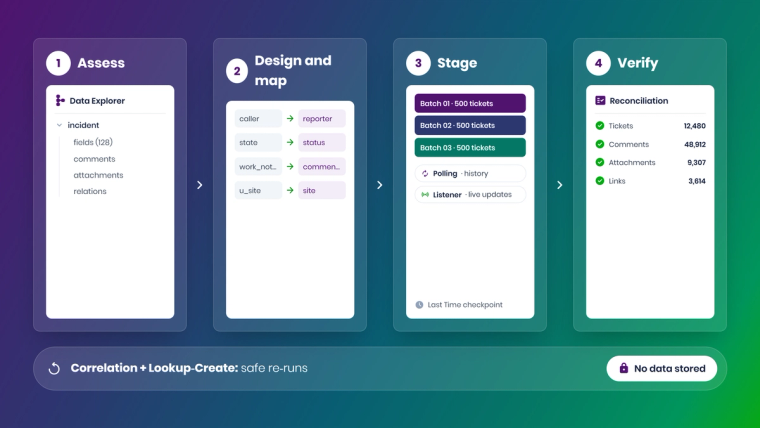
Trigger conditions define the scope of each wave: a project, a queue, a priority, a date range or any attribute of the source entity, combined with AND and OR logic. For historical backfill, a Polling trigger queries the source API on a schedule and collects records that match the conditions. The Last Time expression stores the latest date and time value processed and moves forward with each run, so a batch never re-collects records it has already handled. Comments, work notes and attachments are migrated together with their parent record, and Related Records conditions let you filter a wave on nested child fields as well.
During the coexistence period, a Listener trigger can receive updates from the source in real time over HTTP, while polling continues to catch anything else. That is the delta sync that keeps the target current between batches and keeps the final cutover small.
Re-runs are safe by design. Correlation stores the ID of each source record on the target record (or the other way round), so later updates go to the right ticket instead of creating a new one. Lookup-Create actions only create a record when no matching record exists, and Lookup-Update actions only update records that already exist.
4. Verify and cut over
Each batch is verified before the next one starts, with reconciliation reports to confirm record counts and spot gaps. Status history and audit trails are preserved in the target, comments carry over with timestamps and attribution, and parent and child structures, linked records and CMDB dependency references stay intact. When the last wave is verified, a short source write freeze, a final delta run and a switch of any existing integrations complete the move.
On the ZigiOps data migration page, ZigiWave reports 5,700+ records migrated per run. For a typical mid-to-large ServiceNow and Jira migration of 10,000 to 100,000 records, our ServiceNow Jira ticket migration guide outlines a timeline of about five weeks, including a pilot of 50 to 200 tickets.
Security throughout
ZigiOps does not store the data it transfers. Credentials and tokens are encrypted with FIPS 140-2 compliant AES-256 by default, connections use SSL certificates that you control, IP allowlisting is available, and ZigiWave is ISO 27001 certified. For regulated industries, that combination usually shortens the security review considerably. The ZigiOps security page has the details.
A practical checklist for choosing a migration tool
Score each candidate against these questions:
- Does it support both your source and target systems through their APIs, including the versions you run?
- Can it migrate comments, internal notes, attachments and links, not just records?
- How does it map statuses and custom fields between different data models, and can your admins change those mappings without code?
- Can you scope batches by project, queue, date or any field, and save those definitions for reuse?
- Is a re-run safe? What prevents duplicates?
- Can both systems stay live during migration, with changes synced until cutover?
- Where does the data go in transit, and does the tool store it anywhere?
- What happens to your existing integrations after cutover? Can the same tool take them over?
The last question is easy to forget. Your old platform was probably connected to monitoring, DevOps and CRM tools. If those integrations break on cutover day, the migration has not succeeded. Our article on keeping integrations running during system migration covers this in more detail.
Common mistakes that lose ticket history
- Migrating only open tickets. Closed records feed SLA reports, problem analysis and audits. Decide on a history cut-off on purpose, not by accident.
- Flattening comments into the description. It looks fine until someone needs to know who said what and when.
- Ignoring users who have left. Tickets assigned to departed staff need a mapping rule, or they fail silently.
- Skipping the pilot. A pilot of a few hundred real tickets shows mapping errors that no workshop will.
- Forgetting attachments' size and volume. Large binary transfers need retries and throttling, not a single bulk call.
- Treating cutover as the finish line. Run a reconciliation after cutover, and keep the source read-only until the business signs off.
The bottom line
The best data migration tool is the one that matches your move. Native assistants are excellent for same-vendor upgrades. Exports work for small, flat data. Services bring capacity for one-off giants. For cross-vendor ITSM and DevOps migrations where history matters and the service desk cannot stop, an integration platform gives you batch control, safe re-runs, delta sync and an integration layer that stays useful long after the migration is done.
Planning a move from Remedy, Cherwell, Jira Data Center or another ITSM tool? Book a demo and we will map your migration scenario with you, from the first pilot batch to cutover.
Frequently asked questions
Can the Jira Cloud Migration Assistant migrate data from ServiceNow?
No. The Jira Cloud Migration Assistant is designed to move Jira Server or Data Center data to Jira Cloud. To move tickets between different vendors, such as ServiceNow and Jira Service Management, you need a cross-vendor tool such as an integration platform like ZigiOps.
Can ZigiOps migrate comments and attachments?
Yes. ZigiOps moves comments, work notes and attachments together with the parent record, keeps timestamps and attribution, and preserves parent and child links and related records in the target system.
Can both systems stay live during a migration?
Yes. With ZigiOps you can migrate history in batches while a Listener or Polling trigger keeps syncing new updates from the source. Users keep working in the old system until the final cutover, which only needs a short write freeze.
Can I re-run a migration batch without creating duplicates?
Yes. ZigiOps uses correlation IDs, Lookup-Create and Lookup-Update actions and the Last Time expression to make re-runs safe, so a repeated batch updates existing records instead of creating new ones.
Does ZigiOps store data during migration?
No. ZigiOps does not store the data it transfers between systems. Sensitive configuration data such as credentials is encrypted, and ZigiWave is ISO 27001 certified.
Can ZigiOps migrate CMDB data?
Yes. ZigiOps works with CMDB entities such as configuration items, hosts, nodes and applications, and keeps CMDB dependency references intact when it migrates related tickets.
How long does an ITSM data migration take?
It depends on volume and customization. As a guide, a mid-to-large migration of 10,000 to 100,000 records typically takes about five weeks with ZigiOps, including a pilot. Simple environments can take two to three weeks, and heavily customized ones six to eight.