GitHub for Jira vs. a Dedicated Sync Platform

The GitHub for Jira app is Atlassian's free connector that links GitHub branches, commits, pull requests, builds and deployments to Jira issues, based on the issue keys developers type into their work. A dedicated sync platform goes further: it creates and updates records in both systems, so a Jira issue and a GitHub issue (or a ServiceNow incident) stay aligned in status, comments and fields. Use the app for development visibility. Use a sync platform when two teams need to work from the same record.
The short answer
- Choose the native app if your developers live in GitHub, your planners live in Jira Cloud, and all you need is to see code activity on the Jira issue.
- Choose a dedicated sync platform if GitHub Issues and Jira issues must stay in sync both ways, if support or ITSM tickets need to reach engineering, or if you run Jira Data Center or several Jira and GitHub instances.
- Use both when developers want code visibility and everyone else wants record-level sync. The two solve different problems and do not conflict.
Why the Jira–GitHub question matters more in 2026
GitHub is where most code work happens today. According to GitHub's Octoverse 2025 report, more than 180 million developers build on the platform, and an average of 43.2 million pull requests were merged every month in 2025, up 23% year over year. Jira, meanwhile, remains the planning and tracking layer for a large share of engineering and IT organizations.
That split creates a constant translation job. Product managers want to know whether a fix shipped. Support wants to know when a customer-reported bug moves to Done. Developers want to stay in GitHub and not update two tools. Every manual copy between the two adds delay and another chance for the records to drift apart.
Atlassian's own answer changed as well. On Jira Cloud, the legacy DVCS connector was retired on March 31, 2024 in favor of the GitHub for Jira app, which, according to Atlassian's DVCS migration announcement, syncs data in seconds instead of the minutes (sometimes up to 20) that DVCS needed. Jira Server and Data Center customers stayed on DVCS. So the first decision many teams face in 2026 is not "which tool" but "which problem are we actually solving".
What the GitHub for Jira app actually does
The app, now listed on the Atlassian Marketplace as GitHub for Atlassian, is built and maintained by Atlassian, costs nothing, and has more than 137,000 installs. Its job is visibility: it pulls development activity from GitHub and shows it next to the Jira issue it belongs to.
- It links branches, commits, pull requests, builds and deployments to Jira issues.
- Matching relies on issue keys. Developers add a key such as DEV-2095 to a branch name, commit message or pull request title, as described in Atlassian's GitHub for Jira documentation.
- Linked data appears in the issue's development panel, on board cards, and in the Code and Releases views.
- Smart Commits let a commit message transition an issue, add a comment or log time.
- It works with GitHub Cloud, GitHub Enterprise Cloud and GitHub Enterprise Server. On the Jira side, it is a Jira Cloud app.
Where the native app stops
The app is very good at what it was designed for. The gaps appear when teams expect it to behave like an integration platform:
- No record-level sync. It links code activity to a Jira issue. It does not create a mirrored GitHub issue and keep fields, statuses and comments aligned on both sides.
- It depends on discipline. If a developer forgets the issue key, the link never appears, and nobody notices until a release review.
- Two tools, one direction of value. It covers GitHub and Jira Cloud only. Nothing in the app reaches ServiceNow, Zendesk, Freshservice or a monitoring tool, which is exactly where many escalations start.
- Minimal field control. You cannot map GitHub labels to Jira priorities, transform values, or filter which issues travel.
What a dedicated sync platform adds
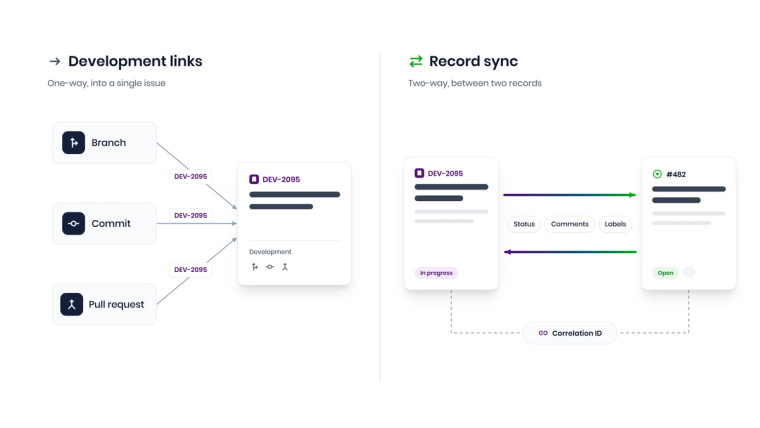
A sync platform treats Jira and GitHub as two systems of record that need to agree. Instead of displaying links, it creates and updates entities on both sides. A typical setup includes:
- Record creation: a GitHub issue labeled "bug" creates a Jira bug, or a Jira story creates a GitHub issue in the right repository.
- Correlation: each record stores the ID of its counterpart, so later updates land on the right record instead of creating duplicates.
- Field mapping and transformations: labels become priorities, statuses map to the right workflow transitions, and text is reshaped for the target system.
- Conditions: only issues from selected repositories, labels or projects are synced.
- Two-way updates: comments, status changes and assignees flow in both directions.
- Multi-system reach: the same platform can connect GitHub to ServiceNow, Jira Service Management or Zendesk once support and IT operations join the conversation.
The trade-off is setup effort and, usually, cost. So ask which problem you have. If it is "I can't see the code from Jira", the free app is enough. If it is "two teams are working from different records", only a sync platform fixes it.
GitHub for Jira vs. sync platforms: side-by-side comparison
The table compares the native app with the dedicated tools most often shortlisted for Jira–GitHub sync. Competitor details reflect each vendor's public product information as of October 2026, so confirm current editions and pricing before you buy.
| Criteria | GitHub for Jira app | Exalate | Getint | Unito | ZigiOps |
|---|---|---|---|---|---|
| What moves | Links branches, commits, PRs, builds and deployments to Jira issues | Jira and GitHub issues with mapped fields | Jira and GitHub issues with mapped fields | Jira and GitHub issues with mapped fields | Jira issues with GitHub issues, pull requests and commits |
| Direction | GitHub to Jira display, plus Smart Commits | Two-way | Two-way | Two-way | Two-way |
| Setup model | Install the app and connect GitHub orgs | Visual mode plus Groovy script mode | UI-based mapping | No-code sync rules | 100% no-code guided UI with templates |
| Needs issue keys in commits | Yes | No | No | No | No (uses a correlation field) |
| Jira editions | Jira Cloud only | Cloud and Data Center | Cloud and Data Center | Cloud (check vendor for Data Center) | Cloud and Data Center |
| Reaches ITSM tools | No | Yes | Yes | Selected tools | Yes: ServiceNow, Jira Service Management, Zendesk, Freshservice and more |
| Deployment | Atlassian-hosted app | Cloud or self-hosted | Cloud app or on-premises | SaaS | Standalone app, on-premises or cloud |
| Pricing basis | Free | Vendor quote | Atlassian Marketplace user tiers | Plans by items kept in sync | Per connected system pair, unlimited transactions |
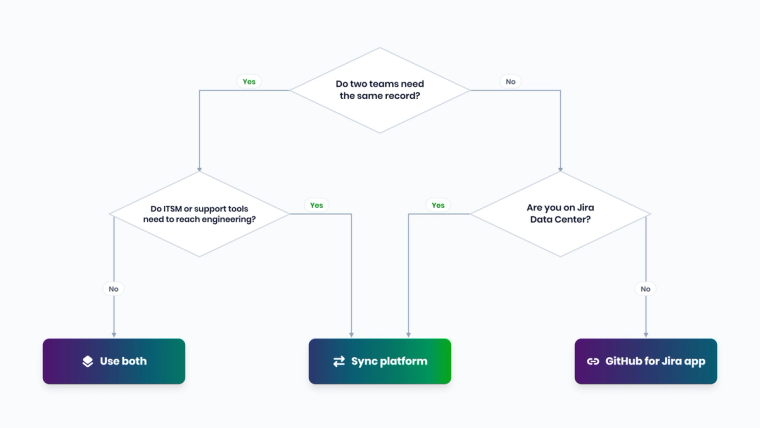
Which approach fits your team? Five common scenarios
1. Developers just need to see code on the Jira issue
A single product team, Jira Cloud for planning, GitHub for code. Product owners want to see which pull request closed a story and whether it deployed. This is the native app's home turf. Install it, agree on the branch naming convention, and you are done in an afternoon. Buying a platform here is like hiring a moving company to carry one chair.
2. Customer-facing repositories that use GitHub Issues
Open-source projects, SDKs and public APIs collect bug reports as GitHub Issues, while the internal team plans in Jira. Here you need real records on both sides: a GitHub issue labeled "bug" should create a Jira bug, and when engineering comments or closes it, the reporter should see that on GitHub. The native app cannot do this. A sync platform with label-based conditions and two-way comment sync can.
3. Support and ITSM escalations need engineering
A ServiceNow incident or a Zendesk ticket turns out to be a code defect. Someone copies it into GitHub or Jira, and from then on the service desk chases developers for updates. ZigiOps ships a ready-made "ServiceNow incidents to GitHub issues" template, and its GitHub and ServiceNow integration sends status, priority and comments back so the requester gets updates without anyone asking. If you are building the business case, see how this fits a broader incident management integration strategy.
4. Several Jira or GitHub instances, or external partners
Mergers, outsourcing partners and regulated business units often run separate Jira sites and GitHub organizations. You need control over what crosses each boundary: which projects, which fields, which comments. That is a conditions-and-mapping problem, which is what sync platforms are built for. With ZigiOps, licensing is per connected system pair with unlimited integrations and transactions between them, so adding workflows between the same two instances does not raise the bill.
5. Jira Data Center or a strict security review
The native app is a Jira Cloud app, so Data Center teams still depend on DVCS for links and have no answer for record sync. Security teams also ask where synced data lives. ZigiOps can run on-premises or in the cloud, does not store the data it transfers, and is ISO 27001 certified. The ZigiOps security and compliance overview answers the usual questionnaire items up front.
Can you run both at once?
Yes, and many teams should. Keep the native app for branch, commit and deployment visibility inside Jira, and use a sync platform for issue-level sync and cross-tool flows. The app shows developers what changed in the code. The platform makes sure everyone else is looking at the same record.
How does ZigiOps sync Jira and GitHub without code?
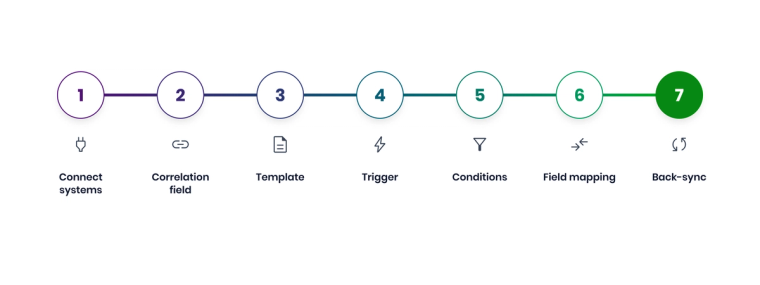
ZigiOps is a standalone, no-code integration platform. Its Jira and GitHub integration keeps Jira issues aligned with GitHub issues, pull requests and commits, with status, comments and labels flowing both ways. Setup follows the same pattern as every ZigiOps workflow:
- Connect both systems. Add GitHub as a connected system with its API URL (for example, https://api.github.com), an integration username and a personal access token. Add Jira with its URL and an API token.
- Create the correlation field. Add a single-line text custom field in Jira, such as "Correlation ID", so each Jira issue stores the ID of its GitHub counterpart.
- Start from a template or from scratch. Load a bundled workflow template as a starting point, or build the workflow action by action in the guided UI.
- Set the trigger. Use a polling trigger to collect new and updated records on a schedule, or a listener trigger to receive incoming HTTP requests such as webhooks.
- Add conditions. Filter by repository, label, project or issue type so only relevant records travel.
- Map fields and apply expressions. Map title, description, labels, status and assignee. Expressions such as Pattern (regex) extract or reshape values in transit, for example pulling a ticket number out of a longer string.
- Add the back-sync. A second action sends comments and status changes the other way, using the correlation to update the right record.
Expressions run at runtime, after collection and before delivery, so the source data is never modified. If you want to go deeper on what happens when both sides change the same field, read our guide to conflict resolution in bidirectional synchronization.
Why IT and engineering teams pick this route
- 100% code-free: no Groovy, no GitHub Actions, no scripts to maintain when an API changes.
- No data storage: ZigiOps moves records between systems without keeping copies of them.
- ISO 27001 certified: a shorter path through security review.
- Unlimited transactions: licensing is based on connected system pairs, not on how many issues you sync.
- Standalone, not a plugin: Jira or GitHub upgrades do not break the integration, and the same platform connects GitHub to many other systems, including Azure DevOps, Freshservice, Salesforce and Zendesk.
Pitfalls to avoid in any Jira–GitHub integration
Whatever tool you pick, these five issues cause most of the support tickets we see:
- Status mismatch. GitHub issues are open or closed. Jira workflows have many statuses. Decide which Jira statuses mean "closed" and map the transitions explicitly.
- Echo loops. If both directions update the same field without correlation and conditions, records ping-pong forever. Use correlation IDs and ignore updates made by the integration user.
- API rate limits. The GitHub REST API rate limits allow 5,000 requests per hour for requests authenticated with a personal access token. Size polling intervals and filters to stay well under that.
- Token hygiene. Use a dedicated integration account with least-privilege token scopes, and rotate tokens on a schedule.
- Identity mapping. Usernames rarely match across Jira and GitHub. Map assignees by email or a lookup, or leave assignment to each team.
Still tempted to script it yourself? Our breakdown of building vs. buying a Jira integration covers the maintenance cost most teams underestimate, from API deprecations to the engineer who wrote the script leaving the company.
What should you look for in a Jira–GitHub sync tool?
If the scenarios above point you toward a platform, use these six questions to separate a real integration from a demo that only works on a clean test project:
- Which GitHub entities are supported? Issues are table stakes. Ask whether pull requests and commits can be synced or referenced too, and whether labels, milestones and assignees map cleanly.
- How are duplicates prevented? Look for explicit correlation between records, not matching on titles. Titles change; IDs do not.
- Who can change the configuration? If every new field mapping needs a developer to edit a script, the integration will lag behind your workflows. A guided UI lets service managers and admins own it.
- Where does the data go? Ask whether the vendor stores synced records, for how long, and in which region. A platform that does not store transferred data removes a whole category of audit questions.
- What happens when it breaks? Check how failed records are logged, retried and surfaced. You want to see the error in the integration console, not hear about it from an angry customer.
- Can it grow beyond Jira and GitHub? Today it is two tools. Next quarter it is ServiceNow for incidents, Azure DevOps for a newly acquired team, and a monitoring tool that should open bugs automatically. Pricing by connected system pair, with unlimited transactions, keeps that growth predictable.
A good rule of thumb: if a vendor cannot answer all six in a 30-minute call, the integration will take longer than 30 minutes to fix the first time it fails.
The bottom line
The GitHub for Jira app is the right default for code visibility, and it is free. Once your Jira–GitHub problem is really about two teams, two records and one truth, especially when ServiceNow, Zendesk or other ITSM tools are involved, a dedicated sync platform is the better fit. ZigiOps gives you that sync with no code, no stored data and no per-transaction surprises.
Want to see a Jira–GitHub or ServiceNow–GitHub workflow built live? Book a demo and bring your most chaotic repository.
Frequently asked questions
Can the GitHub for Jira app sync GitHub Issues with Jira issues?
No. The app links branches, commits, pull requests, builds and deployments to Jira issues using issue keys. It does not create mirrored records or keep GitHub Issues and Jira issues aligned in both directions. For that you need a sync platform such as ZigiOps.
Is the GitHub for Jira app free?
Yes. Atlassian builds and maintains the app and lists it as free on the Atlassian Marketplace, where it now appears as GitHub for Atlassian.
Does GitHub for Jira work with Jira Data Center?
No. It is a Jira Cloud app. Jira Server and Data Center customers use the DVCS connector for development links. ZigiOps can connect both Jira Cloud and Jira Data Center to GitHub for record-level sync.
Can ZigiOps sync Jira and GitHub without code?
Yes. You configure connected systems, triggers, conditions, correlation and field mappings in a guided UI. Jira issues sync with GitHub issues, pull requests and commits, and status, comments and labels flow both ways, with no scripts.
Can I connect ServiceNow incidents to GitHub issues?
Yes. ZigiOps includes a ServiceNow incidents to GitHub issues template. Incidents that need a code fix become GitHub issues automatically, and status, priority and comments sync back so the service desk can update the requester.
Does ZigiOps store the data it syncs between Jira and GitHub?
No. ZigiOps transfers and transforms data in transit and does not store it. The platform is ISO 27001 certified and can run on-premises or in the cloud.
Can I use the GitHub for Jira app and ZigiOps together?
Yes. Keep the app for development visibility inside Jira and use ZigiOps for issue-level sync and cross-tool workflows such as ServiceNow to GitHub. They solve different problems and work side by side.