Automated Ticket Creation Across ITSM, DevOps, and Monitoring Tools: Stop Copy-Pasting Incidents in 2026

Automated ticket creation is the practice of opening incidents, issues or tickets in one system automatically when something happens in another, such as a monitoring alert, a customer case or a failed deployment, instead of having someone copy the details by hand. Done well, it also keeps both records linked, so updates, comments and resolutions flow back to the source without duplicates. In 2026 the realistic options are native automation rules, scripts, general iPaaS and no-code integration platforms.
If you have ever watched an L1 analyst read an alert in one browser tab and retype it into ServiceNow in another, you already know the problem. It is slow, it is error-prone, and it is the least interesting thing a skilled person can do with their shift. It also hides a bigger cost: every minute between "the alert fired" and "the right team has a ticket" is a minute of downtime. This guide explains how automated ticket creation works across ITSM, DevOps and monitoring tools, compares the four ways to build it, and shows how to avoid the two classic failure modes: duplicates and orphaned tickets. Last updated: October 19, 2026.
Why manual ticket creation is more expensive than it looks
Manual ticket creation feels cheap because nobody gets an invoice for it. The cost shows up elsewhere:
- Slower response: ITIC's 2024 Hourly Cost of Downtime survey reports that one hour of downtime now costs more than $300,000 for over 90% of mid-size and large enterprises, and 41% of enterprises put the figure at $1 million to over $5 million per hour. Shaving minutes off "alert to assigned ticket" is real money.
- Lost context: humans copy the summary and skip the rest. Host names, metric values, links and attachments go missing, so the resolver team starts with a phone call.
- Duplicates: two people see the same alert and open two incidents. Or nobody does, because everyone assumed someone else had.
- Hidden engineering time: the MuleSoft 2025 Connectivity Benchmark Report found that IT teams spend 39% of their time building custom integrations such as automations. A lot of that is glue code for exactly this kind of flow.
Where automated ticket creation pays off first
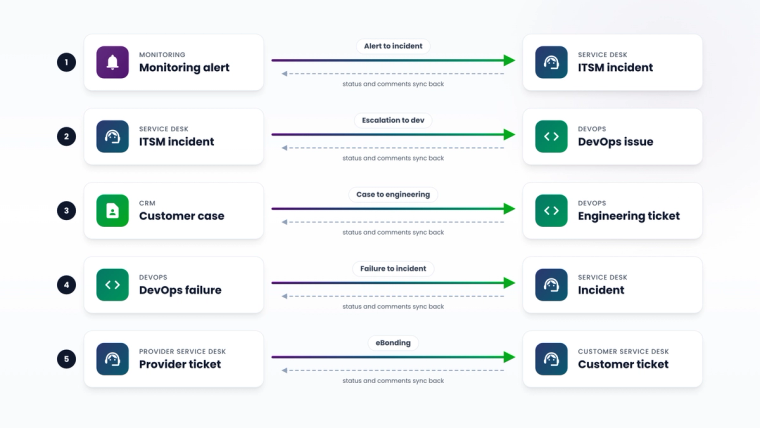
Most organizations start with one of these five flows:
- Monitoring alert to ITSM incident: Dynatrace, SolarWinds, Zabbix, Splunk, Datadog or OpenText Operations Bridge (OBM) events become ServiceNow, BMC Remedy, Ivanti or Cherwell incidents.
- ITSM incident to DevOps issue: when an incident needs a code fix, the service desk escalates it to Jira, Azure DevOps or GitHub, and the developer's status and comments flow back.
- Customer case to engineering ticket: Salesforce cases or Zendesk tickets that point to a bug become Jira issues, and the fix status is visible to support.
- DevOps failure to incident: a failed pipeline, commit or work item in Bitbucket, Jenkins or Azure DevOps opens a ServiceNow incident for the operations team.
- Service provider to customer (eBonding): MSPs and enterprises exchange tickets between their own ITSM instances so both sides work from the same record.
How automated ticket creation works (the logic that actually matters)
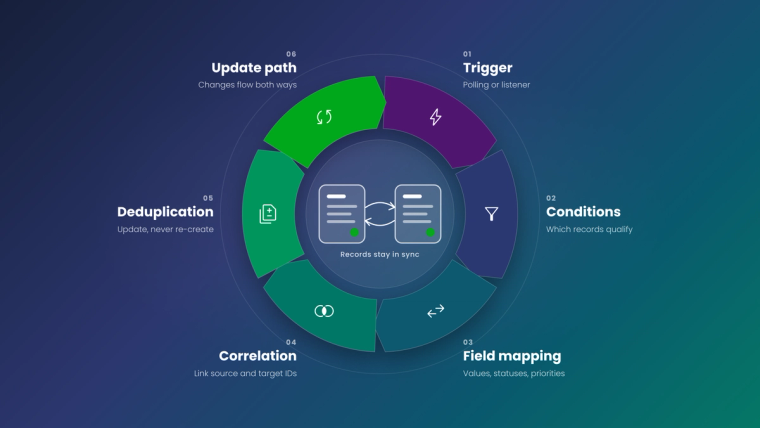
Whatever tool you use, a reliable automated ticket flow needs the same six building blocks. If a solution skips one of them, you will feel it within a week.
1. A trigger: polling or listening
Something has to notice the source event. There are two models:
- Polling: the integration queries the source system's API on a schedule. In ZigiOps, a polling trigger makes the platform the active side and supports a custom interval (the documentation recommends 1 minute for typical use cases).
- Listening (webhooks): the source pushes data the moment it happens. A ZigiOps listener trigger registers an HTTPS endpoint that receives incoming POST requests, which is how webhook-based alerts from tools like Azure Monitor or Dynatrace can be received.
2. Trigger conditions: which events deserve a ticket
Not every alert should become an incident. Conditions such as "severity is one of Critical, Major", "environment is production" or "assignment group is not empty" keep the noise out. ZigiOps trigger conditions support operators such as is, is not, is one of, contains, does not contain, greater than and less than, and can also filter on related child records like comments or change history.
3. Field mapping: what goes into the ticket
A useful ticket carries more than a title. Map severity to priority (or impact and urgency), host or service to configuration item, and include the metric value, the link back to the source and the right assignment group. Conditional mapping lets one source value produce different target values, for example "critical in production" becomes P1 while "critical in test" becomes P3.
4. Correlation: linking the two records
This is the part most home-grown automations skip. The integration stores the source record's ID in a field on the target record (for example the Jira key in ServiceNow's correlation_id field) and the target ID back on the source. That link is what makes updates, comments and closure sync to the right place later. ZigiOps recommends a dedicated custom field for correlation so it never clashes with fields people use.
5. Deduplication: one problem, one ticket
Duplicates come from two places: the same alert firing repeatedly, and the integration collecting records it already processed. Two techniques solve most of it:
- Lookup before create: ZigiOps' Lookup-Create action checks the target system first and creates a record only if no matching record exists. Our guide to lookup actions without duplication shows it in practice.
- Collect only what is new: a "Last Time" expression makes the integration collect only records created or updated since the previous run, and a condition that excludes the integration user prevents ping-pong loops. See Expressions in integrations: the "Last Time" expression.
6. The update path: closing the loop
Creating the ticket is half the job. When the developer resolves the Jira issue, the ServiceNow incident should know. When the service desk adds a work note, the developer should see it. In ZigiOps this is a separate Update action that uses the correlation information to sync state, comments and selected fields in either direction.
Four ways to automate ticket creation, compared
| Criteria | Native automation rules | Custom scripts | General iPaaS | No-code integration platform (ZigiOps) |
|---|---|---|---|---|
| Typical example | ServiceNow Event Management rules, Jira Automation, monitoring tool ITSM actions | Python or PowerShell calling REST APIs on a schedule | Cloud flow from alert webhook to ITSM API | Template such as "SolarWinds alerts to ServiceNow incidents" |
| Cross-tool reach | Strong inside one platform, limited across vendors | Anything, if you write it | Broad connector library | 50+ ITSM, ITOM, DevOps, cloud and CRM systems |
| Two-way sync and correlation | Usually one direction | Must be built and maintained | Possible, often needs extra logic | Built in through correlation and Update actions |
| Deduplication | Platform-specific | Custom code | Custom steps | Lookup-Create, Last Time expressions, trigger conditions |
| Who maintains it | Platform admins | The developer who wrote it | Developers or power users | Service, ITOM or DevOps admins in a guided UI |
| Cost behavior at volume | Some platforms meter automation usage | Engineering time | Often metered by tasks or volume | Unlimited transactions per licensed system pair |
| Data stored by the integration | In the host platform | Depends on the script | Varies by vendor | None, stateless processing |
Sources: Atlassian on Jira automation usage, Microsoft on Azure Monitor ITSM integration, ServiceNow alert management rules and ZigiOps product documentation.
Native automation rules
Every major platform has some automation. ServiceNow alert management rules can open incidents from alerts that reach ServiceNow, Jira Automation can create issues from many triggers, and monitoring tools ship their own ITSM actions. These are a good starting point when both ends live in the same platform.
Two cautions. First, usage may be metered: Atlassian counts Jira Cloud automation by steps, with monthly allowances that depend on your plan (for example 400 steps per user on Standard and 1,000 on Enterprise), and every trigger, condition and action that runs counts. Second, native integrations can be retired: Microsoft has been deprecating the Azure Monitor ITSM action for sending alerts to ServiceNow since September 2022, no longer lets you create that connector in the portal UI, and directs ServiceNow ITOM and BMC Helix users to a secure webhook action instead. If your ticket flow depends on one vendor's built-in connector, its roadmap becomes your roadmap.
Custom scripts
A script that polls an API and posts to another is quick to write and slow to own. Somebody has to handle authentication changes, API versioning, retries, rate limits, field changes, duplicates and the update path. When that somebody leaves, the script becomes the integration nobody touches. COCC lived exactly this story before replacing their scripts with ZigiOps, and cut cross-system ticket handling time by about 50% (COCC case study).
General iPaaS
A cloud iPaaS can receive an alert webhook and call an ITSM API, and for one-way notifications that works well. The friction appears with two-way sync, correlation, attachment handling and state mapping between ITSM and DevOps tools, which usually needs extra steps or scripts. Volume-based pricing also deserves a stress test against an incident storm.
No-code integration platforms
A domain-specific platform such as ZigiOps ships with the ITSM logic already modeled. The bundled templates include flows like "Jira tasks to ServiceNow incidents", "Azure DevOps work items to ServiceNow incidents", "SolarWinds alerts to ServiceNow incidents", "Zabbix trigger events to ServiceNow incidents", "OBM events to ServiceNow incidents", "OBM events to Zendesk tickets", "Azure DevOps work items to ServiceNow incidents" and "ServiceNow incidents to GitHub issues". You pick a template, connect both systems, adjust conditions and mapping in the UI, and enable it.
Can you automate ticket creation without creating duplicates?
Yes, and it is mostly configuration discipline. Use this checklist before you switch any flow on:
- Filter at the source. Only collect events that should become tickets, and exclude records created by the integration user.
- Collect incrementally. Use a "Last Time" style expression so each run only picks up new or changed records.
- Look up before you create. Check the target for an existing open ticket on the same correlation key or configuration item.
- Store correlation on both sides. Use dedicated custom fields, not description text.
- Decide the update rules. Which fields sync after creation, in which direction, and which system wins on conflict. Our article on conflict resolution in bidirectional sync covers the options.
- Plan for failure. Retries, queuing and high availability matter more for incident flows than for most integrations. See Retry, Queue, Failover: Engineering Reliable Integrations.
How to automatically create incidents from monitoring alerts with ZigiOps
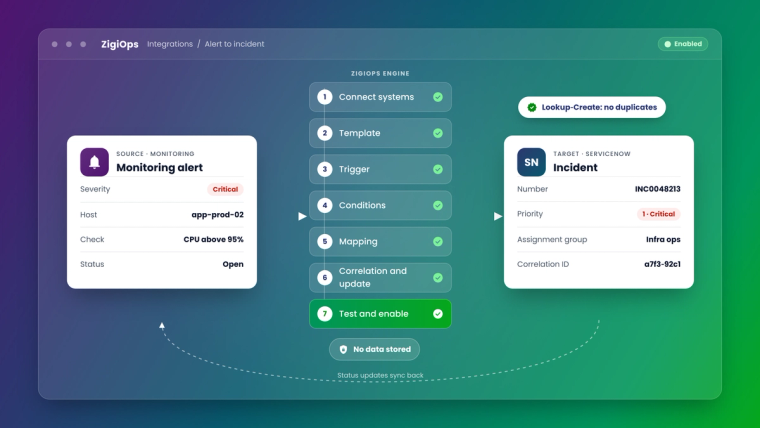
Here is the typical setup for an alert-to-incident flow, for example SolarWinds or Dynatrace to ServiceNow. It is a configuration exercise, not a development project:
- Connect the systems. Add the monitoring tool and ServiceNow as systems with their URLs and credentials, and test the connection.
- Start from a template. Choose the matching alert-to-incident template, or create a new workflow and select the entities (alerts and incidents).
- Choose the trigger. Use polling for tools you query on a schedule, or a listener to receive pushed alerts in real time.
- Set trigger conditions. For example, severity is one of Critical or Major, and the node belongs to production.
- Map the fields. Map severity to impact and urgency with conditional mapping, the node to the configuration item, and add the alert link and metric details to the description.
- Configure correlation and the update action. Store the alert ID on the incident, and add an Update action so incident state and notes flow back to the monitoring tool where supported.
- Test with a real alert, then enable. Use the troubleshooting and logging options to watch the first records go through.
What results can you expect?
Results depend on your volume and process, but customer outcomes give a sense of scale. Metrolinx connected OpenText Operations Bridge with ServiceNow using ZigiOps and reports an 80% reduction in manual ticket creation and a 90% decrease in MTTR (Metrolinx case study). If you want to quantify the business case for your own team, start with three numbers: tickets created manually per week, average minutes per ticket, and average time from alert to assignment.
For more flow ideas between service and engineering teams, see 15 Ways Teams Use Jira and ServiceNow Together, and for the monitoring side, Align Monitoring and ITSM Through Integration.
Why IT teams choose ZigiOps for automated ticket creation
- 100% code-free: templates, trigger conditions, field mapping and expressions are configured in a guided UI.
- No data storage: the engine processes records in memory and does not keep a copy, which simplifies security reviews.
- ISO 27001 certified.
- Unlimited transactions: licensing is based on connected system pairs, so a noisy week does not change the bill.
- Standalone application: independent of any one vendor's platform, deployable on-premises or as hosted SaaS, with primary and backup server options for high availability.
The bottom line
Automated ticket creation is one of the fastest integration wins in IT operations, but only if it includes the boring parts: filtering, correlation, deduplication and the update path. Native rules work inside one platform, scripts work until their author leaves, iPaaS works for simple one-way flows, and a no-code integration platform gives your operations team the full loop without writing code.
Want to see an alert become a correlated, two-way synced incident in your own tools? Book a demo and we will set up one of your flows live, or browse the ZigiOps integrations to check which of your systems are covered.
Frequently asked questions
What is automated ticket creation?
Automated ticket creation means a ticket, incident or issue is opened in one system automatically when an event happens in another, such as a monitoring alert, a customer case or a failed build. A good setup also links the two records so updates, comments and resolutions sync back without duplicates.
Can ZigiOps automatically create ServiceNow incidents from monitoring alerts?
Yes. ZigiOps ships with templates such as SolarWinds alerts to ServiceNow incidents, Zabbix trigger events to ServiceNow incidents and OBM events to ServiceNow incidents. You connect both systems, set trigger conditions and field mapping in the UI, and enable the workflow without writing code.
Can Jira issues be created automatically from ServiceNow incidents?
Yes. A no-code platform like ZigiOps can create a Jira issue when a ServiceNow incident meets your conditions, for example a specific assignment group or category, store the correlation on both records, and sync comments, state and resolution in both directions.
How do I stop automated ticket creation from creating duplicates?
Filter events at the source, collect only new or changed records with a "Last Time" style expression, exclude records created by the integration user, and look up existing tickets before creating new ones. In ZigiOps, the Lookup-Create action creates a record only if no matching record already exists.
Is polling or a webhook listener better for automated ticket creation?
Listeners (webhooks) deliver events the moment they happen, which suits real-time alerting. Polling is simpler when the source cannot push data and works well at short intervals. ZigiOps supports both, with polling intervals you can customize and listener endpoints that receive HTTPS POST requests.
Does automated ticket creation require coding?
Not with a no-code integration platform. Native automation rules and iPaaS flows can need scripts for correlation and two-way sync, and custom scripts are code by definition. ZigiOps configures triggers, conditions, mapping, correlation and deduplication in a guided UI.
Does ZigiOps store ticket or alert data?
No. ZigiOps is stateless: it reads data from the source, transforms it in memory and writes it to the target without keeping a copy of your records.