Integration Services vs. a No-Code Integration Platform: What You Actually Pay For in 2026

Integration services are outsourced offerings in which a vendor, consultancy or managed provider designs, builds and often runs the connections between your business systems for a fee. A no-code integration platform is software your own team uses to build and run those same connections through a visual interface, without writing or maintaining code. The real difference is not who clicks the buttons on day one. It is who pays, and how much, every time a field, a workflow or an API changes after go-live.
If you run a service desk, a DevOps toolchain or a monitoring stack at enterprise scale, you have almost certainly been offered both. A partner proposes a fixed-price project or a managed integration subscription. A software vendor offers a platform license and a demo. Both promise that ServiceNow will finally talk to Jira. This guide breaks down what each model really costs over three years, where the hidden line items live, and how to decide which one fits your team. Last updated: October 12, 2026.
Why this decision matters more in 2026
The integration backlog is not getting shorter. Zylo's 2026 SaaS Management Index found that the average company now manages 305 SaaS applications and spends $55.7 million a year on them, up 8% year over year. Every one of those tools holds data that another team eventually needs somewhere else, and wiring them together by hand is a lot of skilled engineering time going into plumbing.
At the same time, budgets are shifting toward software. Gartner's July 2026 IT spending forecast puts 2026 IT services spending at $1.57 trillion, up 5.3%, while software spending grows 15.5% to $1.47 trillion. In plain terms, organizations are buying more tools than ever, and every new tool is another integration somebody has to build and keep alive.
Then there is platform churn. Atlassian has confirmed that Data Center reaches end of life on March 28, 2029, with new Data Center subscriptions ending for new customers on March 30, 2026. Every Jira Data Center integration in your estate will need to be re-pointed, re-tested or rebuilt against Jira Cloud before then. Whoever owns your integrations owns that work, and that is exactly where the services-versus-platform question stops being theoretical.
What "integration services" means today
The phrase covers several quite different commercial models. Before comparing costs, it helps to be precise about which one you are being offered.
1. Project-based integration services
A systems integrator or consultancy scopes the integration, writes the code or configures a toolkit, tests it and hands it over. You pay for the project, usually as fixed price or time and materials. After hand-over, changes become new statements of work.
2. Managed integration services
The provider builds the integration and keeps running it for you as an ongoing subscription. ONEiO is a well-known example in the ITSM space and describes its model plainly: "ONEiO runs your integrations. You deliver your services." Under this model you rent an outcome rather than own a configuration, and the provider's operations team handles monitoring and changes, within the limits of your contract.
3. In-house custom development
Your own engineers write scripts or services against each system's API. There is no external invoice, but there is a very real cost in salaries, maintenance and key-person risk. We covered this route in depth in ZigiOps vs. Internal Development: 5 Things to Consider.
4. Low-code iPaaS
General-purpose platforms such as Workato or Tray.ai give you building blocks (recipes, connectors, scripting steps) to assemble integrations. They reduce code but rarely remove it, and they usually expect someone with developer-style thinking to own complex flows. If you need a refresher on the category, see What Is iPaaS? A 2026 Definition.
5. A no-code integration platform
A standalone product where integrations are configured entirely in a guided UI: pick two systems, choose entities, map fields, set conditions and launch. ZigiOps sits in this category, with a focus on ITSM, DevOps, monitoring, cloud and CRM tools.
Side-by-side: services vs. platforms
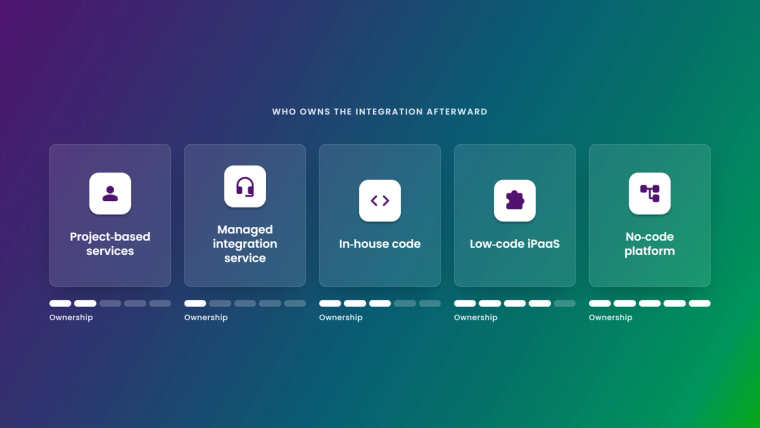
The table below compares the five models on criteria you can verify during procurement. Where a cell refers to ZigiOps, it is based on the ZigiOps product documentation.
| Criteria | Project-based services | Managed integration service | In-house code | Low-code iPaaS | No-code platform (ZigiOps) |
|---|---|---|---|---|---|
| Who builds the integration | Partner consultants | Provider's team | Your developers | Your developers or power users | Your service, DevOps or ITOM team in a guided UI |
| Typical cost model | Project fee, then change orders | Recurring subscription, scope set by contract | Salaries and maintenance time | Subscription, often metered by tasks, recipes or connectors | License points per connected system-instance pair, with unlimited integrations between that pair |
| Cost of a field or workflow change | New statement of work | Ticket to provider, within contract limits | Developer sprint time | Builder time, sometimes developer time | Edit the field map or condition yourself |
| Who owns the configuration | Your copy of the delivered code | Provider runs it, portability depends on contract | You | You, inside the vendor's platform | You: integrations can be exported, imported and cloned |
| Data handling | Depends on what is built | Data passes through provider's cloud | Depends on what is built | Usually processed in the vendor's cloud | No transferred data stored, ISO 27001 certified vendor |
| Skills needed after go-live | Partner availability | Provider availability | API and scripting skills | Builder plus occasional scripting | Knowledge of your own systems and processes |
| Exit and lock-in risk | Medium: code without its authors | High: the service is the integration | Key-person risk | Medium: recipes are platform-specific | Lower: standalone app, configuration stays with you |
None of these models is wrong. They optimize for different things. Services buy you capacity you do not have. Platforms buy you control you get to keep. The question is which one you need more over the life of the integration.
Where the money actually goes
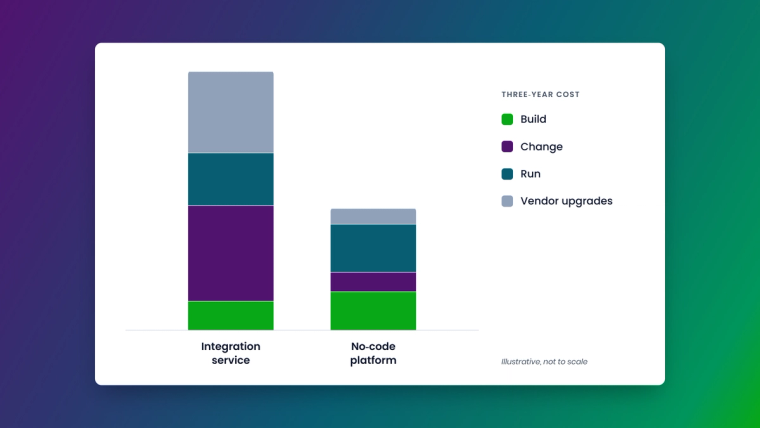
Most proposals compare the visible number: the project fee against the license fee. That comparison is misleading because the build is the cheapest part of an integration's life. A more useful view splits the cost into four buckets.
Build
Discovery, mapping workshops, configuration or coding, testing and go-live. Services firms are good at this, and a fixed-price build can look attractive. A no-code platform shortens the build because templates and visual mapping replace custom code, but someone on your side still needs to know which fields matter.
Change
This is where services get expensive. Integrations are never finished. Teams add custom fields, rename assignment groups, split one queue into three and introduce new priority schemes. Each change is small on its own and costly in aggregate when every adjustment goes through a change order or a provider ticket. With a platform, a change is an edit to a field map, a condition or a trigger filter, made by the person who understands the process.
Run
Monitoring, error handling, retries and incident response when a sync fails at 2 a.m. Managed services include this, which is a real benefit. Platforms need an owner, but good ones make the job light. ZigiOps, for example, shows workflow status and logs directly in the UI and supports high availability with a primary and backup server, so the run cost is a few hours of attention rather than a dedicated team.
Vendor upgrades
Every connected system changes underneath you. ServiceNow ships family releases twice a year. Microsoft documents that preview versions of the Azure DevOps REST API can be deactivated 12 weeks after the released version ships. Atlassian is moving the entire Data Center base to cloud. With in-house code or a services project, each of these events is billable work. With a maintained platform, keeping connectors current is the vendor's job. Our deep dive on integration fragility across platform releases shows what this looks like in a real Jira and ServiceNow estate.
A simple way to compare three-year cost
You do not need a consultant to model this. Use the same formula for every option and fill it in with your own quotes:
Three-year cost = build + (expected changes per year x cost per change x 3) + (run cost per year x 3) + (vendor upgrade events x cost per event) + exit cost
A few practical rules for filling it in:
- Count changes realistically. Pull the last 12 months of change requests that touched your current integrations, or the workflows they connect. Most teams underestimate this number.
- Price a change at your provider's real rate. Ask for the minimum billable unit for a change. A two-minute field addition that triggers a four-hour minimum is a four-hour change.
- Include exit cost. If the managed service ends, what do you get back? A running configuration, a document or nothing? Ask before you sign.
- Match transaction volumes to pricing. If a platform or service meters by tasks, messages or records, model peak months such as a major incident or a migration, not average months.
When teams run this exercise, the pattern is consistent: services win on year-one build effort when internal capacity is close to zero, and platforms win on years two and three, when change and upgrade costs dominate. For a ServiceNow-specific version of this math, see The Real Cost of a ServiceNow Integration in 2026.
When integration services are the right call
Being fair to services matters, because the right answer is sometimes "hire help":
- You have a one-off, highly custom requirement. A legacy mainframe feed or a proprietary in-house tool with no usable API may need bespoke engineering.
- You need capacity, not capability. If your team knows exactly what to build but has no time this quarter, a partner can accelerate delivery.
- You want process consulting, not just plumbing. Good partners redesign the workflow before automating it, which is often worth more than the integration itself.
- Your operating model is fully outsourced. If an MSP already runs your service desk, a managed integration service may fit the contract structure.
Notice that most of these are about the first build. The case for services weakens as soon as the integration enters its long, change-heavy middle life.
When a no-code platform wins
A platform is usually the better choice when:
- Integrations change often. ITSM and DevOps workflows evolve every quarter. If you expect frequent changes, owning the configuration is cheaper than renting it.
- You connect many tools. Once you integrate more than one pair, a shared platform with reusable systems and templates beats a stack of separate projects.
- Security reviews are strict. Regulated industries need to know exactly where data flows and whether it is stored. A platform that does not store transferred data gives your security team a much shorter review.
- You want to avoid key-person risk. A visual configuration that any trained admin can read survives staff turnover far better than a folder of scripts.
- Volume is unpredictable. Incident storms, monitoring alert floods and migrations create spikes. Per-message or per-task pricing turns those spikes into surprise invoices.
How ZigiOps changes the math
ZigiOps was built for the teams who live in these tools every day: service managers, DevOps engineers and ITOM engineers. Here is how its design maps to the cost buckets above.
Build in a guided UI, not in code
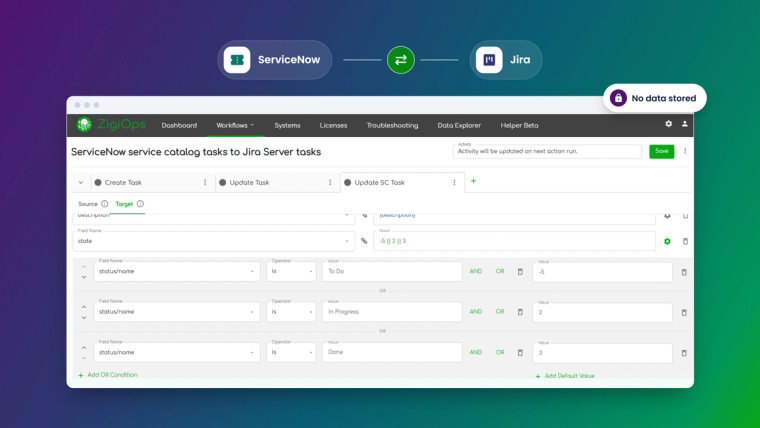
Every ZigiOps integration is a workflow between a pair of system instances. Each workflow contains actions with a Source tab (what to collect and how) and a Target tab (how to deliver it). You pick a trigger, either a Polling trigger that queries the source API on a schedule or a Listener trigger that receives incoming HTTP requests, then define field mappings with dynamic variables such as {priority}. Out-of-the-box templates cover common use cases like ServiceNow incidents to Jira issues, and you can load a template and adjust it rather than starting from zero. The documented connector library covers 58 systems, from ServiceNow, Jira, Azure DevOps and Salesforce to Dynatrace, Datadog, Splunk and Zendesk. You can see the full list on the integrations page.
Change without a change order
Conditional mappings, trigger conditions with AND and OR logic, and expressions (Pattern, Replace Text, Last Time, Date and Time Format and more) handle the logic that would normally require a developer. When a team adds a custom field or a new status, an admin updates the mapping and saves. Correlation settings keep updates flowing both ways between linked records, and Lookup-Create and Lookup-Update actions prevent duplicates when the same data arrives twice.
Run with less effort
The ZigiOps dashboard and workflow views show what ran, what failed and why, and the platform includes an AI-powered troubleshooting assistant for faster diagnosis. High availability with a primary and backup server keeps critical syncs running during maintenance.
Keep data and pricing under control
ZigiOps does not store the data it transfers. It encrypts sensitive configuration data such as passwords and tokens with FIPS 140-2 compliant AES-256 by default, supports external security providers and hardware security modules, and ZigiWave is ISO 27001 certified. You can review the details on the ZigiOps security page. On pricing, ZigiOps is licensed by connected system-instance pairs: one license point enables unlimited integrations between, for example, one ServiceNow instance and one Jira instance, and ZigiWave positions the platform with unlimited transactions instead of per-message metering. See ZigiOps pricing for current plans.
Stay independent
ZigiOps is a standalone application, not a plugin inside one of the systems it connects. It can run on-premises or in the cloud, and integrations can be exported, imported and cloned between environments. If you ever change one of the connected tools, the integration layer stays where it is.
Services and platforms are not mutually exclusive
Many enterprises land on a hybrid: a no-code platform as the integration layer, with a partner helping on the first rollout or on complex process design. That gives you outside expertise when you need it and ownership when the partner leaves. ZigiWave works with integration partners who deliver ZigiOps projects, so you can buy implementation help without renting your integrations forever. If you are weighing specific vendors, our comparison of ONEiO, Exalate and ZigiOps goes deeper into how the managed and platform models differ in practice.
Questions to ask before you sign anything
Use these in your next vendor or partner call:
- Who can change a field mapping after go-live, and how long does it take?
- What is the minimum billable unit for a change request?
- Is pricing metered by messages, tasks, records or connectors? What happens in a month with ten times the usual volume?
- Where does my data go in transit, and is any of it stored? Which certifications cover that?
- When a connected system ships a new version or API, who updates the integration, and is it included in the price?
- If we end the contract, what exactly do we keep?
- Can our own admins see logs, retries and failures without opening a ticket?
If the answers to questions 1, 5 and 6 depend on someone else's calendar, you are buying a service, whatever the brochure calls it.
The bottom line
Integration services are a good way to get capacity and expertise for a first build. They are an expensive way to own an integration for years. A no-code integration platform moves the long tail of changes, upgrades and fixes back to the people who understand the workflows, at a predictable cost and with your data staying where it belongs.
Want to see what that looks like with your own ServiceNow, Jira, Azure DevOps or monitoring tools? Book a demo and we will walk through your use case live, field mapping included.
Frequently asked questions
Can a no-code integration platform replace an integration service provider?
For most ITSM, DevOps and monitoring integrations, yes. A no-code platform like ZigiOps lets your own admins build, change and run integrations between tools such as ServiceNow, Jira, Azure DevOps and Dynatrace. Many teams still use a partner for the first rollout or complex process design, then own the integrations themselves.
Can ZigiOps be used without any coding?
Yes. ZigiOps is 100% code-free. Integrations are configured in a guided UI with templates, visual field mapping, trigger conditions and built-in expressions. An optional JS mapping script exists for unusual edge cases, but it is not required for standard integrations.
Does ZigiOps store the data it transfers?
No. ZigiOps does not store the data that passes between connected systems. Sensitive configuration data such as passwords and tokens is encrypted with FIPS 140-2 compliant AES-256 by default, and ZigiWave is ISO 27001 certified.
Is integration-as-a-service cheaper than buying a platform?
It can be cheaper in year one, when the provider absorbs the build effort. Over three years, change requests, vendor upgrades and exit costs usually make a platform cheaper, especially when integrations change often or connect more than one pair of tools.
Can I move from a managed integration service to ZigiOps?
Yes. ZigiOps connects to the same systems through their APIs, so you can rebuild the flows in ZigiOps, run them in parallel to validate the results and then switch off the old service. Correlation and lookup actions help avoid duplicates during the switchover.
Does ZigiOps charge per transaction?
No. ZigiOps is licensed by connected system-instance pairs, and one license point enables unlimited integrations between two instances. ZigiWave positions the platform with unlimited transactions rather than per-message metering.
Can ZigiOps run on-premises?
Yes. ZigiOps is a standalone application that can be deployed on-premises or used in the cloud, and it supports high availability with a primary and backup server.