Watch: ZigiOps ServiceNow-to-Azure DevOps Setup Walkthrough
This video walks you through configuring a two-way integration between ServiceNow and Azure DevOps using ZigiOps — a flexible, no-code integration platform that automates real-time data flow between ITSM and DevOps environments. Whether you're tracking incidents or managing work items, ZigiOps ensures synchronization without custom code or manual effort.
What you’ll learn in this guide:
Step 1 – Installing and Logging into ZigiOps
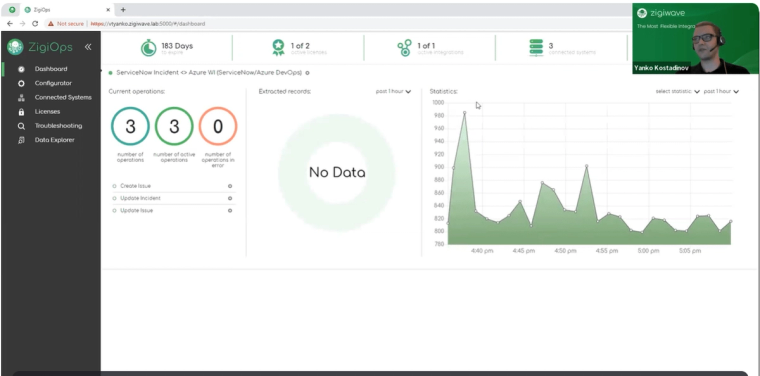
Install the on-prem version of ZigiOps — the setup is fast and takes just a few minutes. Once installed, log in to access the Dashboard, which provides:
- Integration health status
- License utilization
- Key operational metrics
Step 2 – Connecting ServiceNow and Azure DevOps
From the Connected Systems menu, add both platforms:
ServiceNow Setup:
- Instance URL
- Username and password
- Required permissions:
- incident (READ, WRITE, CREATE)
- sys_db_object, sys_dictionary, sys_journal_field, sys_glide_object (READ)
Azure DevOps Setup:
- Instance URL
- Organization name
- Username and Personal Access Token (PAT)
- Choose instance type: Azure DevOps Services or TFS
- Required permission: Work Items (READ, WRITE)
Click Save, then Test to validate connectivity and metadata access.
Step 3 – Loading a Template
Navigate to the Configurator tab and create a new integration. Search for the predefined template:
- ServiceNow Incident → Azure DevOps Work Item
You can also import custom templates or start a new configuration from scratch.
Step 4 – Configuring the Integration
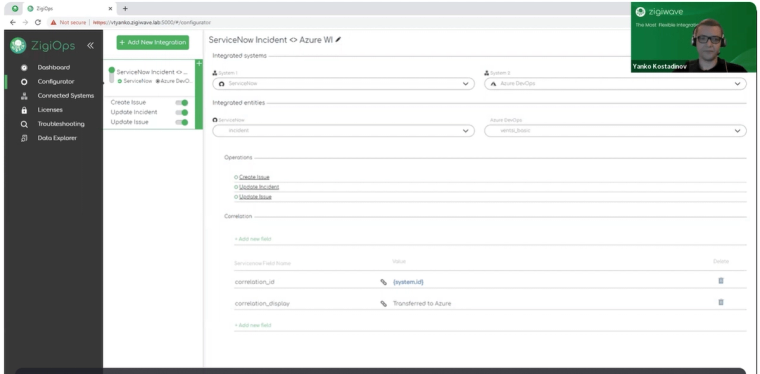
Define Source and Target Systems:
- Source: ServiceNow (Entity: incident)
- Target: Azure DevOps (Entity: work item)
Correlation Logic:
- Use unique System IDs to link records across platforms
- Enables backsync, so changes in Azure DevOps reflect in ServiceNow and vice versa
Step 5 – Setting Integration Operations
Create Azure DevOps Work Item:
- Trigger: Polling (e.g., every 10 seconds)
- Define trigger conditions (e.g., status = “New”)
- Field mapping:
- Use simple, nested, or conditional logic
- Combine values or transform fields for platform compatibility
Update Azure DevOps Issue:
- Triggered by updates in ServiceNow
- Sync fields like:
- Status
- Comments
- Priority
- Apply conditions to handle value translation (e.g., converting ServiceNow status codes)
Update ServiceNow Incident:
- Triggered by changes in Azure DevOps
- Enables two-way updates
- Customize mapping and triggers to control how and when updates apply
Final Step – Activating the Integration
Click Save, then activate the integration. You can now test the integration by:
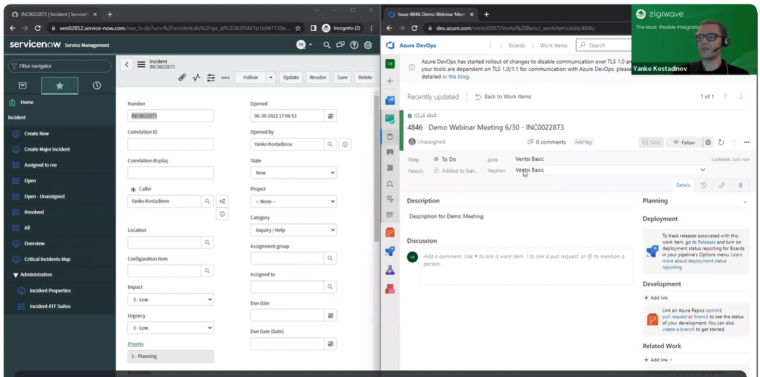
- Creating an incident in ServiceNow → Auto-generates a work item in Azure DevOps
- Resolving the issue in Azure DevOps → Auto-updates or closes the incident in ServiceNow
Unify ITSM and DevOps Effortlessly With ZigiOps, ServiceNow and Azure DevOps stay in sync — reducing manual effort, accelerating workflows, and improving cross-team visibility.
Book a demo or start your free trial today!
For the full write-up of this ServiceNow ↔ Azure DevOps sync, see our integration page.
Here are the main things that we covered during this live demo
In the beginning, Yanko briefly showcased the ZigiOps UI from 4.01.
Right after that he started with the ServiceNow Incident to Azure DevOps Work Item integration setup, starting from 5:06.
And then he demonstrated how the integration works in the two connected systems (ServiceNow and Azure DevOps) from 13:02. He created a brand-new incident in ServiceNow and it was automatically logged in Azure DevOps as a work item.
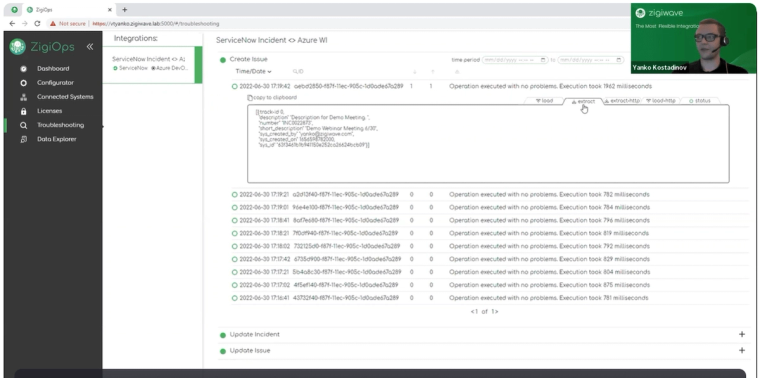
While waiting for the polling time of 20 seconds, Yanko also showcased the troubleshooting section of ZigiOps, where you can see in details what is being extracted from the source system and what is being loaded in the target system, and how the overall data transfer happens. This greatly eases troubleshooting in case of any issues.
After that, from 14:24 he also showed some two-way updates, by adding comments and attachments to both the ServiceNow incident and the Azure DevOps work item, and also changing the status. When there are changes in ServceNow, ZigiOps updates them in Azure DevOps immediately and vice versa.
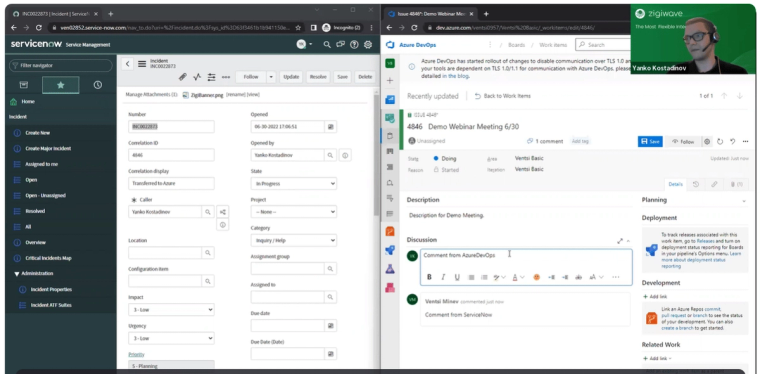
After the integration was completed and tested, Yanko concluded the demo and opened the stage for questions, from 17:30.
We had a few great questions from our attendees. For example, about the entities that ZigiOps can sync between the two systems, the authorization methods that are used and what system versions are supported.
Lyubo, our R&D manager, gave really detailed and interesting answers, so if you'd like to watch the whole Q&A session, you can do it here.
Of course, if you have any additional questions, you can contact us at any time at jane.doe@example.com. And if you have a specific or more complex use case, just book a demo with our team and we will show you how you can complete it with ZigiOps.
Example Use case
The service desk team receives a new incident in ServiceNow. They look into the issue and find out that it is due to a software bug, so they need to forward it to the development team.
With ZigiOps this will be automated. No need to manually open Azure DevOps and enter the information there. The integration platform will transfer all the necessary details to Azure DevOps and the responsible team members will have the data in real time.
The integration can easily be customized to log only specific ServiceNow incidents. ZigiOps provides advanced filtering and mapping options, and everything can be fine-tuned so the teams can communicate effortlessly. All log files, traces, or other attachments can also be synchronized. This way you can easily eliminate communication bottlenecks and avoid errors and delays caused by manual data transfer.
The integration is two-way, so any updates will be reflected in both systems. Once the development team fixes the issue, and closes it in Azure DevOps, ZigiOps will automatically close the incident in ServiceNow. The end customer will receive a notification that their problem is resolved.
Join our ServiceNow Azure DevOps integration demo on the 30th of June.
At the webinar you will be able to ask all the questions you have about your specific use case and get them answered by our specialists.
See you there or you can directly book a demo with our tech team.