Zendesk Connector Options Compared: Native Apps vs. Standalone Platforms

A Zendesk connector is any tool that moves ticket, customer, or workflow data between Zendesk and another system, either through a marketplace app installed inside Zendesk or through a standalone platform that talks to Zendesk's API from the outside. The two architectures look similar on the surface, but they behave very differently once you factor in data residency, transaction volume, and what happens when Zendesk pushes an update. If you're choosing a zendesk connector for anything beyond a single helpdesk-to-Slack notification, the architecture decision matters more than the feature list.
The Problem: Marketplace Convenience Has a Ceiling
Installing an app from the Zendesk Marketplace feels effortless, click, authorize, done. That convenience is exactly why over 58% of Zendesk customers have installed at least one marketplace app or integration, and why those apps now influence a large share of Zendesk's revenue. But most of these apps were built for one thing: extending the Zendesk agent interface, not running enterprise-grade, bi-directional data pipelines to ServiceNow, Jira, or Salesforce.
Once you need field-level mapping, conditional logic, high transaction volume, or a connection that survives a Zendesk UI redesign, the marketplace app model starts to show its seams. That's the gap standalone integration platforms were built to close, and it's worth understanding exactly how they close it before you commit engineering time to either path.
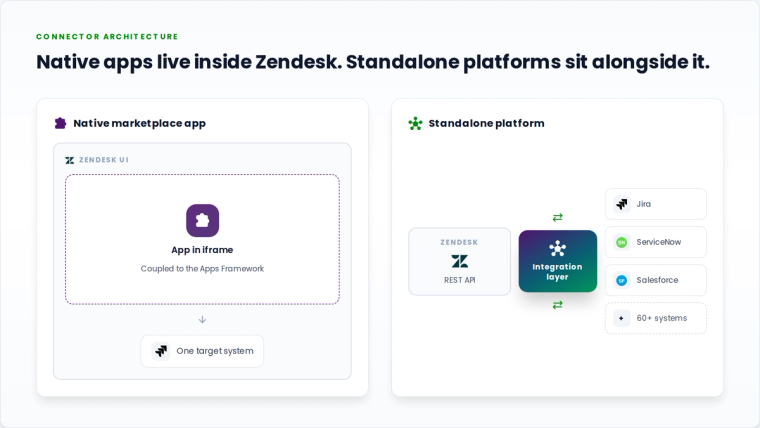
Native Marketplace Apps vs. Standalone Integration Platforms
Here's how the two approaches actually compare, criteria by criteria, based on how each is architected rather than how each is marketed.
| Criteria | Native Zendesk Marketplace App | Standalone Platform (e.g., ZigiOps) |
|---|---|---|
| Runtime location | Runs inside Zendesk's iframe or as a Zendesk-hosted integration app | Runs independently, outside Zendesk, connecting via REST API |
| Coding requirement | Many are pre-built for narrow use cases; custom logic often needs the Zendesk Apps Framework (JavaScript) | 100% code-free setup through a guided UI, no scripting for field mapping or conditions |
| Data storage | Varies by vendor; some apps cache or store ticket data on third-party servers | ZigiOps does not store any transferred data; information moves directly between endpoints |
| Transaction limits | Often tiered by pricing plan or API rate limits per app | Unlimited transactions, no per-record or per-sync ceiling |
| Security certification | Reviewed by Zendesk before listing, but certification level depends on the individual publisher | ISO 27001 certified integration platform |
| Multi-system reach | Typically one-to-one: Zendesk to a single target system per app | Connects Zendesk to 60+ ITSM, DevOps, monitoring, and CRM tools from one platform |
| Resilience to UI changes | Coupled to the Zendesk Apps Framework; framework updates can require app updates | Standalone application, not a plugin, so it isn't dependent on Zendesk's internal UI framework |
How Zendesk Connects to Jira Through ZigiOps: A Detailed Walkthrough
Support tickets and development tickets rarely live in the same system, which is exactly the problem when a Zendesk agent discovers what's actually a software bug. Instead of manually opening Jira and re-typing the issue, a standalone connector like ZigiOps builds and maintains that link automatically. Here's what that setup actually involves, step by step.
Step 1: Connect Zendesk as System 1
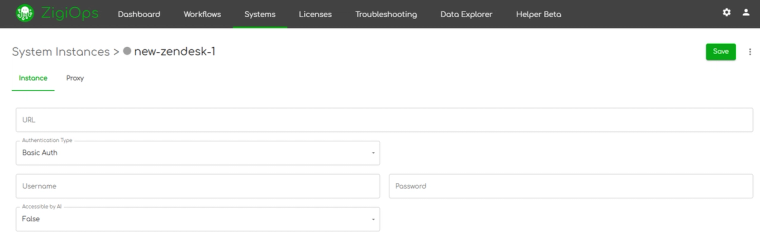
Inside ZigiOps, you navigate to Connected Systems > Add New System > Zendesk and provide:
- Server URL, for example https://example.zendesk.com
- Authentication type: Basic Auth (username and password), Bearer Token (username and client application ID), or full OAuth (username, password, client application ID, and client secret)
- Proxy settings, if your network requires routing through one
Step 2: Connect Jira as System 2
The same connected-system pattern applies to Jira, using the instance URL, a user, and a password (or token, depending on your Atlassian security policy). Once both systems are authenticated, ZigiOps pulls each platform's schema automatically, so every custom field, issue type, and ticket form already configured in your Zendesk and Jira instances shows up for mapping without anyone hand-typing field names.
Step 3: Load or Build the Workflow
Rather than starting from a blank canvas, most teams search ZigiOps' template library by system pair (Zendesk and Jira) and load the closest matching pre-built template. From there, you define which entities move between the two systems, in the most common case, Zendesk tickets becoming Jira issues.
Step 4: Configure the Action Levels
This is where the real logic lives. A typical Zendesk-to-Jira workflow uses three action levels:
- Create task: When a new qualifying Zendesk ticket appears, ZigiOps creates a corresponding Jira issue automatically, using a polling trigger you control (checking every minute, every few minutes, or on whatever cadence fits your SLA).
- Update task: As the Zendesk ticket changes, for example new comments, priority changes, or attachments, those updates flow into the Jira issue on the same polling interval.
- Update ticket (backsync): This is the direction most native apps struggle with. When the Jira issue changes status, gets a fix committed, or is closed by the DevOps team, that update flows back into the original Zendesk ticket automatically, closing the loop without either team touching the other system.
Each action has a Source tab (the originating system and entity) and a Target tab (field mapping into the destination system), giving you granular control over exactly which Zendesk fields populate which Jira fields, and vice versa on the backsync.
Step 5: Use Expressions for Anything the Native Fields Can't Handle
Zendesk's priority scale, custom ticket fields, and Jira's issue types rarely line up one-to-one. ZigiOps' expression engine lets you create derived variables, concatenating fields, transforming values, or applying conditional logic, so a five-point Zendesk priority can map cleanly onto a three-point Jira priority without losing meaning, all without writing a script from scratch.
The result: when a helpdesk agent flags a bug, ZigiOps creates the Jira issue automatically, keeps it updated in near real time, and syncs the resolution back to Zendesk the moment the developer closes it. No plugin, no manual re-entry, and no second login for either team.
How Zendesk Connects to ServiceNow (and Other ITSM Platforms) the Same Way
The Jira pattern above isn't a one-off; it reflects how ZigiOps handles any Zendesk pairing, including ServiceNow. Since ZigiOps treats every connected system the same way, source and target instances, entity selection, action levels, and field mapping, connecting Zendesk to ServiceNow follows the identical architecture: authenticate both systems, pick or build a workflow, define triggers and polling intervals, and configure Create, Update, and backsync actions for incidents instead of Jira issues.
Because ZigiOps sits outside both platforms rather than living inside either one's marketplace, it can enforce ServiceNow's own data-handling expectations on the way in. ServiceNow's own community guidance recommends standardizing field mapping and using dedicated integration accounts for cross-platform sync, which is far easier to enforce from a dedicated integration layer with its own audit trail than from an app embedded in Zendesk's interface. In practice, this means a Zendesk escalation becomes a properly formatted ServiceNow incident, complete with correct priority mapping and category assignment, and any status change or resolution note in ServiceNow flows back to the original Zendesk ticket automatically.
What Happens Under the Hood: Rate Limits, Loops, and Schema Drift
The technical challenges of connecting Zendesk to another enterprise system are rarely about authentication, they're about what happens at scale. Zendesk enforces API limits around 700 calls per minute per account, which means any integration pulling large ticket volumes needs batching, queuing, and retry logic rather than constant polling. Platforms on the other side, whether Jira, ServiceNow, or Salesforce, carry their own API ceilings and token-refresh cycles for OAuth 2.0 connections.
A standalone platform is built to absorb this complexity. ZigiOps combines real-time event triggers with scheduled polling so sync frequency can be tuned to actual load, automatically detects the origin of a change to prevent infinite update loops between two connected systems, and adapts to schema changes on either side, like a new custom field in Zendesk, without breaking the whole workflow. A single marketplace app, scoped to one narrow use case, typically isn't built to absorb that kind of cross-platform variability.
Real-World Scenario: Support and ITOps, Finally in Sync
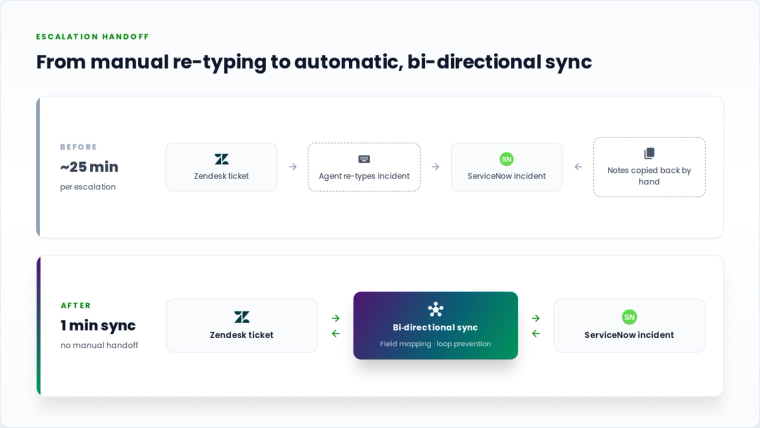
A mid-size SaaS company running Zendesk for customer support and ServiceNow for internal IT operations had agents manually re-typing escalated tickets into ServiceNow incidents, then copying resolution notes back once engineering closed the loop. Average escalation handoff time: roughly 25 minutes per ticket, multiplied across dozens of daily escalations. After connecting both systems through a standalone platform with bi-directional field mapping and a one-minute polling interval, escalations synced automatically in both directions, with status updates flowing back to Zendesk the moment ServiceNow closed the incident. The manual handoff step disappeared entirely, and support agents stopped needing ServiceNow logins just to check on ticket status.
Expert Tips
1. Choose your authentication method based on what's downstream, not what's easiest to set up. Basic Auth is the fastest to configure, but security researchers consistently flag Basic Authentication over unencrypted channels as one of the weaker options for production API integrations. If Zendesk is feeding a system with strict compliance requirements, use OAuth from the start rather than migrating later.
2. Map fields before you touch trigger settings. Field mismatches, like a five-point Zendesk priority scale against a three-point Jira or ServiceNow scale, cause more integration headaches than any authentication issue. Build and test your field mapping against edge cases (empty fields, unusual characters, multi-select custom fields) before enabling bi-directional sync.
3. Watch your polling interval against the target system's API ceiling. A one-minute polling interval feels responsive, but if you're also running bulk syncs or other integrations against the same Zendesk or ServiceNow instance, you can hit rate limits (Zendesk's is roughly 700 calls per minute per account) faster than expected. Stagger polling intervals across workflows rather than defaulting every integration to the tightest setting.
4. Guard against update loops on any bi-directional sync. Backsync is what makes a Zendesk-Jira or Zendesk-ServiceNow integration genuinely useful, but without loop prevention, an update in System A triggers an update in System B, which triggers another update in System A, and so on. Confirm your integration platform detects change origin automatically rather than relying on manual timing workarounds.
5. Use expressions instead of forcing a 1:1 field match. Native fields almost never line up perfectly between two platforms. Rather than dropping data that doesn't fit, use the platform's expression or scripting layer to transform, concatenate, or conditionally map values, so a Zendesk custom field with five options can still translate meaningfully into a ServiceNow category with three.
Book a Demo
If manually re-keying Zendesk tickets into ServiceNow, Jira, or Salesforce is eating into your team's day, it's worth seeing the standalone approach in action. Book a demo and we'll walk through a Zendesk integration built around your actual ticket fields, not a generic sandbox.
Frequently asked questions
Is ZigiOps a Zendesk marketplace app?
No. ZigiOps is a standalone application that connects to Zendesk through its REST API using Basic Auth, Bearer Token, or OAuth. It runs independently rather than as an installed app inside the Zendesk interface.
Can a Zendesk connector integrate with ServiceNow and Jira at the same time?
Yes. A standalone platform like ZigiOps can run separate Zendesk-to-ServiceNow and Zendesk-to-Jira workflows simultaneously from the same instance, each with its own action levels, field mapping, and polling cadence, something a single-purpose marketplace app typically can't do.
Does ZigiOps store Zendesk ticket data?
No. ZigiOps does not store any of the data it transfers. Information is read from Zendesk, mapped, and delivered to the target system without being retained on ZigiOps servers.
Do I need developer resources to set up a Zendesk connector this way?
No. ZigiOps is 100% code-free. Connections, action levels, field mapping, and conditional logic are configured through a guided UI rather than the Zendesk Apps Framework or custom scripts.
Is there a limit on how many tickets can sync per month?
No. ZigiOps has no cap on the number of transactions, so ticket volume doesn't dictate your integration plan the way some marketplace app tiers do. The practical ceiling is Zendesk's own API rate limit, not anything imposed by the connector.
Does a Zendesk-Jira integration update both directions, or just Zendesk to Jira?
With ZigiOps, it's bi-directional. Zendesk tickets create and update Jira issues, and any status change or resolution in Jira syncs back to the original Zendesk ticket through a backsync action.