What Is System Integration in 2026? Types, Methods, and When You Still Need a System Integrator

System integration is the process of connecting separate IT systems, applications, and data sources so they work as one coordinated whole, sharing data and triggering actions automatically instead of relying on manual re-entry. A system integrator is the person, team, or firm that designs and delivers those connections, although in 2026 much of that work can be handled by no-code integration platforms.
Why system integration matters more in 2026, not less
You would think that after twenty years of APIs and cloud software, integration would be a solved problem. It is not. It is arguably worse, because the number of systems keeps growing faster than the connections between them.
According to Zylo's 2026 SaaS Management Index, large enterprises add around 21 new applications every month, and IT directly manages only 15% of SaaS spend, while business units control 81%. Every one of those apps is another island of data that someone eventually has to connect. The stakes are rising fast: Gartner predicts that through 2026, organizations will abandon 60% of AI projects that are not supported by AI-ready data, and 63% of organizations either lack or are unsure they have the right data management practices for AI.
Read that last one again. The AI projects everyone is funding in 2026 depend on the integration work nobody wants to talk about. An AI agent that cannot see your ServiceNow incidents, Jira issues, and monitoring alerts in context is just a very confident guesser.
Meanwhile, Gartner forecasts IT services spending of $1.57 trillion in 2026, up 5.3% from 2025. A meaningful share of that goes to integration and implementation services. So the real question is not whether you need system integration. It is how you get it without spending a fortune or waiting a year.
What does system integration actually involve?
Strip away the jargon and every system integration project answers the same five questions:
- Which systems need to talk? For IT teams, that is usually an ITSM tool (ServiceNow, BMC Remedy, Jira Service Management), a DevOps tool (Jira, Azure DevOps, GitHub), monitoring (Dynatrace, Splunk, Datadog), and a CRM (Salesforce, Zendesk).
- What data moves, and in which direction? Incidents, issues, events, configuration items, comments, attachments. One-way or bi-directional.
- When does it move? On a schedule, in near real time, or when an event is pushed.
- How does data get translated? Priorities, statuses, users, and custom fields rarely match between tools, so field mapping and value transformation are unavoidable.
- Who maintains it? APIs change, tools get upgraded, and processes evolve. Someone has to keep the integration healthy.
That fifth question is where most integration budgets quietly leak.
The main types of system integration
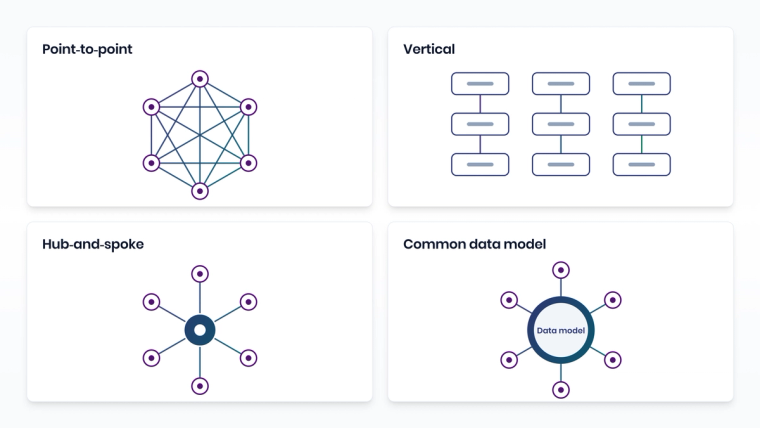
Integration architects usually describe four classic patterns. Knowing them helps you understand what vendors and consultants are actually proposing.
| Integration type | How it works | Strengths | Weaknesses |
|---|---|---|---|
| Point-to-point ("spaghetti") | Each pair of systems is connected directly with its own code or connector | Quick to start for two or three systems | Connections grow as n(n-1)/2, brittle and hard to maintain |
| Vertical (silo) integration | Subsystems are integrated by function into self-contained stacks | Fast and inexpensive for a single function | Hard to reuse or extend across departments |
| Hub-and-spoke / ESB (star) | A central hub routes, transforms, and delivers data between systems | Central control and far fewer connections | The hub can become a bottleneck and needs specialist skills |
| Common data model (canonical) | Every system translates to and from a shared data format | Consistent data and easier onboarding of new systems | Significant upfront modeling and governance effort |
In practice, most enterprises end up with a mix: a few legacy point-to-point scripts, maybe an ESB in the data center, a platform or two for SaaS tools, and a strong desire to stop adding to the pile. If you want the architecture deep dive, we compared the two dominant modern approaches in Cross-Platform Integration Architecture: Hub-and-Spoke vs Mesh.
Why point-to-point breaks down
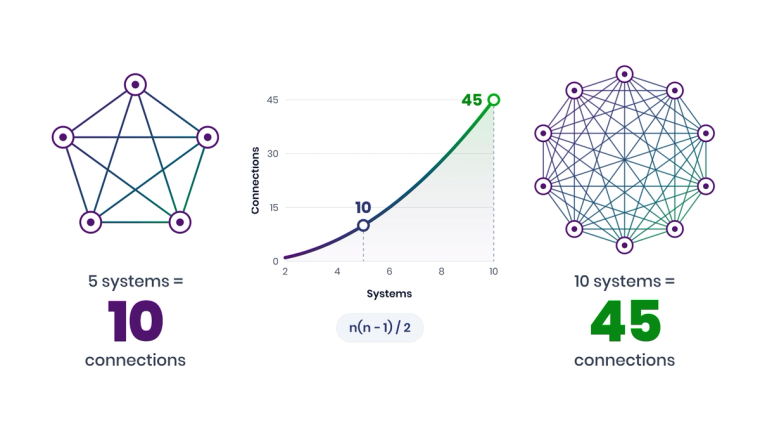
The math is unforgiving. Fully connecting n systems point-to-point takes n(n-1)/2 connections. Five systems need 10 integrations. Ten systems need 45. Every one of them is a small piece of custom software with its own credentials, error handling, and upgrade risk.
IBM describes the core problem well in its explanation of the enterprise service bus pattern: when each application owner connects directly to every service it needs and handles its own data transformations, the result is a lot of work and a significant maintenance challenge. That is exactly why centralized integration layers exist.
What does a system integrator do?
A system integrator (SI) is a company or specialist that designs, builds, and often operates the connections between an organization's systems. Think of large global firms delivering ERP rollouts, regional consultancies, and platform partners focused on ServiceNow, Salesforce, or Atlassian.
A typical SI engagement covers:
- Discovery and architecture: mapping systems, data flows, and business processes.
- Build: custom code, middleware configuration, or platform setup.
- Testing and cutover: validating data, running parallel operations, and going live.
- Run and support: monitoring, fixing breakages, and handling changes, often on a retainer.
System integrators bring valuable expertise, especially for complex, one-time transformations. The catch is that every custom connection they build becomes something you need them, or someone like them, to maintain.
Methods compared: from custom code to no-code platforms
Here is how the main delivery methods stack up for IT operations integrations, such as connecting ServiceNow, Jira, Azure DevOps, and monitoring tools.
| Method | Who builds it | Time to first integration | Maintenance burden | Bi-directional sync | Best for |
|---|---|---|---|---|---|
| Custom code and scripts | Developers | Weeks to months | High, breaks on API changes | Possible, hand-built | Unique systems with no connectors |
| System integrator services | External consultants | Months | Ongoing retainer | Possible, custom-built | Large transformations and ERP rollouts |
| ESB / traditional middleware | Integration specialists | Months | Medium to high | Yes, with effort | Legacy on-premises estates |
| General iPaaS (e.g. Workato, Tray.ai) | Low-code integration specialists | Days to weeks | Medium | Possible via workflow logic | Company-wide business automation |
| No-code IT integration platform (ZigiOps) | Service managers and ITSM engineers | Days | Low, changes made in the UI | Yes, native with record correlation | ITSM, DevOps, and monitoring tool sync |
The pattern is clear. Custom code gives maximum control at maximum maintenance cost. System integrators trade your time for their fees. General iPaaS platforms reduce effort but still expect technical builders. No-code platforms designed for IT operations push the work to the people who understand the process: service managers and ITSM engineers.
For a closer look at the build-versus-buy economics, see ZigiOps vs. Internal Development: 5 Things to Consider, and for the ERP angle, ERP Integrator vs. iPaaS: What's the Real Difference in 2026?.
Do you still need a system integrator in 2026?
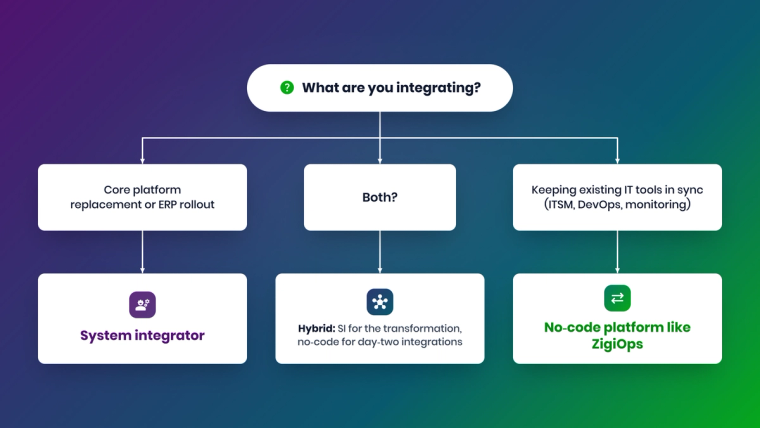
Sometimes, yes. Here is an honest breakdown.
You probably still want a system integrator when:
- You are implementing or replacing a core platform like an ERP, where process redesign is the real work.
- The project involves heavy organizational change management across many business units.
- You need custom development for a homegrown system with no usable API.
- Regulatory requirements demand a formally documented, externally delivered implementation.
You probably do not need one when:
- The goal is keeping existing tools in sync, such as ServiceNow incidents and Jira issues, or monitoring alerts and ITSM tickets.
- The systems are mainstream tools with supported connectors.
- Your team wants to own and adjust the workflows itself as processes change.
- Speed matters more than a bespoke architecture.
Many organizations land on a hybrid: an SI for the big transformation, and a no-code platform for the ongoing tool-to-tool integrations that the IT team owns afterwards. That split keeps consultants focused on the hard problems and stops you paying consultant rates to change a field mapping.
How no-code system integration works with ZigiOps
ZigiOps is a no-code integration platform built for IT operations. It connects 60+ systems across ITSM, DevOps, monitoring, cloud, and CRM, including ServiceNow, Jira, Azure DevOps, BMC Remedy, Salesforce, Zendesk, Dynatrace, Splunk, Datadog, SolarWinds, and Microsoft Dynamics 365. You can browse the full catalog on the ZigiOps integrations page.
Instead of writing code, you configure:
- Systems: connection and authentication details for each tool. ZigiOps loads each system's schema, including custom fields.
- Workflows and actions: which entities move between which systems, for example incidents to issues, and in which direction.
- Triggers: polling on a schedule or listening for pushed events on an HTTPS endpoint.
- Trigger conditions: filters that decide which records qualify, using operators such as "is one of," "contains," or "greater than."
- Correlation: how records are linked so updates, comments, and status changes sync both ways.
- Field mapping and expressions: value translation with conditions, RegEx, and "Last Time" expressions to collect only what changed.
Under the hood, several design choices address the classic integration pain points:
- 100% code-free, so the people who own the process can own the integration.
- No data storage: ZigiOps does not store the data it transfers, only a few kilobytes of runtime state.
- ISO 27001 certified, with AES-256 encryption (FIPS 140-2 compliant) for credentials by default and TLS for web and listener traffic.
- Unlimited transactions, with licensing based on connected system pairs rather than per-message fees.
- Standalone application, deployable on-premises on Windows or Linux or in the cloud, with a primary and backup server model for high availability.
Real-world results from no-code system integration
What happens when integration moves from projects to configuration? A few published ZigiOps outcomes:
- COCC cut cross-system ticket handling time by roughly 50% and went live in days rather than months.
- Telus achieved 45% to 75% faster incident and change cycles across multiple integrated systems.
- Metrolinx reduced manual ticket creation by 80% and mean time to resolution by 90% after connecting OpsBridge and ServiceNow.
The common thread: none of these required a long custom development project to get started.
System integration in the age of AI agents
There is a new reason to get integration right in 2026: AI agents. Whether you are rolling out an AI service desk assistant or connecting a large language model to operational data through the Model Context Protocol (MCP), the agent is only as useful as the systems it can reach.
Gartner's warning about AI-ready data applies directly here: an AI agent is only as good as the connected, current data behind it. That matches what IT teams see on the ground. An agent that can read a ServiceNow incident but not the linked Jira issue, the related Dynatrace problem, or the configuration item in the CMDB will give partial answers with total confidence.
Good system integration gives AI three things it cannot create on its own:
- Context: a connected view of related records across tools, not a single system's slice.
- Freshness: data that reflects what happened a minute ago, not at the last nightly export.
- Governed access: clear boundaries around what data moves where, and who is allowed to see it.
That is why integration strategy and AI strategy are increasingly the same conversation. We went deeper on this in AI in System Integration: What Actually Works in 2026.
Five common system integration mistakes
Even well-funded projects stumble on the same issues. Watch out for these:
- Integrating everything at once. Big-bang projects hide problems until go-live. Start with one high-value flow, such as ServiceNow incidents to Jira issues, prove it, then expand.
- Ignoring field ownership. When both systems can edit the same field, updates overwrite each other and nobody trusts the data. Decide which system owns each field before you map it.
- Forgetting about loops. Without conditions that ignore changes made by the integration user, a bi-directional sync can bounce the same update back and forth indefinitely.
- Treating go-live as the finish line. Integrations are living systems. Tools get upgraded, new custom fields appear, and processes change. Budget for day-two ownership.
- Leaving security review to the end. Security teams will ask where data flows, whether it is stored, and how credentials are protected. An integration layer that does not store transferred data makes that conversation dramatically shorter.
A practical checklist for your next system integration project
Before you sign a statement of work or buy a platform, work through this list:
- Inventory your systems and mark which ones are systems of record for incidents, changes, issues, and assets.
- Draw the data flows and label each one as one-way or bi-directional.
- Define field ownership so two systems never fight over the same value.
- Decide on triggering: scheduled polling, event-driven, or both.
- Check data residency and security requirements, including whether the integration layer may store data at all.
- Assign an owner for day-two changes, not just the go-live.
- Model the cost of change, not just the cost of build. Ask what it takes to add a field in year two.
If you want to see where integrations usually go wrong, Top System Integration Challenges covers the most common failure points and how to avoid them.
The bottom line
System integration is no longer a once-a-decade project. It is an ongoing capability that determines how fast your IT teams can respond, and whether your AI initiatives have the data they need. System integrators still play an important role in large transformations, but for connecting the tools your IT teams use every day, a no-code platform lets you move faster, spend less, and keep control.
Curious what your integrations would look like without the custom code? Book a demo and we will build one of your real use cases live.
Frequently asked questions
What is system integration in simple terms?
System integration means connecting separate IT systems so they share data and trigger actions automatically. For example, when an incident is created in ServiceNow, a linked issue appears in Jira, and status updates and comments flow back without anyone copying them by hand.
Can a no-code platform replace a system integrator?
For tool-to-tool integrations between mainstream IT systems, often yes. A no-code platform like ZigiOps lets IT teams configure and maintain integrations between ServiceNow, Jira, Azure DevOps, monitoring tools, and CRMs without custom code. For large ERP rollouts or deep process redesign, a system integrator still adds value, and many organizations use both.
What are the four main types of system integration?
The four classic types are point-to-point integration, vertical (silo) integration, hub-and-spoke or ESB (star) integration, and integration through a common data model. Most enterprises use a mix, increasingly delivered through integration platforms.
Can system integration be done without storing data in the middle?
Yes. ZigiOps transfers data between systems without storing it, keeping only a few kilobytes of runtime state to track progress. This reduces the security and compliance footprint of the integration layer.
Can ZigiOps integrate on-premises and cloud systems together?
Yes. ZigiOps is a standalone application that can run on-premises or in the cloud and connects both on-premises and SaaS editions of supported tools, such as ServiceNow, Jira, BMC Remedy, and Microsoft SCOM.
How long does a system integration project take?
Custom-coded or SI-led projects typically take weeks to months. With a no-code platform and pre-built templates, IT teams commonly get a first bi-directional integration running in days. COCC, for example, went live with ZigiOps in days rather than months.
What skills do I need to integrate systems with ZigiOps?
You need to understand the process you are automating and the fields in each system. ZigiOps is 100% code-free, so no API scripting or programming skills are required to build or maintain workflows.