Cloud Integration Platform: The Complete Buyer's Guide for Enterprise IT

A cloud integration platform is software that connects cloud-based and on-premise applications, enabling automated, real-time data flow between systems without manual intervention. It acts as the integration layer that keeps your tools aligned - so data entered in one system doesn't have to be re-entered, copied, or exported into another.
For enterprise IT teams, a cloud integration platform is not just a convenience. It's infrastructure. As organisations run increasingly complex stacks of SaaS, on-premise, and hybrid applications, the question isn't whether to integrate - it's how to do it in a way that scales, stays secure, and doesn't require a full-time developer team to maintain.
This guide covers what cloud integration platforms are, how they work, the different types available, and a structured framework for evaluating them.
What Is a Cloud Integration Platform?
A cloud integration platform is middleware - software that sits between your applications and manages how data moves between them. It handles authentication, API calls, data transformation, event triggers, and error handling, so your teams don't have to.
The term covers a range of tool types, from general-purpose iPaaS platforms (Integration Platform as a Service) to purpose-built standalone integration engines designed for specific IT environments. What unites them is the core function: automating data flow between systems.
Modern cloud integration platforms support:
- Real-time, event-driven sync: When something happens in System A - a ticket created, a priority changed, a record updated - the platform immediately reflects it in System B.
- Bidirectional data flow: Data doesn't just flow one direction. Changes in either connected system propagate to the other.
- Field-level transformation: Different systems use different field names, formats, and value lists. A platform handles the translation layer - 'High' in ServiceNow becomes 'Highest' in Jira.
- Error handling and monitoring: When an API call fails or a schema change breaks a mapping, the platform alerts you and queues data for retry rather than silently dropping it.
How Cloud Integration Platforms Work
At a technical level, all cloud integration platforms share a common architecture:
1. Connectors (or Adapters)
Each platform ships with pre-built connectors to popular applications - ServiceNow, Jira, Salesforce, Zendesk, Azure DevOps, and more. A connector handles authentication and API communication with that application, abstracting away the complexity of individual API specifications. The depth of a connector matters as much as its existence: one that supports only read and create is far less useful than one covering full CRUD, custom fields, webhooks, and workflow state transitions.
2. Integration Templates or Flows
The logic that defines what data moves, under what conditions, and in which direction. This is where you configure: 'When a ServiceNow incident with Priority = 1 is created, create a corresponding Jira bug in project CRITICAL, and sync status updates bidirectionally.'
3. Field Mapping and Transformation Engine
The layer that translates data between systems. A robust transformation engine supports value mapping (status codes, priority levels, user identities), format conversion (date formats, text encoding), and conditional logic (if field X = Y, set field Z to W).
4. Trigger and Scheduling Layer
Defines what initiates a data sync - a real-time event (webhook), a polling interval, or a scheduled batch. Real-time event triggers are essential for operational IT integrations where response time affects SLA outcomes.
5. Monitoring and Logging
Integration observability: logs of what was processed, what failed, and why. Essential for debugging, audit trails, and compliance documentation.
Types of Cloud Integration Platforms
Not all cloud integration platforms are designed for the same use case. Understanding the landscape is the first step in choosing the right tool.
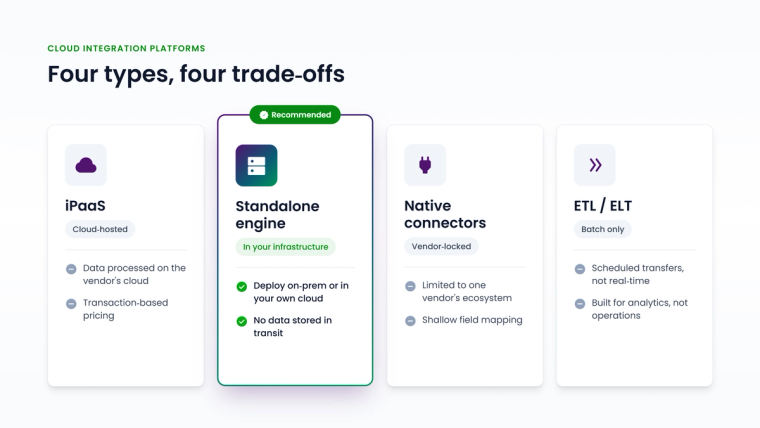
iPaaS (Integration Platform as a Service)
Cloud-hosted middleware platforms with broad connector libraries and visual workflow builders. Designed for connecting SaaS applications, automating business processes, and automating multi-step workflows.
Best for: Cloud-first organisations automating business processes across SaaS tools.
Key consideration: iPaaS platforms process - and often log - data on their cloud infrastructure. For organisations with GDPR, HIPAA, or data sovereignty requirements, this raises compliance questions about where customer data is processed and stored in transit.
Standalone Integration Engines
Purpose-built integration platforms that run in your own infrastructure - on-premise or private cloud. Designed for operational IT integration: keeping ITSM, DevOps, CRM, and monitoring systems synchronised in real time.
Best for: Enterprise IT teams managing complex ITSM and DevOps stacks with data security requirements.
Key advantage: Data stays in your environment. The platform acts as a conduit - reading from System A, transforming, and writing to System B - without storing anything in between. ZigiOps is built on this architecture.
Native Connectors (Built-in Integrations)
Integration capabilities built directly into one of the applications you're connecting - for example, Jira's native ServiceNow connector or Salesforce's built-in integration features.
Best for: Simple, one-directional sync between two specific tools.
Limitations: Native connectors are typically constrained to the vendor's ecosystem, support only one direction of sync, and break when either platform independently updates its API.
ETL and ELT Tools
Batch-oriented data movement platforms designed for analytics pipelines and data warehousing (examples: Informatica, Talend, AWS Glue). Not appropriate for real-time operational integration between live ITSM or DevOps systems.
API Management Platforms
Platforms focused on exposing, securing, and managing APIs - not automating integration flows. Often conflated with integration platforms but serve a different function: publishing APIs versus consuming them for integration.
Key Use Cases for Enterprise IT
Cloud integration platforms solve specific problems in enterprise IT environments. The most common:
ITSM to DevOps synchronisation: When a customer reports an issue via ServiceNow or Zendesk, a corresponding Jira or Azure DevOps ticket needs to be created automatically, tracked through the development cycle, and resolved back in the ITSM system when the fix is deployed. Manual handoffs create delays, errors, and accountability gaps that directly affect SLA performance.
Cross-platform incident management: Major incidents involve multiple teams using different tools. An integration platform ensures an incident in ServiceNow is immediately visible to the DevOps team in Jira, with status and priority synchronised in real time throughout the lifecycle.
CRM to project management handoff: When a deal closes in Salesforce, the delivery team needs a project in Jira or ServiceNow. An integration platform automates this handoff, carrying over account data, contract details, and SLAs without manual entry.
CMDB synchronisation: Keeping a ServiceNow CMDB accurate requires ongoing data feeds from monitoring tools, cloud platforms, and asset management systems. An integration platform handles these updates automatically, reducing CMDB drift.
Multi-vendor IT operations: Large enterprises often run IT operations across internal teams, managed service providers, and third-party contractors - each using their own ticketing or monitoring tools. Integration platforms create a unified operational view by connecting those systems.
How to Choose a Cloud Integration Platform: 10 Evaluation Criteria
Choosing an integration platform involves more than comparing feature lists. Operational and compliance context matters as much as the connector catalog.
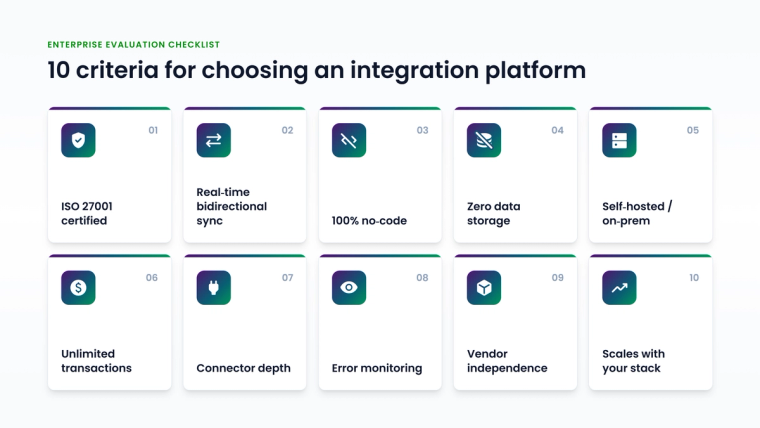
1. Connector Depth, Not Just Breadth
Count the connectors, but evaluate their depth. Does the connector support webhooks and event-based triggers, or only scheduled polling? Can it handle custom fields and workflow state transitions specific to your configuration? Always test with your actual systems and your actual data model.
2. Real-Time vs. Batch Processing
For ITSM and DevOps workflows, real-time event-driven sync is non-negotiable. A platform that polls every 15 minutes introduces delays that directly affect SLA performance on P1 incidents. Verify that 'real-time' in the vendor's marketing translates to event-driven webhooks in practice.
3. Bidirectional Synchronisation
True bidirectional sync - not just A to B - with built-in loop prevention and conflict resolution. Verify that the platform handles the scenario where both systems are updated simultaneously: which value wins, and how is that configured?
4. Data Storage Model
This is the most underrated evaluation criterion in enterprise procurement. Does the platform store the data it transfers? Most iPaaS platforms log payloads in transit. For organisations processing personal data, health records, or financial information, this creates compliance exposure that needs to be addressed in vendor risk reviews. A platform that routes data without storing it eliminates this risk category.
5. Deployment Model
Cloud-hosted (SaaS), self-hosted, or on-premise? The answer determines whether your data leaves your environment during processing - with direct implications for data residency requirements, network security policies, and vendor risk assessments under GDPR, CCPA, and similar regulations.
6. No-Code vs. Low-Code vs. Code-Required
How much does ongoing maintenance depend on a developer? Platforms that require code changes for field mapping updates or schema changes create a bottleneck in IT Operations. A visual, guided interface lets service managers and operations engineers manage integrations independently - without queuing a development ticket for every configuration change.
7. Pricing Model at Scale
Per-transaction pricing is common in iPaaS. At enterprise scale, transaction fees become significant and unpredictable - particularly for high-volume ITSM environments where thousands of ticket updates flow through the integration daily. Subscription-based pricing with unlimited transactions is more predictable for budget planning.
8. Security Certifications
ISO 27001 is the baseline for enterprise vendor risk reviews. Confirm that certifications cover the specific scope of the integration service, not just the vendor's broader organisation.
9. Error Handling and Monitoring
Integration failures happen: APIs go down, schema changes break mappings, credentials expire. How does the platform detect, alert on, and recover from failures? Does it queue data during outages and process it when connectivity is restored? Integration observability is a practical differentiator that separates production-grade platforms from demo-grade ones.
10. Vendor Independence
Is the platform a standalone application, or does it depend on one of the connected systems - a Jira Marketplace app, a ServiceNow store plugin? Standalone applications are not caught in the upgrade cycles, Marketplace approval queues, or platform dependency chains of either connected system. This matters whenever you're upgrading ServiceNow or Jira on a tight change window.
Common Mistakes When Evaluating Cloud Integration Platforms
Evaluating connectors, not integrations. A connector list tells you which systems a platform can reach. It doesn't tell you whether it can handle the specific workflows, custom fields, and transition rules in your environment. Always request a demo using your actual systems and your actual use case.
Ignoring the data storage question. It's easy to overlook whether a platform stores data in transit. Ask explicitly in every evaluation: 'Where is our data processed? Is it stored at any point? Under what terms and retention policy?' This question should appear in every RFP for integration platforms.
Underestimating maintenance costs. The cost of building an integration is often less than the cost of maintaining it over three years. Every time ServiceNow, Jira, or Salesforce updates its API, integrations may break. Evaluate platforms on how quickly field mappings can be updated and how API changes are handled - without engineering involvement.
Treating integration as a project, not a capability. Integration needs grow as your application stack grows. A platform that handles three integrations today may not scale to 30 without significant effort. Evaluate for where you're going, not just where you are.
Choosing based on brand recognition alone. Larger iPaaS platforms have strong brand recognition and extensive marketing. That doesn't mean they're the right fit for ITSM-heavy enterprise IT environments. Evaluate on the specific use case and the specific technical requirements of your environment.
ZigiOps: A Standalone Cloud Integration Platform Built for Enterprise IT
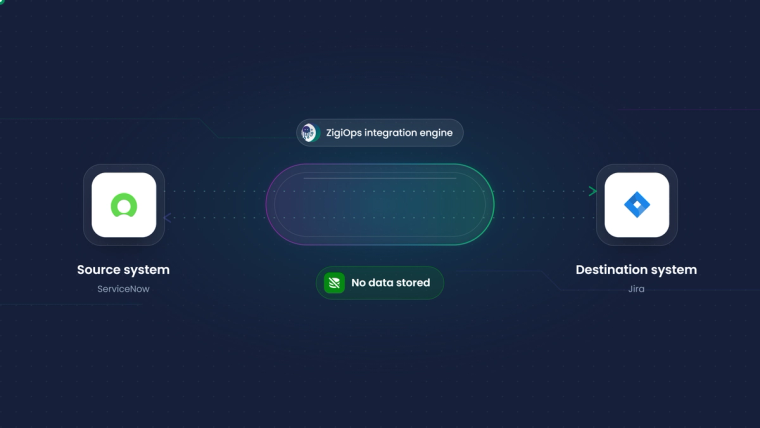
ZigiOps is a 100% code-free, standalone integration platform purpose-built for IT Operations, ITSM, DevOps, and service management environments. It connects 100+ enterprise systems - ServiceNow, Jira, Salesforce, Azure DevOps, Zendesk, Freshservice, BMC Remedy, IFS, and more - with real-time, bidirectional synchronisation.
What sets ZigiOps apart in the context of the criteria above:
- 100% code-free: All integration setup, field mapping, and transformation logic is configured through a guided visual UI. No scripting, no developer dependency, no change tickets to configure a new field mapping.
- Does not store transferred data: ZigiOps acts as a real-time conduit. It reads from the source system, transforms according to your rules, and writes to the destination - nothing is stored in between. This is a direct architectural response to the data governance requirements of enterprise IT.
- ISO 27001 certified: ZigiOps meets the ISO 27001:2022 standard for information security management - satisfying the baseline certification requirement in most enterprise vendor risk reviews.
- Unlimited transactions: Flat subscription pricing with no per-transaction fees. Integration volume never creates a budget surprise, regardless of how many incidents, tickets, or updates flow through the platform daily.
- Standalone application: Not a Jira plugin, not a ServiceNow add-on. ZigiOps runs independently, outside of either connected system's upgrade cycle and Marketplace approval process.
- Intuitive guided UI: Most standard integrations are configured in hours using pre-built templates. The setup wizard walks teams through connecting systems, mapping fields, setting trigger conditions, and testing flows step by step.
Book a Demo with ZigiWave to see ZigiOps connecting your specific systems in a live environment.
Key Takeaways
A cloud integration platform is the connective layer that makes your application stack behave like a unified system rather than a collection of siloed tools. For enterprise IT teams, it's the difference between SLA breaches caused by missed ticket handoffs and a fully automated, auditable integration that moves data in seconds.
When evaluating platforms, the questions that matter most are often the ones buyers skip: Where is my data processed? Does it get stored? What happens when an API breaks? How much developer time does ongoing maintenance require?
The right cloud integration platform for enterprise IT gives your operations teams the tools to manage integrations independently - with the security posture, scalability, and reliability that enterprise procurement requires. For IT environments centered on ITSM and DevOps toolchains, a standalone, code-free engine with no data storage and ISO 27001 certification is not just the safest choice - it's the most practical one.
Frequently asked questions
What is a cloud integration platform?
A cloud integration platform is middleware software that connects applications and automates data flow between them - eliminating manual data entry, export/import processes, and copy-paste workflows between systems. It handles the authentication, transformation, and routing logic that keeps connected systems in sync.
What is the difference between a cloud integration platform and an iPaaS?
iPaaS (Integration Platform as a Service) is one type of cloud integration platform - specifically, a cloud-hosted model where the integration engine runs on the vendor's infrastructure. Other types include standalone integration engines that run in your own environment. The distinction matters primarily for data governance: iPaaS processes data on the vendor's cloud; a standalone engine keeps processing inside your network.
Does a cloud integration platform store my data?
It depends on the platform. Most iPaaS platforms log data in transit as part of their processing model. Standalone integration engines like ZigiOps are specifically designed to not store transferred data, routing it directly between source and destination systems without persistence.
What is the best cloud integration platform for ITSM?
For ITSM environments - ServiceNow, Jira Service Management, Zendesk, Freshservice - the best platform is one with deep connectors for those specific tools, real-time bidirectional sync, and a data security model that meets enterprise compliance requirements. ZigiOps was built specifically for this environment and supports all major ITSM platforms.
How long does it take to set up a cloud integration platform?
With a code-free platform like ZigiOps, a standard integration between two systems can be configured in a few hours using pre-built templates. Complex integrations involving custom workflows, multiple object types, or advanced transformation logic typically take one to two days. Initial setup is only part of the cost - evaluate for ongoing maintenance time, not just initial configuration.
Can a cloud integration platform work on-premise or in a private cloud?
Yes. Not all integration platforms are cloud-hosted. Standalone platforms like ZigiOps can be deployed in your own on-premise or private cloud environment, keeping all data processing within your network. This is particularly relevant for regulated industries and organisations with strict data residency requirements.
What is the difference between a cloud integration platform and a data integration platform?
The terms overlap significantly. 'Data integration platform' often includes ETL and ELT tools used for analytics pipelines. 'Cloud integration platform' typically refers to operational integration - connecting live applications in real time for workflow automation. The right distinction is use case: batch analytics needs ETL; real-time operational sync between ITSM and DevOps systems needs an operational integration platform.