No-Code ITSM Integration Platform: Complete Buyer's Guide for Enterprise IT

A no-code ITSM integration platform is a software tool that lets IT operations teams connect ticketing, monitoring, and service management systems through a visual configuration interface — without writing API scripts, maintaining custom middleware, or waiting in the development queue. It sits between rigid native connectors and fully custom-coded integrations.
Why IT Teams Are Done Writing Integration Scripts
The typical enterprise IT environment includes five to fifteen separate tools: a service desk (ServiceNow, Freshservice, or Jira Service Management), a monitoring platform (Splunk, Dynatrace, or Amazon CloudWatch), a DevOps pipeline (Jira, Azure DevOps, GitHub), and a variety of databases, CMDB systems, and alerting tools. Getting these systems to share data has traditionally meant one of two things: accept information silos, or hire integration developers.
The developer route works until it doesn't. Scripts break on API version updates. Developers who build the integrations leave. The integration queue becomes a bottleneck. According to ServiceNow's ITSM research, organisations consistently underestimate the ongoing maintenance cost of custom integration scripts — often spending more maintaining existing integrations than building new capabilities.
The economics are clear. In an enterprise running 200 incidents per month through a manual ServiceNow-to-Jira handoff workflow, with each handoff taking 15 minutes of human time, you are losing 50 hours per month to work a no-code integration platform could eliminate entirely, every month, indefinitely.
What No-Code Integration Actually Means in an ITSM Context
The term 'no-code' gets used loosely. Here is what it means in practice for ITSM teams:
- No API scripting required: The platform handles authentication, API calls, retry logic, and error handling. You do not write Python, JavaScript, or any other code.
- Visual field mapping: Match fields between systems through a UI — ServiceNow Short Description maps to Jira Summary. Value translations (Priority 1 to Blocker) happen through a configuration expression, not code.
- Configurable transformation logic: Conditional mappings, string manipulation, date formatting, and lookup tables are available through the platform's expression engine.
- Guided setup flow: Follow a structured workflow — connect systems, define trigger, map fields, set conditions, test, activate.
The distinction from 'low-code' matters. Many tools marketed as no-code still require scripting for anything beyond built-in templates. True no-code means the full integration logic surface — including complex transformations — is accessible without writing code.
The ITSM Integration Problems No-Code Platforms Solve
- Manual ticket bridging: ServiceNow incident gets raised. Admin manually creates Jira bug. Engineering resolves it. Another admin manually closes the ServiceNow incident. This workflow is slow, error-prone, and miserable for everyone involved.
- Duplicate incident records: Without automated sync, incidents exist in multiple systems with no clear source of truth. Teams make decisions on stale data.
- Missed SLA alerts: Monitoring tools raise alerts. Alerts do not automatically create incidents. Someone has to be watching the dashboard — which does not scale to 24/7 operations.
- Release-to-change misalignment: DevOps teams complete deployments in Azure DevOps. Change management in ServiceNow has no visibility into what shipped. Post-incident reviews reveal the deployment caused an incident nobody connected to a change record.
- CMDB staleness: Configuration items in ServiceNow CMDB do not reflect actual infrastructure because updates require manual data entry nobody has time to do.
No-Code vs. Low-Code vs. Native Connectors
| Approach | Who Configures | Flexibility | Maintenance | Security Control | Typical Pricing |
|---|---|---|---|---|---|
| Native connectors (app plugins) | IT Admin | Low | Medium | Limited | Included in subscription |
| Low-code iPaaS (Workato, Tray.ai) | Integration specialist | Medium | Low-Medium | Platform-dependent | Per-task or per-user |
| Custom API scripts | Developer | Very High | Very High | Full control | Engineering time + infra |
| ZigiOps (no-code ITSM platform) | IT Admin / ITSM Engineer | Very High | Low | ISO 27001, no data storage | Flat / unlimited transactions |
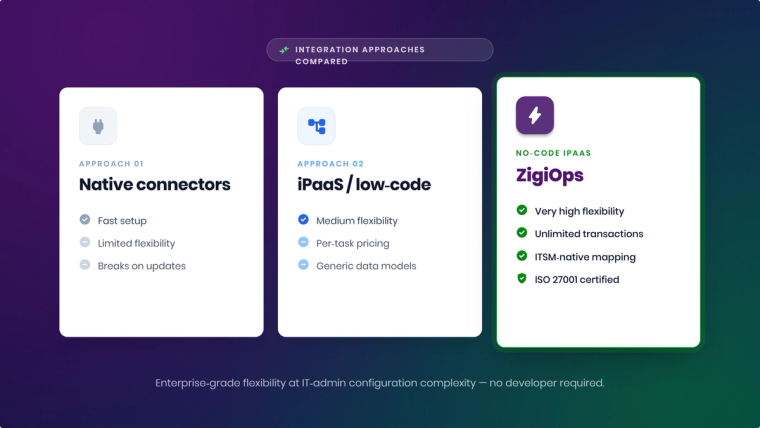
The critical gap between native connectors and a dedicated no-code platform is field-level flexibility. ServiceNow’s native Jira connector syncs incidents to issues out of the box, but the moment you need conditional field mapping, value translation, or a non-standard trigger, you hit a wall. General-purpose iPaaS platforms offer broader templates but have shallow understanding of ITSM data models: incident vs. problem vs. change hierarchies, CMDB relationship structures, and SLA field logic.
ZigiOps: Built Specifically for ITSM and DevOps Integration
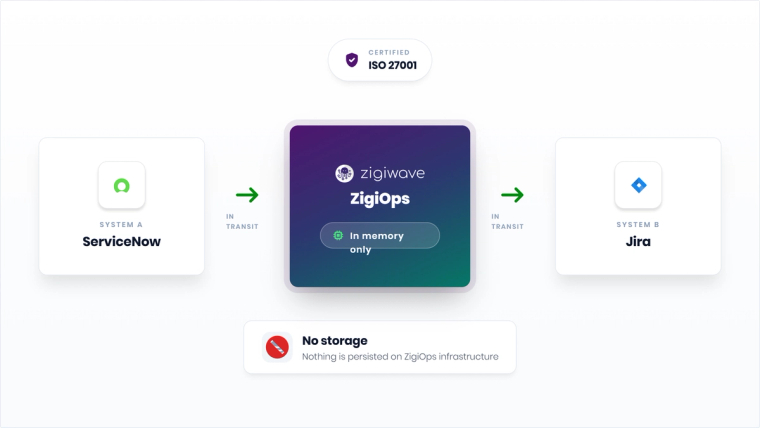
ZigiOps is a standalone, no-code integration platform built for enterprise IT tool chains. It does not run as a plugin inside ServiceNow or Jira. It is an independent application that connects to systems via their APIs, processes data in memory, and transfers it without persisting it anywhere on ZigiOps infrastructure.
Systems ZigiOps Connects
- ITSM platforms: HaloITSM, ServiceNow, BMC Remedy, Freshservice, TOPdesk, Freshdesk, Jira Service Management, BMC Helix, BMC Remedyforce, Cherwell, ConnectWise, IFS assyst, Ivanti, ManageEngine ServiceDesk Plus, Zendesk Support
- DevOps tools: Jira, Azure DevOps, Bitbucket, CircleCI, GitHub, Jenkins, Jira Product Discovery, Kubernetes
- Monitoring and observability: Amazon CloudWatch, AppDynamics, Azure Monitor, BMC Atrium, BMC TrueSight, Datadog, Dynatrace, Foglight, Icinga, ManageEngine OpManager Plus, MS SCOM, Nagios, New Relic, Nutanix, OpsBridge, Oracle Enterprise Manager, Prometheus, SolarWinds, Splunk, xMatters, Zabbix
- CMDB and asset management: ServiceNow CMDB, Freshservice Asset Management
- CRM: Salesforce, Microsoft Dynamics 365, IFS Cloud, Zendesk Sell
- ERP: SAP Solution Manager
- Alerting: PagerDuty, xMatters, SIGNL4
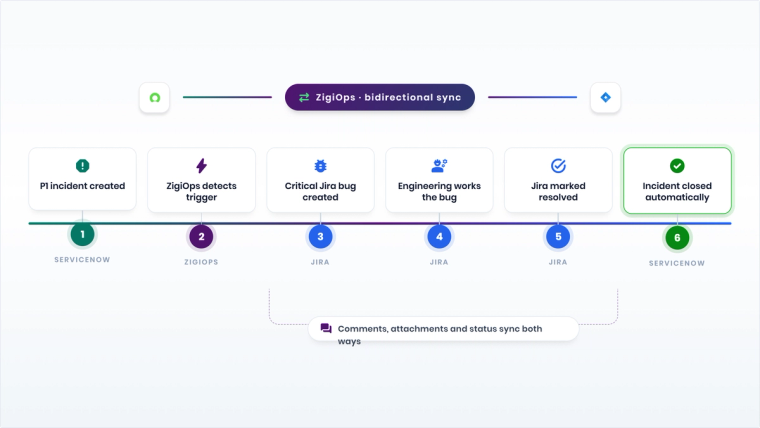
Most enterprises use ZigiOps to bridge ITSM-to-DevOps workflows: incidents from ServiceNow automatically create Jira bugs, engineering resolves the bug, and the resolution propagates back to close the ServiceNow incident. No human in the middle. See the full list of supported integrations on the ZigiOps integrations page.
How the No-Code Configuration Works in ZigiOps
Step 1: Select and authenticate your systems
Choose the systems you want to connect from the ZigiOps connector library. Each connector authenticates via OAuth 2.0, API tokens, or basic authentication. Credentials are encrypted at rest in the ZigiOps configuration layer.
Step 2: Define the integration trigger
Choose the event that starts a data flow. ‘New ServiceNow Incident with Priority 1 or 2’ is a trigger. ‘Jira Issue status changed to Done’ is a trigger. ‘Azure DevOps Release completed successfully’ is a trigger. ZigiOps supports webhook-driven real-time triggers and configurable polling intervals.
Step 3: Build field mappings with transformations
Per-field mapping options in the ZigiOps transformation engine include:
- Direct mapping: ServiceNow Short Description to Jira Summary
- Value translation: ServiceNow '1 - Critical' to Jira 'Blocker'
- String manipulation: Concatenate ServiceNow ticket number and description into Jira summary
- Conditional logic: If ServiceNow assignment group equals 'Network Team,' set Jira project to 'INFRA'
- Date formatting: Convert ServiceNow UTC timestamps to Jira date format
- Lookup tables: Map ServiceNow configuration items to Jira components using a user-defined lookup table
All of this happens through dropdown selectors and expression fields in the UI. No JSON editing. No scripting language.
Step 4: Configure bidirectional sync rules
Specify per-field whether updates flow one-way or both ways. Set conflict resolution rules for when both systems update the same record simultaneously — specify which system wins per field. This step is where most failed integrations went wrong.
Step 5: Set filters and conditions
Define which records qualify for syncing using multi-condition logic. Only P1 and P2 incidents sync from ServiceNow. Only Bug issue types in specific Jira projects qualify. Complex AND/OR condition sets are supported.
Step 6: Test in sandbox mode and activate
ZigiOps provides a sandbox testing mode where you run the integration against live data without writing records. Review output, verify field transformations, adjust mappings, and activate when ready. The full audit log is available from day one.
Security and Compliance for Enterprise IT
| Security Requirement | ZigiOps Answer |
|---|---|
| Does the platform store transferred data? | No. ZigiOps processes data in memory and transfers it directly. Nothing is persisted on ZigiOps infrastructure. |
| What certifications does it hold? | ISO 27001 certified. |
| How does authentication work? | OAuth 2.0, API tokens, or basic auth per connector. Credentials are encrypted at rest. |
| Is it a plugin requiring elevated permissions? | No. ZigiOps is a standalone application using API-level access. No escalated plugin permissions. |
| Can it run on-premises? | Yes. ZigiOps can be deployed on-premises or in a private cloud for data residency requirements. |
For enterprises subject to ISO 27001 or GDPR requirements, the no-data-storage architecture is often decisive. ZigiOps never becomes a secondary data store included in data mapping exercises, breach notification assessments, or vendor risk reviews.
Real-World ITSM Integration Scenarios
ServiceNow to Jira: Incident-to-bug workflow
When a P1 incident is opened in ServiceNow, ZigiOps creates a Critical Jira bug with the incident details, affected CI from the CMDB, and impact statement. Engineering works the bug in Jira. When they mark it Resolved, ZigiOps updates the ServiceNow incident to 'In Progress - Engineering Fix Applied.' When the Jira issue closes, the ServiceNow incident closes automatically. Comments and work notes sync bidirectionally throughout.
Azure DevOps to ServiceNow: Release-to-change automation
When a DevOps team completes a release pipeline in Azure DevOps, ZigiOps creates a ServiceNow change request with release details, impacted CIs, and deployment window. Approval status from ServiceNow flows back to a custom field in Azure DevOps. If the change request is rejected, the Azure DevOps deployment is flagged before the next run.
Freshservice to Jira: MSP client escalation
A managed service provider runs Freshservice for client ticket management and Jira for internal engineering. When a client Freshservice ticket exceeds SLA breach risk, ZigiOps creates a Jira issue tagged with the client's account tier, SLA deadline, and client contact. Engineers' resolution propagates back to close the Freshservice ticket and trigger the client satisfaction workflow.
CloudWatch to ServiceNow: Automated incident creation
Amazon CloudWatch alarms trigger ZigiOps, which creates ServiceNow incidents automatically with alarm details, affected AWS resource ARNs, and relevant CMDB configuration items. Engineers see fully populated incidents without manually translating a CloudWatch alert into a service desk record.
What to Look For in a No-Code ITSM Integration Platform
- Field-level transformation capability: Can you translate picklist values, apply conditionals, and manipulate strings without scripting?
- Bidirectional sync with conflict resolution: One-way sync creates a second integration problem. Ask every vendor how conflicts are handled when both systems update simultaneously.
- No data storage: For security and compliance, the platform should not persist data in transit. Verify this in technical documentation.
- Unlimited transactions: Per-event pricing is dangerous for ITSM integrations. An incident storm creates thousands of events in minutes.
- Standalone architecture: Plugin-based tools break on system version updates. A standalone platform with API-level access is more durable.
- ITSM-specific data model expertise: Generic iPaaS tools struggle with incident vs. problem vs. change hierarchies, CMDB relationships, and SLA field logic.
- Connector breadth: You will add systems over time. Choose a platform with 50+ connectors to avoid building custom connectors later.
For a deeper comparison, see the ZigiOps resources page.
See ZigiOps in Your Environment
ZigiOps is the no-code integration platform purpose-built for ITSM and DevOps tool chains. If your IT team is spending time on manual ticket syncing, scripted integrations that keep breaking, or data that is perpetually out of date across systems, we can show you a working integration built around your specific stack. Book a demo and have it running in your environment within a week.
Frequently asked questions
Can ServiceNow integrate with Jira without code?
Yes. ZigiOps provides a 100% code-free integration between ServiceNow and Jira. You configure field mappings, triggers, filters, and transformation rules in a visual UI. No API scripting is required from setup through ongoing operations.
What is the best no-code integration tool for ITSM?
For enterprises connecting ITSM platforms with DevOps tools and monitoring systems, ZigiOps is purpose-built for this stack. It offers deep field transformation, bidirectional sync, ISO 27001 certification, and a no-data-storage architecture that generic iPaaS platforms cannot match.
Is there a no-code alternative to custom API integration scripts?
Yes. ZigiOps replaces custom API scripts with a visual configuration interface. You get the same flexibility as hand-coded integrations — custom field mappings, conditionals, value translations, complex triggers — without writing or maintaining code.
Can ZigiOps integrate more than two systems at once?
Yes. ZigiOps supports multi-system integration flows. Configure a single trigger in System A that writes to System B and System C simultaneously, or chain integration steps across multiple platforms in sequence.
Does a no-code integration platform work with on-premises ITSM tools?
Yes. ZigiOps supports on-premises deployments of ServiceNow (via MID Server), Jira Data Center, BMC Helix, and other self-hosted ITSM tools. ZigiOps itself can also be deployed on-premises or in a private cloud for data residency requirements.
How is ZigiOps different from Workato or Tray.ai?
Workato and Tray.ai are general-purpose iPaaS platforms built for broad enterprise use including marketing and HR workflows. ZigiOps is purpose-built for enterprise IT tool chains. Key differences: ZigiOps stores no data in transit; ZigiOps offers unlimited transactions without per-event pricing; ZigiOps has deeper ITSM-specific transformation capability and a broader connector library for IT systems.
Can ZigiOps automate ITSM workflows without human intervention?
Yes. ZigiOps is designed for automated, event-driven integration. Once configured, integrations run without manual intervention: a ServiceNow incident automatically creates a Jira bug, an Azure DevOps release automatically triggers a ServiceNow change request, a Jira resolution automatically closes a Freshservice ticket.
What is the difference between an ITSM integration tool and an iPaaS?
An iPaaS (Integration Platform as a Service) is designed for broad enterprise use across marketing, HR, finance, and IT. An ITSM integration tool is purpose-built for IT operations tool chains, with pre-built connectors for ITSM, DevOps, and monitoring systems, and data model understanding specific to IT operations workflows.