Watch: ZigiOps ServiceNow-to-Jira Integration Setup
If you’re asking how can I integrate ServiceNow with Jira effectively - this video walks you through the process of integrating ServiceNow with Atlassian Jira using ZigiOps — a no-code integration platform that supports both cloud and on-prem environments. ZigiOps ensures real-time, secure data flow without storing any transferred information.
What you’ll learn:- remove
Why Integrate ServiceNow with Jira?
Understanding what are the benefits of ServiceNow and Jira integration helps align your ITSM and DevOps goals. Real-time sync, improved visibility, and automation are just a few.
Step 1 – Installing and Accessing ZigiOps
Install ZigiOps on your virtual machine or use the cloud version — no coding or system changes required. Log in using your credentials to access the Dashboard, where you’ll find system health metrics, integration statuses, and license usage.
Step 2 – Connecting to ServiceNow
Here’s how you can integrate ServiceNow with Jira effectively, starting with secure system connections.
From the Connected Systems menu, add ServiceNow by entering:
- Instance URL
- Username & Password
ZigiOps validates the connection and automatically retrieves metadata. Required permissions include access to:
- incident
- sys_dictionary
- sys_journal_field
- Additional system tables for full functionality
Step 3 – Connecting to Jira
Enter Jira connection details:
- Jira URL
- Username & Password (or API Token for Jira Cloud)
ZigiOps authenticates and pulls available fields using Jira’s official APIs. Required permissions include the ability to:
- Create, edit, assign issues
- Read project and user metadata
Step 4 – Using Integration Templates
Choose a predefined template such as:
- ServiceNow Incident → Jira Task
Templates are fully customizable and support:
- Custom fields
- User-defined triggers
- Advanced field mapping
You can also start from scratch or import existing configurations.
Following the best practices for ServiceNow and Jira integration — like using predefined templates and validating API access — ensures smoother setup and fewer sync issues.
Step 5 – Configuring the Integration
Define integration logic:
- Source System: ServiceNow (entity: incident)
- Target System: Jira (entity: task, bug, or story)
Select the data to sync, including:
- Priority
- Short description
- Comments
- Attachments
Step 6 – Setting Mappings and Triggers
Customize:
- Polling Interval: Define how frequently ZigiOps checks for changes
- Trigger Conditions: Set logic for when data is sent
- Field Mappings: Map core fields like:
- Summary → Summary
- Description → Description
- Attachments, Comments, and Custom Fields
Step 7 – Enabling Two-way Sync
ZigiOps supports full two-way synchronization:
- Jira task updates (status, comments, etc.) reflect back into ServiceNow
- ServiceNow incident changes automatically update corresponding Jira tasks
Final Step – Save and Activate the Integration
Once all parameters are configured, click Save, then Activate. Your integration is now live, enabling real-time data flow between ServiceNow and Jira for improved collaboration, faster resolution times, and centralized visibility.
What are the benefits of ServiceNow and Jira integration? You’ll streamline incident response, enable DevOps collaboration, and reduce resolution times — all while keeping systems in sync.
Start Your Integration Journey
Book a demo with our experts or start your Free ZigiOps Trial today to experience seamless ITSM and DevOps connectivity — all without writing a single line of code.
For more on how ZigiOps keeps ServiceNow and Jira in sync, see our ServiceNow ↔ Jira integration overview.
The main things that we covered during the live session
Yanko showcased the ServiceNow Incident to Jira Task integration, starting from 2:12. First, he showed how the integration is set in the ZigiOps UI.
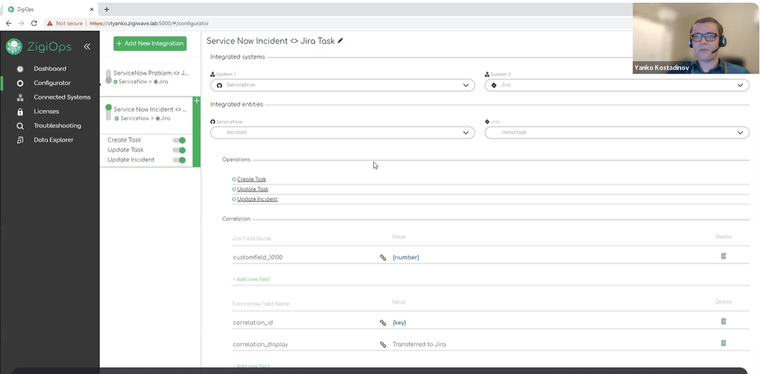
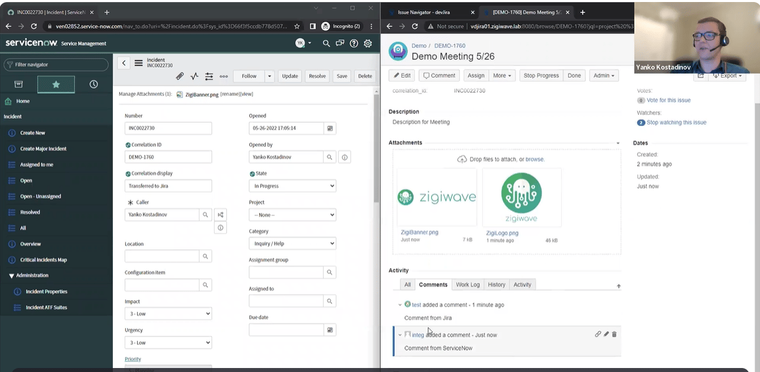
And then he demonstrated how the integration works in the two connected systems (Jira and ServiceNow) from 10:58. He created a brand-new incident in ServiceNow and it was automatically logged in Jira as ticket.
After that (from 12:08) he also added some child entities, like comments and attachments, and we saw how they are synchronized in both directions between Jira and ServiceNow.
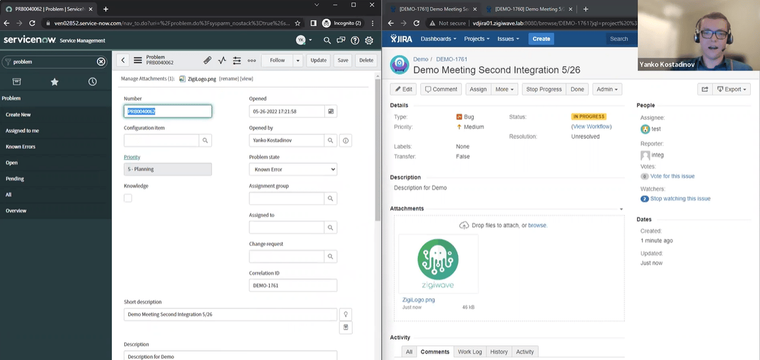
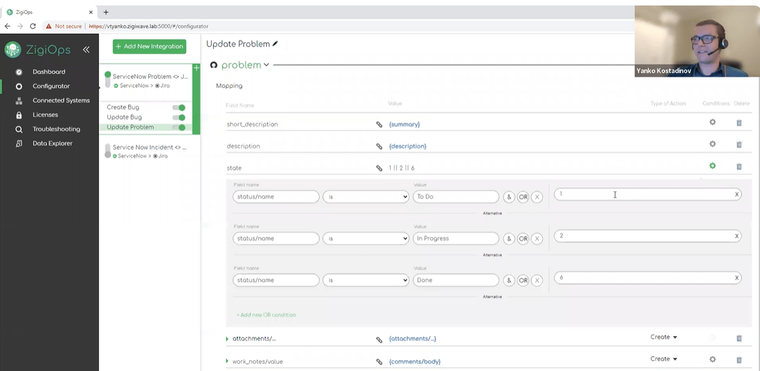
Once the ServiceNow Incident to Jira Task integration was completed, Yanko started sharing our second use case ServiceNow Problems to Jira Bugs. First, he briefly showed the configuration in the ZigiOps UI (from 14:42).
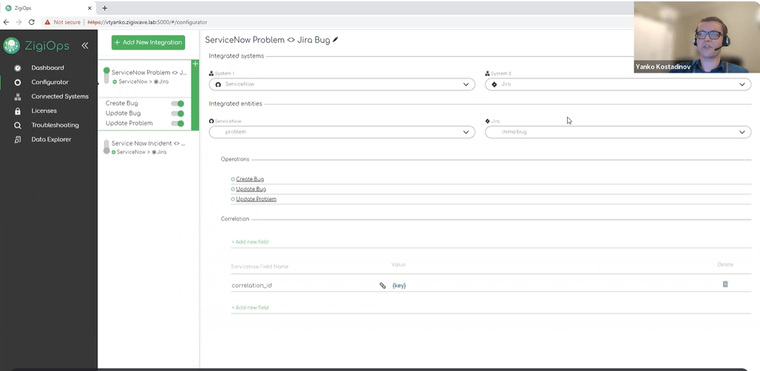
Then he demoed the connection in action in the systems themselves. Yanko created a new Problem in ServiceNow and it was transferred to Jira as a Bug right away (from 15:24).
And finally (from 16:24) he showed the two-way updates between the Problem in ServiceNow and the corresponding Bug in Jira. ZigiOps successfully transferred all attachments, comments, and status updates.
After the two integration workflows were completed, Yanko gave a bit more details on the mapping of the actions in ZigiOps (from 17:21).
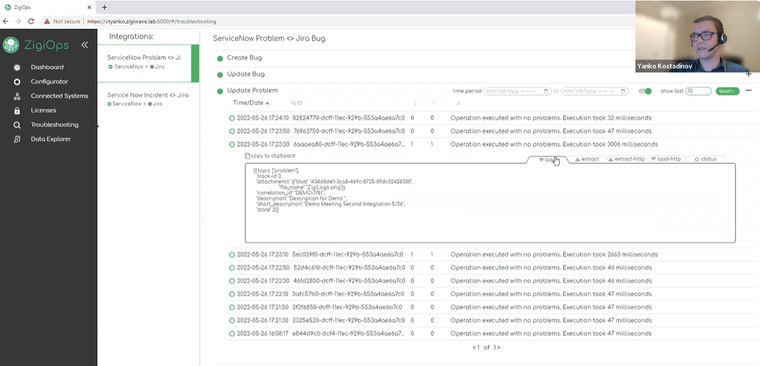
And in the end (from 17:52), he showed the Troubleshooting menu of ZigiOps, where you can see the logs of all actions exactly what is extracted from the source system, and what is loaded in the target system. Also in case of any error messages you can see all the details there and identify what is potentially causing the issue.