Data Integration Tools vs. Data Synchronization Tools: They're Not the Same Thing

A data integration tool combines information from multiple systems into a single, unified structure, usually to feed analytics, reporting, or a centralized data store. A data synchronization tool keeps two or more operational systems updated with the same live data, in real time, often in both directions. Both categories get lumped together under "integration," but they solve different problems, and picking the wrong one is a common reason integration projects stall or get scrapped after the pilot.
If you searched for "data integration tools", "data integration platform", or "data synchronization" and landed here, you're probably trying to solve one of two very different problems: getting a clean, unified view of your data for analysis, or getting two (or ten) live business systems, ServiceNow, Jira, Salesforce, Azure DevOps, to agree on the current state of a record. This article breaks down the real difference, when each category fits, and where a platform like ZigiOps sits across both.
Why This Distinction Actually Matters
Vendors don't help. Plenty of "data integration platforms" describe themselves as synchronization tools in one paragraph and ETL pipelines in the next, because the underlying technology, moving data from point A to point B, looks similar from a distance. But the business outcome, and the architecture required to deliver it, is not the same.
A team that needs analytics-ready data in a warehouse has a very different problem than a team that needs ServiceNow incidents and Jira issues to stay identical in real time so that a developer closing a bug in Jira automatically resolves the linked incident in ServiceNow. Buy the wrong category of tool and you'll either overpay for warehouse-grade transformation you don't need, or underbuy the real-time, bi-directional plumbing that operational teams actually depend on.
What Is a Data Integration Tool?
According to Gartner's market definition for data integration tools, the category covers software that lets organizations ingest, transform, combine, and provision data across many different sources and formats, typically to support use cases like data warehousing, data engineering, master data management, and business intelligence. The unifying theme is centralization: pulling data from many places into one place so it can be queried, modeled, or reported on consistently.
Classic data integration tools (Informatica, Talend, Qlik, Fivetran, and similar platforms) are built around:
- ETL/ELT pipelines that extract, transform, and load data on a schedule or in batches
- A target repository, usually a data warehouse, data lake, or data fabric
- Heavy transformation logic, since analytics use cases often need reshaped, aggregated, or deduplicated data
- One-way flow in most cases: data moves from operational systems into an analytical store, not back
None of that is a criticism. It's exactly what you want if the goal is a single source of truth for reporting. It's the wrong toolkit if the goal is keeping two live, operational systems in step with each other throughout the day.
What Is a Data Synchronization Tool?
As Oracle's definition of data synchronization puts it, synchronization is about establishing and maintaining consistency between two independently managed systems over time, rather than centralizing data into one repository. Data integration focuses on centralization; data synchronization focuses on giving every connected system the same current view.
Data synchronization tools are usually built around:
- Continuous or near real-time updates, rather than scheduled batch loads
- Field-level mapping between two (or more) specific applications, e.g. Jira issues to ServiceNow incidents
- One-way or two-way (bi-directional) sync, where changes made in either system propagate to the other
- Minimal transformation logic beyond field mapping, conditions, and formatting
Point tools in this space, things like Unito, tend to focus narrowly on syncing specific SaaS pairs (Jira, Trello, Asana, GitHub) with lightweight, self-serve setup. That's a good fit for small teams syncing a handful of project-management tools. It's a tighter fit than an enterprise-grade need, and a much harder fit once you're syncing ITSM, monitoring, DevOps, and CRM systems with strict security and auditability requirements.
Data Integration Tools vs. Data Synchronization Tools: Side by Side
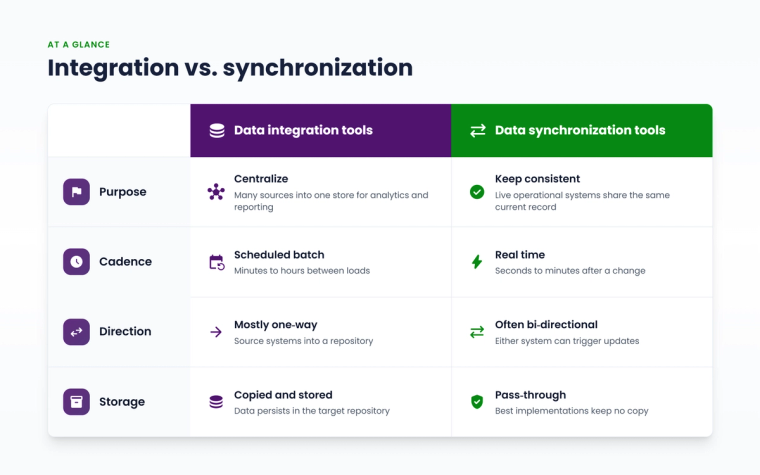
Here's the comparison in a format you can screenshot for your next architecture review.
| Criteria | Data Integration Tools | Data Synchronization Tools |
|---|---|---|
| Primary purpose | Centralize data from many sources for analytics, reporting, or MDM | Keep two or more live operational systems consistent with each other |
| Typical destination | Data warehouse, data lake, or data fabric | Another live application (ITSM, DevOps, CRM, monitoring tool) |
| Update cadence | Scheduled batch or micro-batch (minutes to hours) | Real time or near real time (seconds to minutes) |
| Directionality | Mostly one-way, source systems into a repository | Often bi-directional, both systems can trigger updates |
| Transformation depth | Heavy: cleansing, deduplication, schema remodeling | Lighter: field mapping, conditional logic, formatting |
| Data at rest | Data is copied and stored in the target repository | Best implementations move data through without storing a copy |
| Best-fit persona | Data engineers, analytics and BI teams | Service Managers, ITOM Engineers, DevOps Engineers, Ops Managers |
| Example use case | Combining CRM, ERP, and support data into one warehouse for a BI dashboard | Keeping a ServiceNow incident and its linked Jira issue in sync in both directions |
Table 1. Core differences between data integration platforms and data synchronization tools, based on Gartner's data integration market definition and Oracle's data synchronization guidance.
Where ZigiOps Fits: Both Categories, One Engine
ZigiOps is best known as a no-code data synchronization platform built to enterprise integration standards. Its core, best-known job is keeping live operational systems, ServiceNow, Jira, Azure DevOps, Salesforce, and 50+ other ITSM, DevOps, monitoring, and CRM tools, updated with the same current record, in both directions, in real time. That's the use case it's built and optimized for, and it's the reason most teams bring ZigiOps in.
But calling ZigiOps "just" a synchronization tool undersells what's under the hood. The same engine runs on a genuine extract, transform, load (ETL) foundation, the same architectural pattern classic data integration platforms use. That makes ZigiOps a legitimate data integration tool as well, particularly for one-time and staged data transfers rather than ongoing centralization into a warehouse. In practice, that shows up as ZigiOps' enterprise data migration capability: zero-loss, staged cutovers for moving data between platforms during a system replacement, consolidation, or vendor switch, with normalization and deduplication handled along the way, and no downtime for the teams relying on the source system.

And when a migration or one-off transfer doesn't fit a prebuilt template, ZigiWave's integration engineers can build a custom one-time data transfer on the same ETL foundation. So while data synchronization remains ZigiOps' primary purpose, it isn't limited to that job: the platform genuinely covers both sides of the integration-versus-synchronization split, ongoing bi-directional sync for day-to-day operations, and ETL-based integration for the one-time moves.
On the synchronization side specifically, ZigiOps is built with the rigor teams expect from an enterprise platform, not a lightweight point-sync tool:
- Bi-directional by design: changes in ServiceNow update Jira and vice versa, preserving comments, attachments, and hierarchy.
- 100% code-free: triggers, filters, conditions, and field mapping are configured visually in the ZigiOps UI, no scripts to write or maintain.
- No data storage: ZigiOps is stateless. It moves data between systems and doesn't retain a copy, which matters a great deal to security and compliance teams.
- ISO 27001 certified: enterprise-grade security and information management practices, audited annually.
- Unlimited transactions: no per-record or per-sync ceilings that force you to ration which tickets get synced.
- Standalone application: ZigiOps runs on its own, on-prem or in the cloud, rather than as a plugin bolted onto one of the connected systems.
How the Sync Actually Works
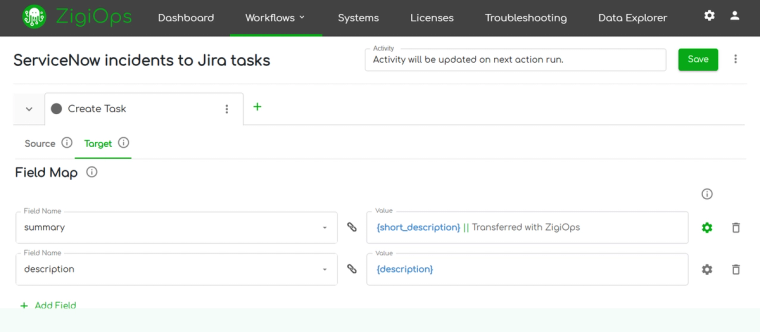
Under the hood, every ZigiOps action runs a lightweight extract, transform, and load flow between a Source tab and a Field Map tab. The Source tab defines what data to pull, for example, only Jira issues assigned to a specific team, using either a Web Listener (a webhook-based trigger for systems that push real-time events) or a Poller (which checks the source system's API on a configurable schedule, as often as every minute for fast-changing data like incidents).
The Field Map tab then defines where that data goes in the target system, down to individual field values, with conditional logic to handle mismatches like Jira's status labels versus ServiceNow's numeric state model. This is the same conceptual pattern every synchronization tool uses; ZigiOps' differentiator is doing it visually, at enterprise scale, across 50+ systems, without storing what passes through it.
How to Decide Which One You Actually Need
Run your project through these four questions before you shop:
- 1. Where does the data need to live? If the end goal is a dashboard, report, or model, you need integration/ETL into a warehouse. If the end goal is two teams working from the same live record, you need synchronization.
- 2. How current does the data need to be? Nightly batch loads are fine for quarterly analytics. Incident and change management can't wait for a nightly job; you need near real-time sync.
- 3. Does it need to flow both ways? Analytics pipelines are typically one-way. Cross-team operational workflows almost always need bi-directional updates, so a fix in one tool doesn't get silently overwritten by the other.
- 4. What's your tolerance for a stored copy of the data? Regulated industries (healthcare, finance, government) often can't accept a vendor storing a duplicate of sensitive records. Stateless synchronization avoids that exposure entirely.
Most mid-size and large IT organizations eventually need both: a data integration platform feeding the data warehouse for leadership reporting, and a data synchronization platform keeping ServiceNow, Jira, Azure DevOps, and monitoring tools aligned for the people doing the actual work. Trying to force one tool to do both jobs is usually where the trouble starts, unless the platform you pick, like ZigiOps, is built on an ETL foundation flexible enough to run both a live sync and a one-time data migration without bringing in a second vendor.
See the Difference in Your Own Environment
Whether you're evaluating a data integration platform for your analytics stack, a one-time enterprise data migration for a system cutover, or a real-time synchronization layer for incident management across ServiceNow, Jira, and monitoring tools, it helps to see a live example before you commit budget. ZigiWave's engineers can set up a working sync, or scope your migration, in about 30 minutes.
Ready to see it? Book a demo with ZigiWave and watch a real, no-code, bi-directional sync run against your own data, no scripts, no stored copies, no surprises.
Frequently asked questions
Can a data integration tool also synchronize data in real time?
Some can, if the vendor has built real-time or streaming capabilities on top of their batch architecture, but real-time bi-directional sync usually isn't the core design goal, and it shows in latency, cost, and how much configuration is required to make two operational systems agree.
Is ZigiOps a data integration tool or a data synchronization tool?
Both, though synchronization is its primary purpose. ZigiOps is best known for real-time, bi-directional data synchronization, keeping live operational systems like ServiceNow and Jira consistent with each other without storing a copy of the data. But it runs on a genuine ETL foundation, which also makes it a capable data integration tool for one-time and staged work, like enterprise data migrations or custom one-off transfers between systems that don't need an ongoing live connection.
Do I need both a data integration platform and a data synchronization tool?
Often, yes. Analytics and reporting teams typically need a data integration platform feeding a warehouse or data fabric. Operations, service management, and DevOps teams typically need a synchronization platform keeping the tools they work in every day aligned. The two can, and usually should, run side by side.
Does data synchronization require storing a copy of the data?
Not necessarily. Some synchronization tools stage or cache data as part of their process. ZigiOps is built to be stateless, meaning it moves data between systems in real time and doesn't retain a copy, which is a meaningful distinction for security and compliance teams evaluating vendors.
How is data synchronization different from data replication?
Data replication creates two or more complete, identical copies of a data set, often for backup or disaster recovery. Data synchronization keeps data consistent between systems that each manage their own copy independently; the systems stay aligned, but neither one is simply a mirror of the other.