Best Workflow Automation Platforms for IT Teams in 2026

A workflow automation platform is software that executes multi-step business processes across applications automatically, based on triggers, conditions, and rules, instead of relying on people to copy data or push tickets forward. For IT teams, the best workflow automation platforms do more than chain tasks together: they keep ITSM, DevOps, monitoring, and CRM systems in bi-directional sync, securely, without turning every change into a development project.
Why IT teams are rethinking workflow automation in 2026
Every IT organization automates something. The question in 2026 is whether that automation is a tidy system or a pile of scripts, scheduled jobs, and one-off connectors that only one engineer understands.
Analyst data backs up the shift. Gartner predicts that 30% of enterprises will automate more than half of their network activities by 2026, up from under 10% in mid-2023. The same research notes that hyperautomation remains a staple discipline for 90% of large enterprises, yet fewer than 20% of organizations have mastered measuring the results.
That last number is the interesting one. Plenty of teams are buying automation. Far fewer can prove it works. The difference usually comes down to picking a platform that fits the job, rather than the one with the loudest keynote.
So which platform fits an IT team? That depends on what you are actually trying to automate.
Workflow automation vs. integration: the distinction that shapes your shortlist
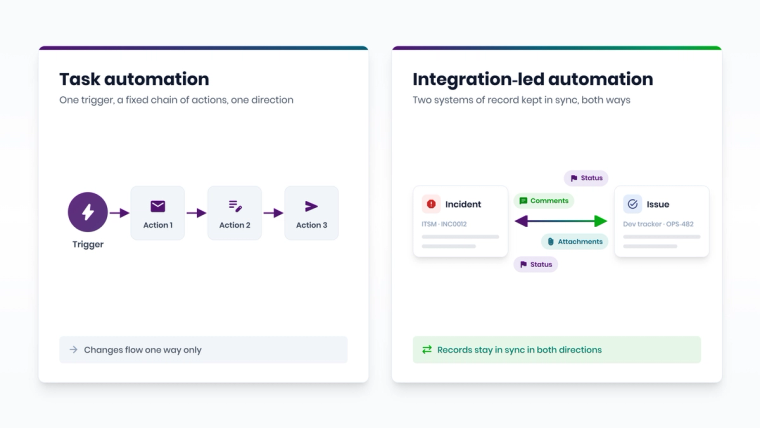
The terms get used interchangeably, and that causes expensive mistakes. Here is the practical difference:
- Task automation strings actions together: "when a form is submitted, create a record, send a message, update a spreadsheet." It is event-in, actions-out, and usually one-directional.
- Integration-led workflow automation keeps records in two or more systems aligned over time: an incident in ServiceNow and its linked issue in Jira stay in sync on status, priority, comments, and attachments, in both directions, for the life of the ticket.
Most business users need the first. Most IT operations teams need the second, because IT work lives in long-running records that several teams touch. If your core use case is "our service desk and our developers keep asking each other for updates," you are shopping for an integration-led platform, even if the search bar said "workflow automation."
We covered the broader market forces in Automation Workflow Tools: 3 Shifts Reshaping IT in 2026. This article focuses on the buying decision.
How we evaluated the platforms
We compared seven platforms that IT teams regularly shortlist, using criteria that matter for ITSM, DevOps, and ITOM workflows rather than for marketing automation:
- Build model: is the workflow configured in a guided UI, a low-code builder, or scripts?
- Sync direction: does it support true bi-directional sync with record correlation, or mostly one-way task chains?
- IT tool coverage: does it connect ITSM, DevOps, monitoring, and CRM tools, including on-premises editions?
- Data handling: does the platform store the data it moves?
- Pricing model: per task, per item, per edition, or per connected system pair?
- Deployment: SaaS only, or on-premises and cloud options?
Pricing and feature details below come from each vendor's public pages and documentation at the time of writing. Vendors change plans often, so treat the table as a starting point for your own due diligence.
Workflow automation platforms compared
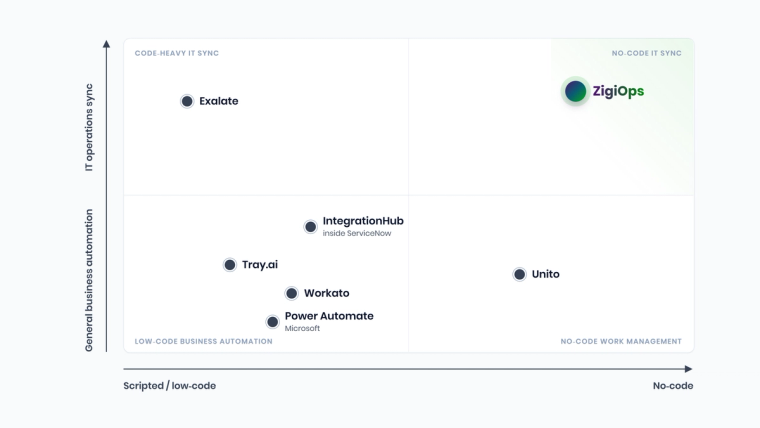
| Platform | Build model | Bi-directional sync | Pricing basis | Deployment | Best for |
|---|---|---|---|---|---|
| ZigiOps | No-code guided UI | Yes, native, with record correlation | Connected system pairs, unlimited transactions | Standalone app, on-premises or cloud | Cross-tool ITSM, DevOps and ITOM sync |
| Workato | Low-code recipes | Possible via recipe logic | Usage-based, quoted by sales | SaaS | Company-wide business process automation |
| Tray.ai | Low-code builder plus AI agents | Possible via workflow logic | Editions plus task usage | SaaS | AI agents and custom automations |
| Unito | No-code sync rules | Yes, native two-way sync | Tools, features and items in sync | SaaS | Task sync between work management tools |
| Microsoft Power Automate | Low-code cloud flows plus RPA | Possible via flow logic | Microsoft licensing (per user or per flow/process) | Microsoft cloud, desktop agents for RPA | Microsoft 365 and Dynamics workflows |
| ServiceNow IntegrationHub | Low-code Flow Designer plus spokes | Possible, built inside ServiceNow | ServiceNow subscription tiers | Runs inside ServiceNow | ServiceNow-centric workflows |
| Exalate | Basic and Visual modes, Groovy Script mode | Yes, native | Vendor quote | Cloud or on-premises (Docker) | Engineering-led sync with scripting control |
A quick read of the table: task-based iPaaS tools like Workato and Tray.ai are broad and powerful but price by usage and expect some technical skill. Unito is simple and sync-focused but meters by items in sync. Platform-native options like ServiceNow IntegrationHub and Power Automate shine inside their own ecosystems. ZigiOps is built specifically for cross-tool IT operations workflows.
The platforms, one by one
ZigiOps
ZigiOps is a no-code integration platform built for IT operations. It connects ITSM, DevOps, monitoring, cloud, and CRM tools, including ServiceNow, Jira, Azure DevOps, BMC Remedy, Salesforce, Zendesk, Dynatrace, Splunk, and Datadog, with close to 60 supported systems in its current documentation.
What sets it apart for IT teams:
- 100% code-free: workflows, field mappings, conditions, and transformations are configured in a guided UI.
- No data storage: ZigiOps does not store the data it transfers. It keeps only a few kilobytes of runtime state, which is also what makes its high-availability failover simple.
- ISO 27001 certified, with AES-256 encryption (FIPS 140-2 compliant) for credentials and sensitive request headers by default.
- Unlimited transactions: licensing is based on connected system pairs rather than per-task metering.
- Standalone application, not a plugin living inside one of the tools it connects, so it deploys on-premises or in the cloud.
Best fit: service managers, DevOps leads, and ITOM engineers who need reliable bi-directional sync between tools owned by different teams. See the ZigiOps integration platform overview for the full picture.
Workato
Workato is a well-established enterprise iPaaS built around "recipes," its term for automated workflows. It has a large connector library and strong capabilities for business process automation across HR, finance, sales, and IT.
The trade-off for IT teams is mostly about skills and cost predictability. Recipes are low-code, which is not the same as no-code: complex ITSM sync logic often needs someone comfortable with data pills, formulas, and API concepts. Workato does not publish price lists; its pricing page directs buyers to sales, and costs typically scale with usage.
Best fit: organizations standardizing on one iPaaS for many departments, with an integration team to run it.
Tray.ai
Tray.ai now positions itself as an AI automation platform covering agents, MCP, intelligent automation, and integration. Its pricing page lists Pro, Team, and Enterprise editions, with usage measured in tasks, alongside the Merlin Agent Builder and more than 700 connectors.
Tray.ai is flexible and developer-friendly. For IT operations teams, the questions to ask are how much ongoing workflow maintenance falls on engineers and how task-based pricing behaves when a noisy monitoring tool starts firing thousands of events a day.
Best fit: product and operations teams building AI agents and custom automations with technical staff on hand.
Unito
Unito focuses on two-way sync between work management tools such as Jira, Asana, Trello, and Monday.com. According to Unito's pricing page, plans are priced by tools, features, and items in sync, where each item synced between two tools counts as two items. Self-serve plans update every 5 to 15 minutes, while ServiceNow, Salesforce, and Jira on-premises are premium connectors reserved for Enterprise plans.
Best fit: project and product teams syncing tasks between collaboration tools. IT teams with heavy ITSM volumes should model the items-in-sync cost carefully.
Microsoft Power Automate
Power Automate is Microsoft's automation service for building workflows between apps and services, with cloud flows for API-based automation and desktop flows for RPA. If your organization lives in Microsoft 365, Dynamics 365, and Azure, it is often the default choice for approvals, notifications, and document workflows.
For cross-vendor ITSM and DevOps sync, Power Automate can do it, but complex bi-directional logic with correlation and conflict handling usually means building and maintaining a lot of flow logic yourself.
Best fit: Microsoft-centric business process automation.
ServiceNow Flow Designer and IntegrationHub
Inside ServiceNow, Flow Designer and IntegrationHub are the native answer. IntegrationHub extends flows with prebuilt "spokes" for third-party systems such as Jira, Azure DevOps, and Microsoft Teams.
It works well when ServiceNow is the center of gravity and the ServiceNow team owns the workflow. Trade-offs include subscription tiers that gate spokes and transaction volumes, and the fact that the integration lives inside one of the systems being integrated. We broke down the numbers in The Real Cost of a ServiceNow Integration in 2026.
Best fit: ServiceNow-first organizations with in-house ServiceNow developers.
Exalate
Exalate specializes in bi-directional sync between tools such as Jira, Azure DevOps, ServiceNow, Zendesk, GitHub, and Salesforce. Its documentation describes Basic, Visual, and Script modes, and advanced configuration relies on Groovy scripting.
That scripting power is a strength for developers and a hurdle for everyone else. If your sync rules will be maintained by service managers rather than engineers, weigh that carefully.
Best fit: engineering-led teams comfortable owning Groovy sync scripts.
Which workflow automation platform fits your IT team?
Skip the feature bingo and start with ownership. Who will build and maintain the workflows two years from now?
- You have an integration team and want one platform for every department: Workato or Tray.ai.
- You mostly sync tasks between collaboration tools: Unito.
- You are all-in on Microsoft: Power Automate.
- ServiceNow is your hub and you have ServiceNow developers: Flow Designer and IntegrationHub.
- Your developers want scripting control over sync logic: Exalate.
- Your ITSM, DevOps, and monitoring tools belong to different teams, and service managers need to own the workflows without code: ZigiOps.
A useful gut check: if the phrase "we just need the ticket status to match on both sides" has been said in three meetings this quarter, you need integration-led automation, not another task builder.
How an IT workflow is built in ZigiOps
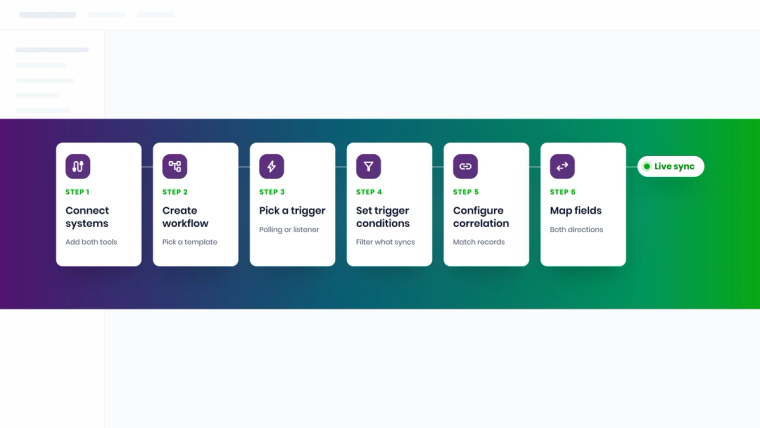
Here is what "no code" looks like in practice for a ServiceNow and Jira workflow. It is a useful yardstick for any platform on your shortlist.
- Connect the systems. Each tool is added as a System with its URL and credentials. ZigiOps tests the connection and loads the system schema, including custom fields.
- Create the workflow. A workflow pairs two system instances and the entities to integrate, for example ServiceNow incidents and Jira tasks. You can start from a bundled template or from scratch.
- Pick a trigger. A polling trigger queries the source API on a schedule (one minute is the recommended interval). A listener trigger opens an HTTPS endpoint and waits for pushed events, which suits monitoring alerts.
- Set trigger conditions. Filters such as "priority is one of 1, 2" or "reporter is not the integration user" decide which records move, and prevent the integration from echoing its own updates back.
- Configure correlation. ZigiOps stores the ID of one record in a field of the other, for example the Jira key in the ServiceNow correlation_id, so later updates find the right partner record in both directions.
- Map fields and transform values. Map summary, description, priority, status, comments, and attachments, with conditional mappings and expressions such as "Last Time" to collect only records changed since the last run.
If you want the deeper technical version, with real expressions and error handling, read Field Mapping and Error Handling for Jira and ServiceNow Sync.
What good workflow automation delivers: real numbers
Automation claims are cheap, so here are outcomes ZigiOps customers have published:
- COCC cut cross-system ticket handling time by roughly 50% and went live in days rather than months. Read the COCC case study.
- Metrolinx reported an 80% reduction in manual ticket creation and a 90% decrease in mean time to resolution after integrating OpsBridge and ServiceNow.
- Telus saw 45% to 75% faster incident and change cycles across its multi-system integration.
None of these came from adding more automation for its own sake. They came from removing the manual handoffs between teams.
Your workflow automation platform checklist
Before you sign anything, ask every vendor these questions and ask them to show, not tell:
- Can a service manager build and change a bi-directional workflow without writing code?
- How does the platform correlate records and prevent update loops?
- Does it store our data? If so, where, for how long, and under which certifications?
- What happens to cost if our event volume triples?
- Does it support our on-premises tools, not just their cloud editions?
- What does failover look like if the integration server goes down?
Security teams will have their own list. The ZigiOps security overview is a good template for what a clear answer looks like.
The bottom line
The best workflow automation platform for an IT team is the one that keeps your service desk, developers, and monitoring tools telling the same story, without creating a new maintenance burden. General-purpose iPaaS tools are excellent at breadth. Platform-native tools are excellent inside their own walls. For cross-tool IT operations, a no-code, standalone, no-data-storage platform like ZigiOps removes the most friction for the teams who actually own the work.
Want to see a real ServiceNow, Jira, or Azure DevOps workflow built live, without a line of code? Book a demo and bring your messiest use case.
Frequently asked questions
Can ZigiOps automate workflows between ServiceNow and Jira without code?
Yes. ZigiOps connects ServiceNow and Jira through a guided UI where you configure triggers, trigger conditions, correlation, and field mappings. Incidents, tasks, comments, attachments, and status changes sync in both directions with no scripting.
Does ZigiOps store the data it transfers between systems?
No. ZigiOps does not store the data it moves. It keeps only a few kilobytes of runtime state needed to track integration progress, which reduces security exposure and simplifies audits.
What is the difference between a workflow automation platform and an iPaaS?
A workflow automation platform executes multi-step processes based on triggers and rules. An iPaaS (integration platform as a service) focuses on connecting applications and moving data between them. Many products do both; for IT teams, the key question is whether the platform keeps long-running records like incidents and issues in bi-directional sync.
Can workflow automation platforms sync records in both directions?
Some can natively, others only through custom workflow logic. Platforms such as ZigiOps, Unito, and Exalate support bi-directional sync with record correlation built in. General-purpose tools like Workato, Tray.ai, and Power Automate can achieve it, but you typically build and maintain the loop-prevention and correlation logic yourself.
Can I use Power Automate or ServiceNow IntegrationHub instead of a third-party platform?
Yes, if most of your workflows stay inside the Microsoft or ServiceNow ecosystem. When workflows span tools owned by different teams, such as ServiceNow, Jira, Azure DevOps, and monitoring tools, a standalone platform avoids tying the integration to one vendor's subscription and release cycle.
Can ZigiOps run on-premises?
Yes. ZigiOps is a standalone application that can be installed on Windows or Linux servers on-premises, and it is also available in the cloud. It supports high availability with a primary and backup server.
How is ZigiOps priced compared with task-based automation platforms?
ZigiOps licensing is based on the pairs of system instances you connect, with unlimited transactions, instead of charging per task or per synced item. That makes costs predictable even when event volumes spike.