

The Complete Guide to Jira–ServiceNow Integration in 2026: Use Cases, Field Mapping, Architecture, Governance & Reliability Engineering
If your IT operations team lives in ServiceNow and your engineering team tracks everything in Jira, you already know the friction. Tickets get retyped. SLAs lose visibility. Status updates vanish in the handoff. Priorities drift. And somewhere in the middle, a critical incident sits unresolved because the two teams are working from different data.
This is not a communication problem. It is an infrastructure problem.
A Jira–ServiceNow integration is not just a convenience feature. When implemented correctly, it becomes the operational backbone that keeps ITSM and DevOps teams synchronized in real time, without manual effort, without duplication, and without data leakage.
This guide covers everything you need to engineer that integration properly in 2026: architecture decisions, step-by-step configuration, advanced field mapping techniques, reliability patterns, governance best practices, and scaling considerations, all based on how ZigiOps actually works.
What Is a Jira–ServiceNow Integration?
A Jira–ServiceNow integration creates a live, bi-directional data bridge between your ITSM platform (ServiceNow) and your development or project tracking tool (Jira). When a record is created or updated in one system, the corresponding record in the other is automatically created or updated, with no manual intervention required.
The most common entity pairs in a Jira–ServiceNow integration are:
The goal is workflow continuity without manual intervention: no ticket duplication, no SLA blind spots, no lifecycle misalignment, and no spreadsheet-based handoffs between teams.
Architecture: How Enterprise-Grade Integration Works
Modern integration must be API-based, event-driven, and secure by design. The architecture of a production-grade Jira–ServiceNow integration involves four key layers: connectivity, triggering, data transformation, and correlation.

API-Based Connectivity
ZigiOps connects to both Jira and ServiceNow via their native REST APIs. There is no database access, no middleware plugin installed in either system, and no data replication into a third-party store. ZigiOps acts as the integration broker: it reads from one API and writes to the other, using only the credentials and permissions you configure.
This architecture means your data never leaves your control. ZigiOps does not store the content of transferred records. It processes them in transit and discards them after delivery.
Hybrid Trigger Model
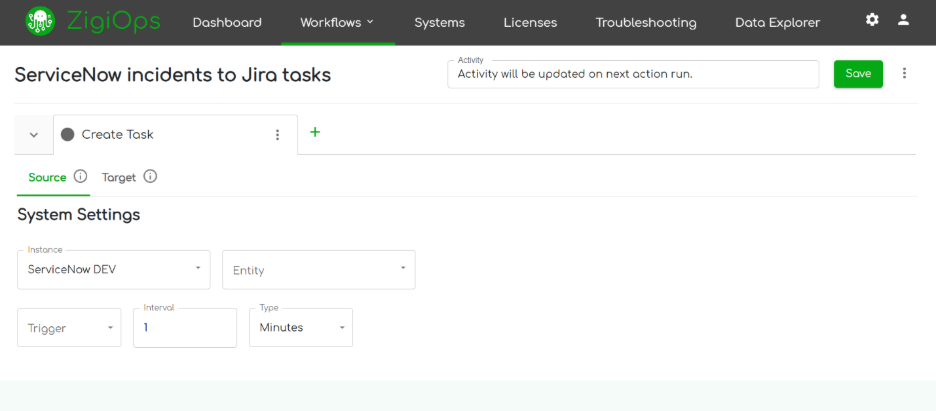
Enterprise-grade integrations typically need two complementary trigger mechanisms working together. ZigiOps supports both, and using them in combination is the recommended approach for production deployments.
The Poller makes ZigiOps the active side: it initiates data collection. The Listener makes ZigiOps the passive side: it waits for incoming events. Combining both ensures low latency for time-critical updates while maintaining complete coverage for systems that do not support webhooks.
Correlation: How Records Stay Linked Across Systems
Correlation is the mechanism that tells ZigiOps how to recognize that a Jira issue and a ServiceNow incident are the same record. Without it, every sync cycle would create new records instead of updating existing ones.
ZigiOps stores only correlation identifiers, not business data. For example, it may store the ServiceNow sys_id alongside the Jira issue key in memory to match future updates to the correct records. The actual field values (summary, description, comments, attachments) are never persisted in ZigiOps itself.
This design is what enables ZigiOps to pass ISO 27001 certification: no sensitive business data is ever stored in the integration layer.
Step-by-Step: Setting Up the Jira–ServiceNow Integration with ZigiOps

Step 1: Add Connected Systems
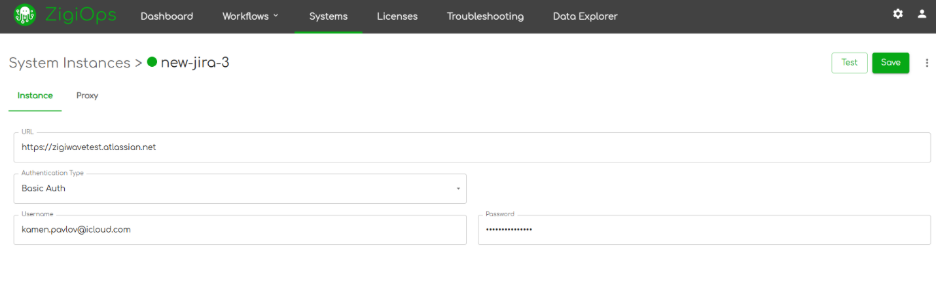
Navigate to Connected Systems > Add New System in the ZigiOps UI. Configure both systems using their respective API credentials:
For Jira, you will need:
- Server URL (e.g., https://yourcompany.atlassian.net)
- Username (the Jira user account ZigiOps will use)
- API Token (generated in your Atlassian account settings)
- Project Key (to scope the integration to the correct project)
For ServiceNow, you will need:
- Instance URL (e.g., https://yourcompany.service-now.com)
- Username and Password for a dedicated integration user
- Optional: OAuth credentials if your instance requires OAuth 2.0 authentication

After saving both systems, use the Test Connection button on each to verify connectivity before proceeding. ZigiOps will also download the available fields and projects from each system at this stage, making them available for use in your integration configuration.
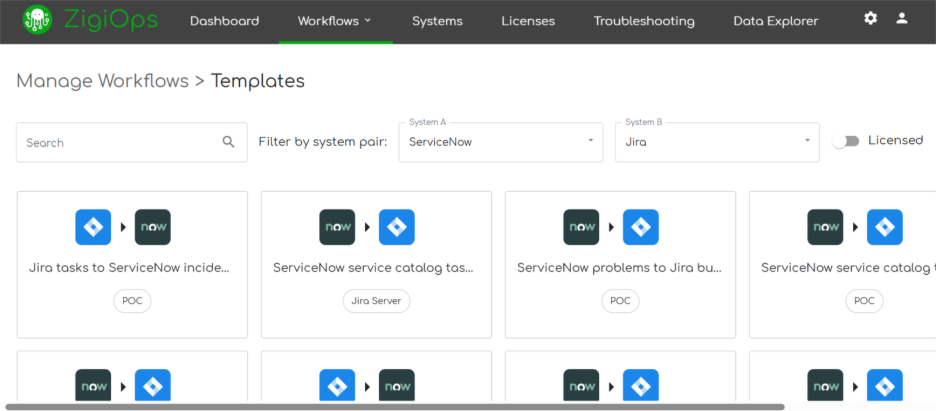
Step 2: Load an Integration Template or Start from Scratch
ZigiOps provides pre-built integration templates for common Jira–ServiceNow use cases. A template typically includes:
- Pre-configured collection logic (new and updated records only)
- Basic field mapping for summary, description, and priority
- Correlation setup for bi-directional sync
You can load a template and adjust it to match your specific field structure, naming conventions, and business rules. Alternatively, you can build a custom integration from scratch using the same guided UI.
Step 3: Define Integrated Entities
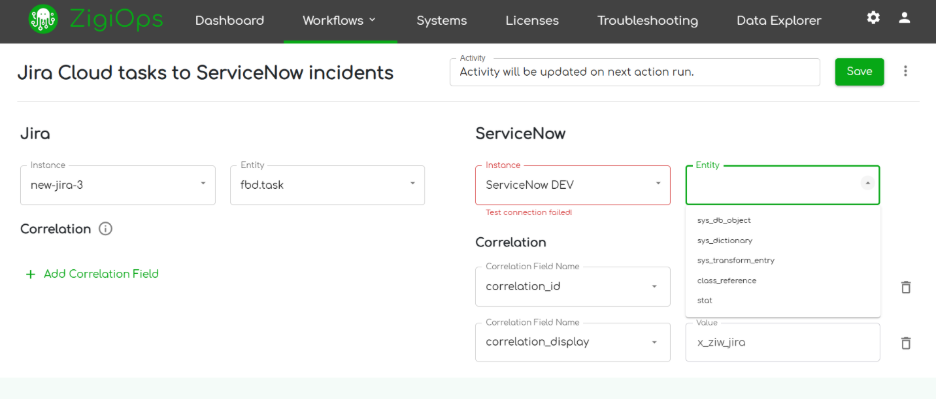
Select the entity pair that reflects your integration use case. The most common configurations are:
- ServiceNow Incident ↔ Jira Issue (for incident-driven development workflows)
- ServiceNow Problem ↔ Jira Bug (for root cause analysis alignment)
- ServiceNow Change Request ↔ Jira Task (for change management and sprint planning)
Each entity pair is configured within a separate ZigiOps integration or as separate actions within a single integration. For a fully bi-directional sync, you will configure at minimum two actions: one to create and update Jira issues from ServiceNow incidents, and one to update ServiceNow incidents when Jira issues change.
Step 4: Configure Correlation
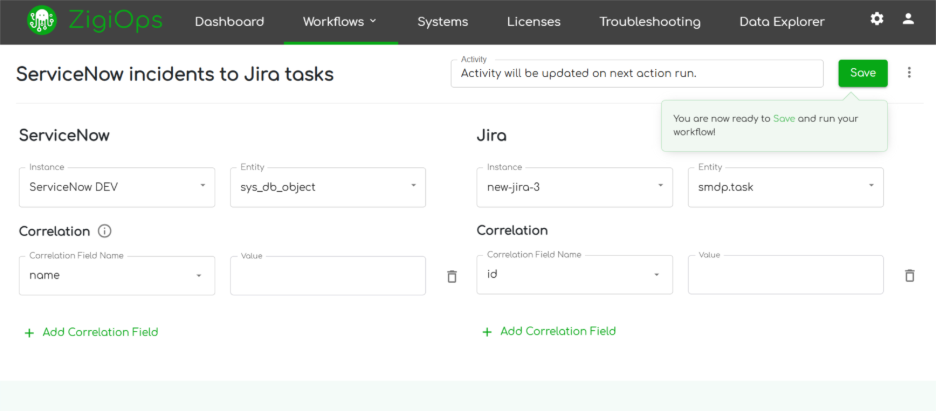
Correlation is how ZigiOps determines whether to create a new record or update an existing one. You define which field in each system stores the unique identifier of its counterpart. Common patterns include:
- Storing the ServiceNow sys_id in a Jira custom field labeled “ServiceNow ID”
- Storing the Jira issue key (e.g., OPS-4512) in a ServiceNow custom field labeled “Jira Reference”
ZigiOps supports one-to-one correlation by default, meaning each record in Jira maps to exactly one record in ServiceNow. This ensures clean update synchronization and prevents duplicate creation even if an event is processed more than once.
Step 5: Design Field Mapping
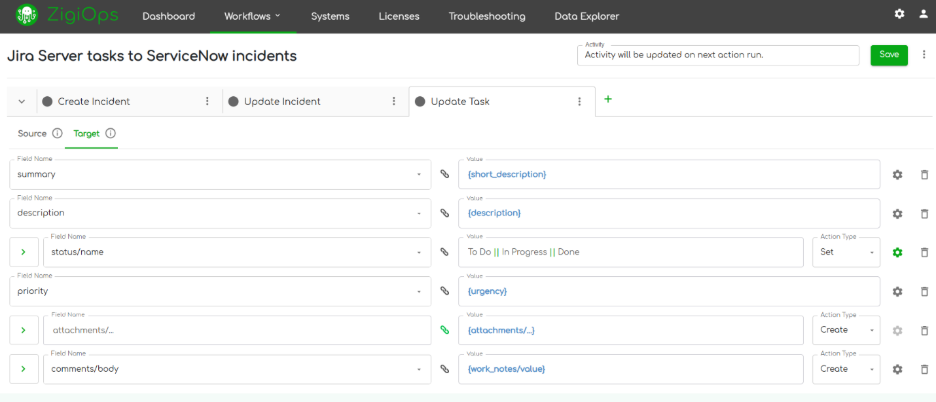
Field mapping is where the technical depth of your integration lives. This is not simply copying values from one field to another. It is aligning business semantics across two systems that use different vocabulary, data types, and lifecycle models.
At minimum, map the following fields in both directions:
Step 6: Add Filters and Conditions
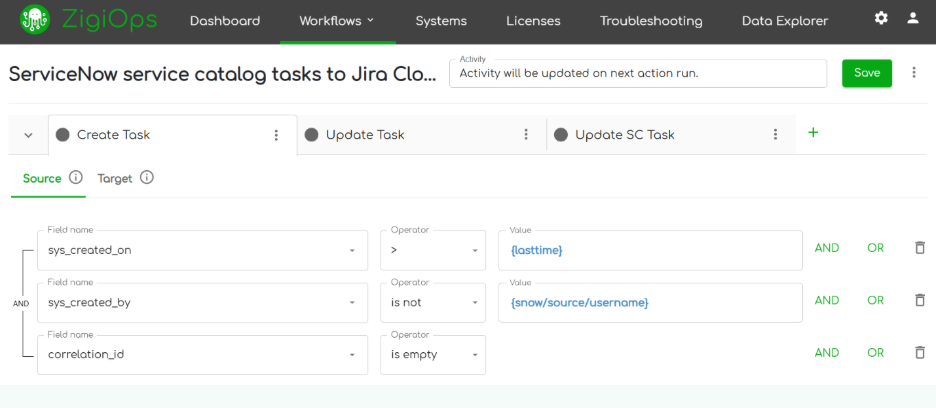
Filters and trigger conditions control which records are collected and when. Without proper filtering, your integration will either process too much data (causing unnecessary API load) or miss critical records (breaking SLA visibility).
Key filter configurations for a Jira–ServiceNow integration include:
- Collect only records created or updated since the last run (using the Last Time expression)
- Exclude records from test or sandbox projects
- Only sync incidents with priority P1 or P2 in real time; batch-sync lower priorities
- Filter out system-generated comments (where author = integration user) to prevent duplicate comment loops
- Apply environment-based conditions (e.g., only sync incidents tagged as Production-affecting)
ZigiOps supports both AND and OR conditions, as well as operators including: is, is not, is one of, is not one of, is empty, is not empty, contains, does not contain, less than, greater than, and equals. These can be applied to any available field from the connected system.
Step 7: Test and Monitor
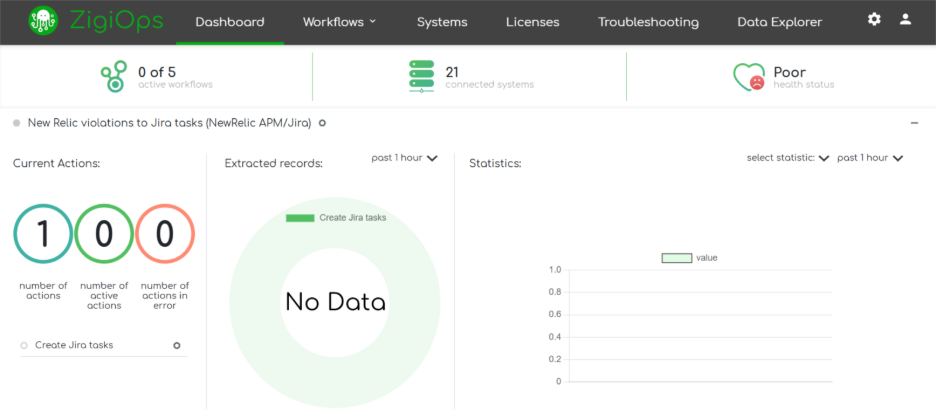
Before activating your integration in production, test each action individually using ZigiOps' built-in troubleshooting tools. The platform provides:
- Real-time operation logs showing every record collected, processed, and delivered
- Payload inspection for debugging field mapping issues
- HTTP request and response data for API-level troubleshooting
- Error classification to distinguish between mapping errors, connectivity issues, and API rejections
Once live, the monitoring dashboard gives you a continuous view of integration health, including extracted record counts, failed operations, and throughput metrics.
Advanced Field Mapping: Where Integrations Succeed or Fail
Field mapping is the most technically demanding part of a Jira–ServiceNow integration. Getting it wrong means tickets close prematurely, priorities do not reflect business impact, or mandatory fields fail validation. Getting it right means the integration is invisible to end users because it just works.
Lifecycle-Aware State Mapping
ServiceNow uses a numeric State field driven by an ITIL-compliant state machine. Jira uses a text-based Status field governed by workflow transitions. They are fundamentally different, and mapping between them requires more than a lookup table.
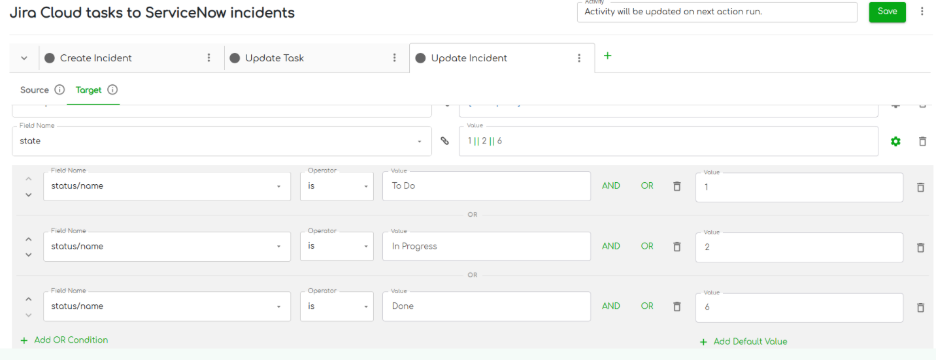
A critical nuance: closing a ServiceNow incident requires both a close_code and close_notes. If you map Jira Done directly to ServiceNow Resolved without these fields, the API call will fail. The correct approach in ZigiOps is to add a conditional mapping:
When Jira status = Done, send close_code = 'Closed/Resolved by Caller' AND close_notes = 'Closed by Jira integration'. Apply this condition only when the Jira status field name = 'Done', so these values are not sent during any other status transition.
In the reverse direction, mapping ServiceNow Resolved to Jira Done requires triggering the correct Jira workflow transition using the transition ID, not just setting the status field value directly. ZigiOps handles this by respecting Jira's transition API, which ensures validators, post-functions, and required fields are honored.
Priority Normalization
ServiceNow calculates priority using a combination of Impact and Urgency. The result is a numeric value from 1 (Critical) to 4 (Low). Jira uses a flat text-based priority list. A direct numeric-to-text lookup will often misrepresent business impact.
The recommended approach is context-aware conditional mapping:
Using ZigiOps' conditional mapping, you can combine two source fields (Impact and Urgency) and evaluate them together to produce a single output value in Jira. This is more accurate than translating numeric priority alone.
Comment Synchronization: A Compliance Risk if Done Wrong
ServiceNow distinguishes between Work Notes (internal, not visible to end users) and Additional Comments (customer-visible). Jira does not make this distinction. If you sync all ServiceNow work notes to Jira without filtering, you risk exposing internal audit details, HR notes, or security findings to development teams, which can trigger compliance violations.
Best practice mapping for comments:
- Sync only ServiceNow Additional Comments (public) to Jira
- Optionally sync Jira comments back to ServiceNow Work Notes (internal)
- Filter out system-generated comments by checking the author against your integration user account
- Sync attachments only during actionable stages (e.g., In Progress or Escalated)
ZigiOps handles comment mapping via the Related Records section of the field mapping configuration. You map the {value} of the ServiceNow work_notes to the body of the Jira comment entity, or vice versa, with conditions applied to control which comments are eligible for sync.
Using ZigiOps Expressions for Smart Data Transformation
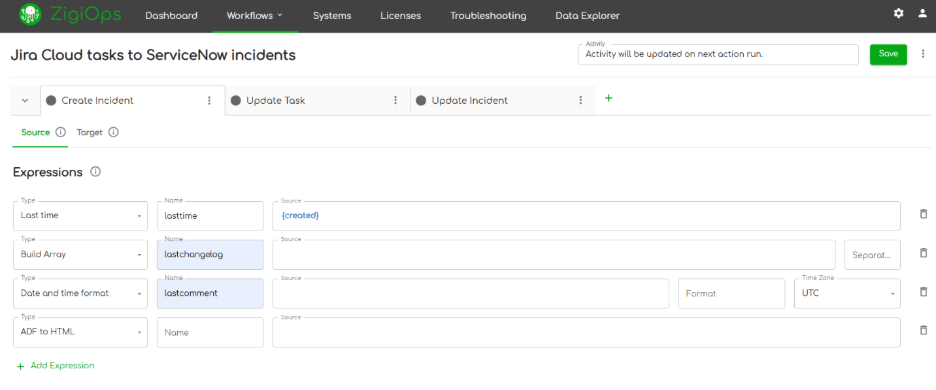
Raw field values from ServiceNow and Jira rarely fit each other's expectations without transformation. Epoch timestamps, truncated text, concatenated strings, embedded structured data inside free-text fields, these all require transformation logic before they can be mapped safely and meaningfully.
ZigiOps Expressions are no-code transformation components built directly into the Source and Target tabs of the integration configuration. They run after data is collected from the source but before it is delivered to the target.
RegEx-Based Structured Data Extraction
Monitoring alerts forwarded through ServiceNow often embed structured data inside free-text fields. Consider this ServiceNow description payload:
Alert: High CPU on server01.prod.eu-west. Environment: PROD-EU-WEST. Severity: Critical. Duration: 14 minutes.
Using a ZigiOps RegEx Pattern expression, you can extract exactly the environment identifier:
Pattern: Environment:\s*([A-Z0-9\-]+)
Result: PROD-EU-WEST
This extracted value can then be mapped directly into a Jira custom field such as 'Affected Environment', enabling developers to immediately understand the blast radius without reading the full alert text.
In ZigiOps, RegEx expressions always return the content of Group 1 if a capturing group is defined. If no group is used, the full match is returned. Expressions are validated during the transform phase and can be referenced in field mappings and respond mappings, but not in trigger conditions.
Engineering for Reliability
A Jira–ServiceNow integration that fails silently is worse than no integration at all. Reliability engineering for this use case involves four practices: idempotency, retry logic, duplicate prevention, and operational visibility.
Idempotency via Correlation Lookup
Every time ZigiOps processes an incoming event, it first checks whether a correlated record already exists in the target system. If one does, it performs an update. If one does not, it performs a create. This two-path logic ensures that reprocessing an event (for example, after a retry) will never create a second ticket.
Correlation lookup happens before any write operation. It is the primary mechanism that makes ZigiOps integrations idempotent by design.
Retry Logic for Transient Failures
API failures are a fact of life in enterprise environments. Rate limits, maintenance windows, and momentary network issues will cause individual operations to fail. ZigiOps implements retry logic to handle these gracefully:
- Failed operations are retried automatically
- Retries prevent data loss without creating duplicate records (due to idempotent correlation)
- The platform distinguishes between transient failures (retry) and permanent failures (log and alert)
This means a brief ServiceNow API outage does not result in missing Jira updates. Once the API recovers, ZigiOps will process the backlog without human intervention.
Duplicate Comment Prevention
Comment synchronization is a common source of duplication bugs. If the integration platform collects comments from Jira and creates them in ServiceNow, and then on the next cycle collects those same comments back from ServiceNow and tries to write them into Jira, you end up with an echo loop.
ZigiOps prevents this with two mechanisms:
- Author filtering: add a trigger condition that excludes records where the author is the integration user. This prevents the integration from processing its own writes.
- Last Time expressions: use {lasttimecomment} and {lasttimechangelog} as filter conditions to ensure only records created after the last run are collected.
Important: if you do not configure the integration user exclusion condition, ZigiOps will continuously re-collect already-synced comments on every run, creating duplicate entries in the target system.
Governance & Change Control
An integration that runs without governance is a liability. In regulated industries such as finance, healthcare, and government, the integration layer itself is subject to audit. Even in non-regulated environments, integration changes that are not tested or versioned can silently break ticket workflows and SLA tracking.
An integration that runs without governance is a liability. In regulated industries such as finance, healthcare, and government, the integration layer itself is subject to audit. Even in non-regulated environments, integration changes that are not tested or versioned can silently break ticket workflows and SLA tracking.
Recommended governance practices for a Jira–ServiceNow integration:
ZigiOps surfaces operational data including extracted record counts, failed operations, active integration status, and HTTP-level debugging data. This provides the audit trail and observability that compliance teams require.
Scaling Your Integration
As your organization grows, so does the volume of incidents, changes, and development tasks flowing between ServiceNow and Jira. Your integration architecture needs to scale with that volume without becoming a bottleneck.
Vertical Scaling
For most enterprise deployments, vertical scaling is the first lever to pull. Increasing the CPU, RAM, or storage available to your ZigiOps instance improves throughput for high-volume integrations. The ZigiOps platform uses Java-based processing, and its heap size is configurable via the Admin settings panel.
ZigiOps hardware requirements scale with integration complexity:
Horizontal Scaling
For very high transaction volumes, ZigiOps supports horizontal scaling: deploying multiple instances and distributing integration workloads across them. This is recommended when transaction volume consistently exceeds your enterprise baseline or when you need geographic redundancy.
Horizontal scaling decisions should be based on monitored throughput data from the ZigiOps operational dashboard, not estimated need.
No Transaction Limits
ZigiOps imposes no artificial caps on the number of transactions processed per day, per integration, or per instance. This is a meaningful differentiator compared to platforms that charge by the transaction or impose daily limits that force customers to throttle their integrations or purchase higher tiers.
You can run high-frequency polling (every 1 minute), handle large bursts of incident creation during outages, and sync thousands of tickets per hour without hitting a platform-imposed ceiling.
Why ZigiOps Is Built for Enterprise Jira–ServiceNow Integration
ZigiOps is not a plugin. It is not embedded inside either Jira or ServiceNow. It is a standalone integration platform, which means it has no dependency on the internal architecture of either system and cannot be broken by upgrades to either platform.
The platform was built specifically for ITSM and DevOps integration ecosystems. It understands the field structures, workflow logic, and data models of both Jira and ServiceNow natively.
Troubleshooting Common Issues
Even well-configured integrations can encounter issues. Here are the most common problems and how to resolve them within ZigiOps:
Final Thoughts
A Jira–ServiceNow integration is workflow infrastructure. When it is built correctly, ITSM and DevOps teams stop duplicating effort, SLA visibility is preserved across the full incident lifecycle, and priorities stay aligned from the moment a ticket is created to the moment it is resolved.
The difference between an integration that works and one that just runs comes down to the details: lifecycle-aware state mapping, idempotent correlation, comment governance, expression-based transformation, and operational monitoring. This guide has covered all of them.
If you are ready to implement a secure, scalable, no-code integration between Jira and ServiceNow, ZigiOps is built for exactly that.
Book a Demo and see it live in action at zigiwave.com
Related Resources
To continue exploring, the following ZigiWave resources are directly relevant to this guide: